An order management system is the software layer that tracks every order from payment through delivery, return or refund, and keeps stock and delivery promises in step with what's available. It earns that role because the numbers underneath it are usually wrong: in a peer-reviewed study of nearly 370,000 inventory records across 37 stores at one retailer, 65% did not match the quantity physically present.
Picture your own Tuesday. The warehouse screen says four units left. The storefront sold six overnight. A wholesale buyer has a draft invoice for a pallet, and a sweater from last week is already back in the stock count while it sits in a returns bin. Four numbers, four systems, four different answers, and one customer service agent about to guess.
Ask what an order management system is and most answers describe checkout. That's the easy half. The hard half is what happens to stock, money and customer history when an order splits across two warehouses, gets cancelled for a stockout, renews as a subscription, or comes back for a refund.
Table of Contents
- What an Order Management System Is and Why It Exists
- How an OMS Differs From ERP, WMS and Storefronts
- How an Order Moves Through an OMS, Step by Step
- How Inventory Allocation and Split Shipments Work
- Returns, Inventory States and Sellable Stock
- How an OMS Connects Customer Data
- Check Your Order Record Against This Checklist
What an Order Management System Is and Why It Exists
A customer pays for a coat at 9:04. By noon the same unit has been promised twice, once to her and once to a wholesale draft order. The system built to prevent that collision is the order management system, usually shortened to OMS. It is the software layer that tracks an order through its whole life, from placement through stock allocation, fulfillment, delivery and, when needed, return or exchange. Its job is narrow and unglamorous: keep the promise made at checkout in step with what is on the shelf and what the delivery operation can do.
An OMS works like the score in an orchestra. The storefront, the payment provider, the warehouse, the carrier and the support inbox are all capable players. The score keeps them playing the same piece at the same tempo. Without it, every player can perform correctly and the result is still noise.
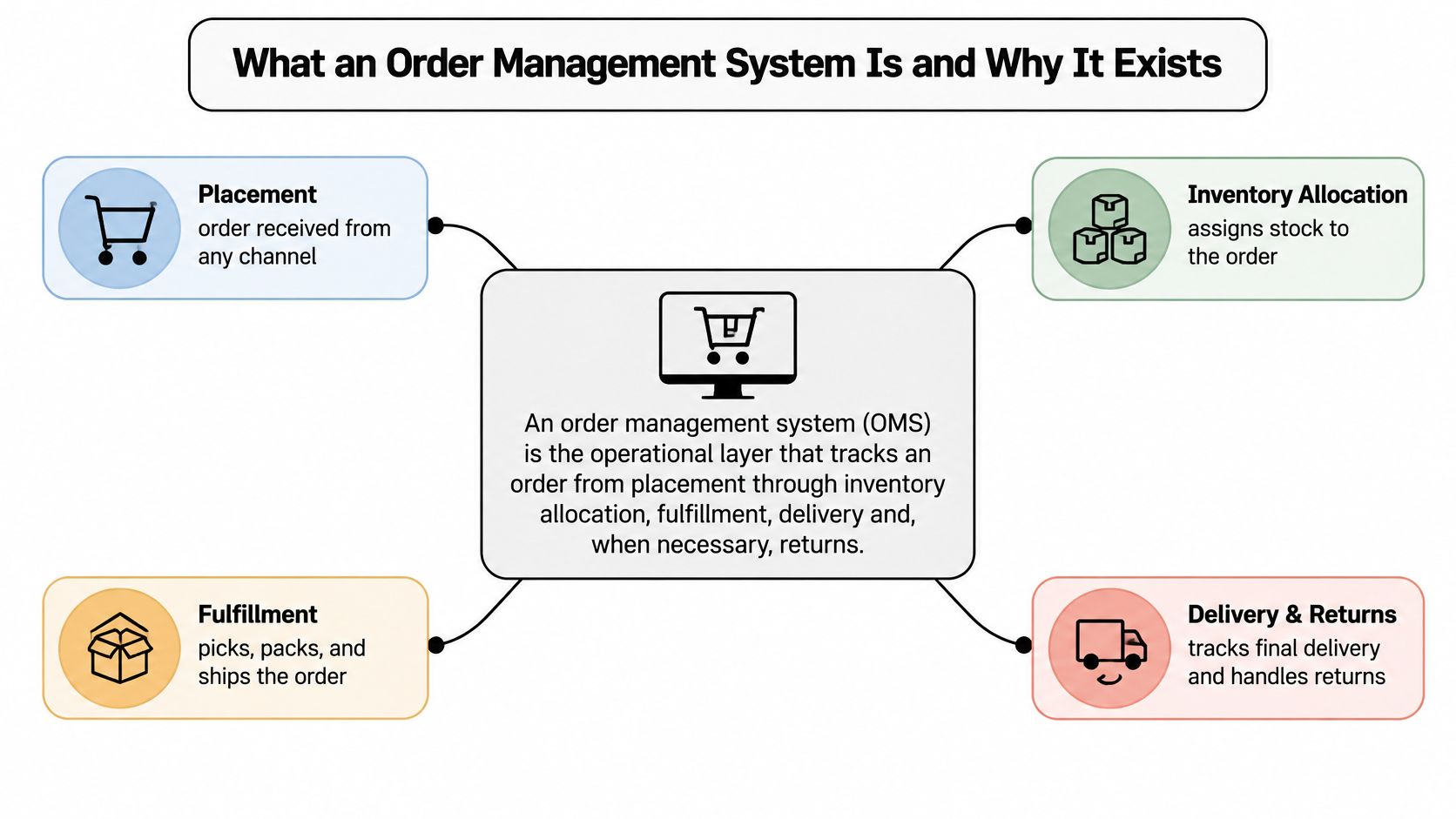
The lifecycle is where the definition earns its keep. An order can split across two warehouses, get cancelled for a stockout, renew as a subscription or come back as a return, and each move changes what the stock number means. A single unit can be on hand, allocated to a paid order, in transit to a customer or sitting in a returns bin waiting for inspection. Allocation means reserving a unit for a specific order so it cannot be sold twice. The OMS has to treat online checkouts, wholesale orders raised as drafts, subscription renewals and point-of-sale sales the same way, because the customer does not care which channel they used.
Why an order database alone doesn't work
Inventory records drift. In a peer-reviewed study published in Management Science, researchers examined nearly 370,000 inventory records across 37 stores at one retailer and found that 65% did not match the quantity physically present, with 26.4% of the variation in inaccuracy sitting between product categories and 2.7% between stores. Mistakes cluster around particular products and particular locations rather than spreading evenly across the estate.
A checkout record that never checks stock will promise items that are not there. The overselling, the cancellations and the delayed fulfillment all trace back to the same gap between the record and the shelf.
Rule of thumb: if your order record and your stock record can disagree, they eventually will, and the customer finds out before your team does.
A five-minute exercise to start with
Write a one-sentence definition of an OMS that a colleague outside operations would understand. Then list the three promises your business makes today about stock and delivery. Look at the delivery window printed on the product page, the answer support gives when a customer asks where a parcel is, and the stock figure your team quotes to a wholesale buyer. Those promises are the actual specification for your order management, and a feature that does not help keep one of them is decoration.
Apply the same discipline to every vendor decision near the order. Write the criteria down, compare candidates side by side, then commit. The method works when you pick a 3PL (a third-party logistics provider that warehouses and ships for you), and it works when you compare guest amenities suppliers or vet any other recurring supplier.
How an OMS Differs From ERP, WMS and Storefronts
| System | Main job | Holds the order from start to finish? | Typical owner |
|---|---|---|---|
| Ecommerce platform | Storefront, cart and checkout | Usually captures the order only | Marketing and ecommerce team |
| Order management system | Routes, tracks and changes orders across channels | Yes, one lifecycle record | Operations and ecommerce teams |
| Warehouse management system | Bin locations, picking, packing and stock movement inside a site | No, runs the physical task | Warehouse managers |
| ERP | Finance, purchasing, accounting and planning | No, records the financial outcome | Finance and operations leaders |
Run one order through all four. A customer buys a jacket and a pair of gloves. The storefront records the sale and hands it on, but it has no idea the gloves sit in a different building. The OMS issues one order ID, checks stock in three locations, splits the order and decides which site ships what. The WMS in the chosen warehouse turns that decision into work, telling a picker to go to bin A-14. The ERP books the revenue, the cost of goods and the tax after the fact.
Read down the third column and the confusion clears. Only one system is designed to hold an order's whole life, and it's rarely the one with the nicest admin screen.
When a brand doesn't need a standalone OMS
A brand selling from a single warehouse through a single website can usually get by with the order tools built into its storefront. Volume is low, stock lives in one place, and every order follows the same path. The case for a dedicated layer arrives with complexity: a second sales channel, a retail counter, wholesale invoicing, subscription renewals that behave differently from one-time purchases, or stock held in more than one location. At that point the storefront's built-in tools start handing off, and handoffs are where statuses diverge.
A useful test takes two questions. Which system currently determines the order status a customer sees on their unified commerce platform's order view, and which system decides where each order ships from?
If those answers point to two different systems, or to nobody, you've found the gap an OMS fills. Answering both from one record is what people mean by unified commerce, and it's the difference between tracking orders and managing them.
How an Order Moves Through an OMS, Step by Step
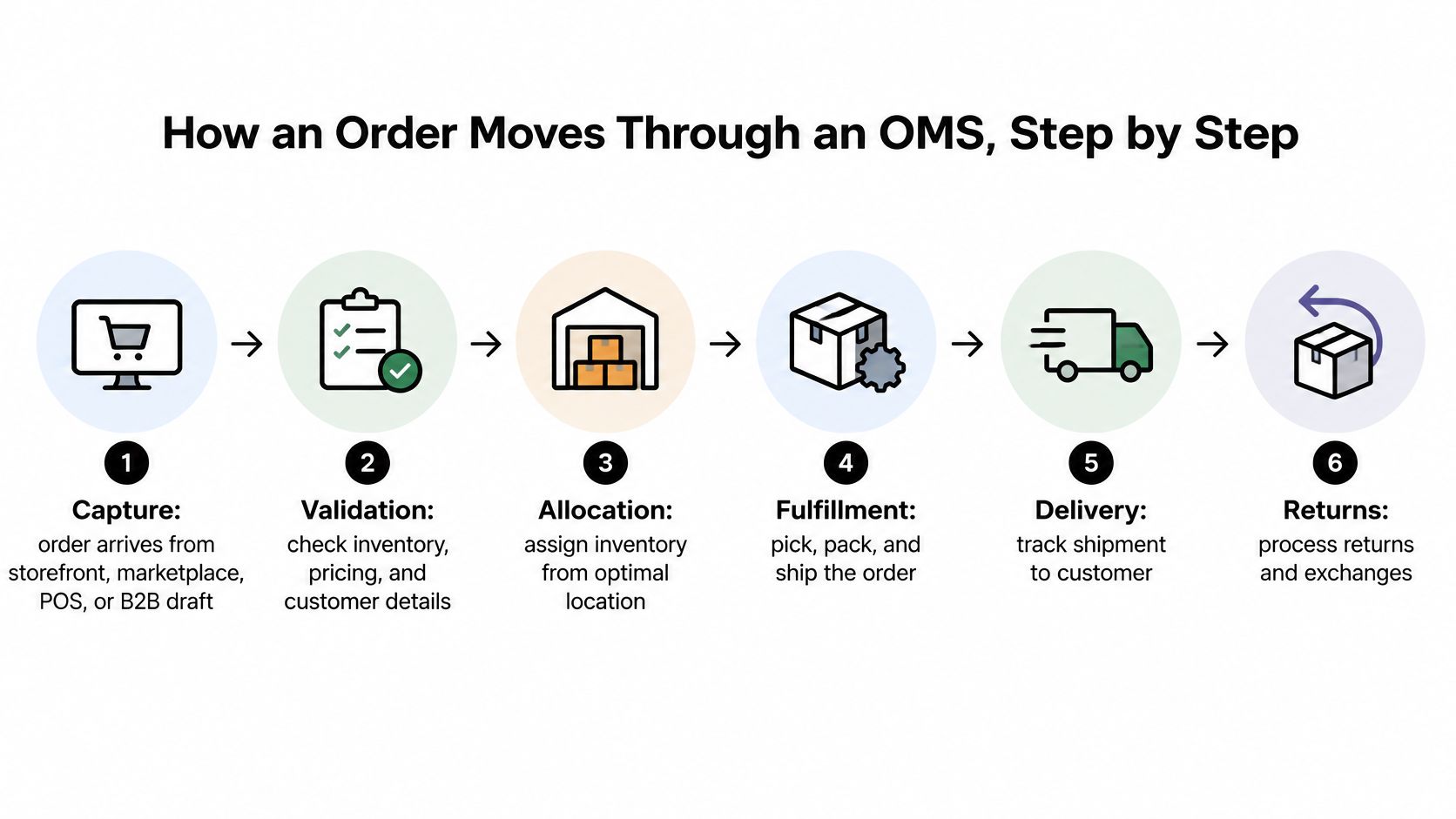
Follow a single order, say a hoodie and a pair of socks bought on a Sunday night. It passes through the same sequence of states every time, and each state exists because skipping it causes a specific failure. Naming them makes the weak points visible.
- Capture. The order arrives from the storefront, a marketplace, a POS terminal or a B2B draft, and it receives exactly one order ID. Without that single ID, every later step works on its own copy of the truth.
- Validate payment. The payment is authorized, meaning the card issuer confirms the money is there, and the order is checked for errors and fraud signals. Skip this and you reserve stock for orders that were never going to be paid for.
- Reserve inventory. The hoodie and socks are held for this order specifically, so a sale on another channel can't take them. A missing reservation is the direct cause of overselling.
- Allocate. The OMS picks which location ships the order. This decision carries the most trade-offs in the whole lifecycle, and it gets its own section below.
- Release to fulfillment. A pick and pack task goes to a warehouse, store, 3PL or supplier. If the release fails, the order sits in limbo, looking paid and unshipped at the same time.
- Ship and track. The label and tracking number attach to the order record itself rather than a separate shipping tool, and that record is what feeds the order status page your customer refreshes. One record means support and the warehouse quote the same status.
- Confirm delivery, or open a return. The record closes as delivered, or the order moves into the reverse path. A missing state change here is why agents tell customers a parcel is "in transit" days after it arrived.
Two of those states are easy to confuse. Reserving holds the stock; allocating chooses where it ships from. An order can sit reserved for days while remaining unallocated, and to a customer both states look like plain silence.
The order ID is the thread through all seven. When the storefront, the warehouse and accounting all reference the same number, a status question has exactly one answer.
Here is that sequence in motion, including the point where a stalled order becomes visible as a stalled order rather than a mystery.
Take one order from last week and trace it through the seven states. Mark where it stalled, and mark any point where two systems disagreed about its status. The pattern you find in ten orders is usually the same pattern in ten thousand, and it shows which state your operation handles worst.
How Inventory Allocation and Split Shipments Work
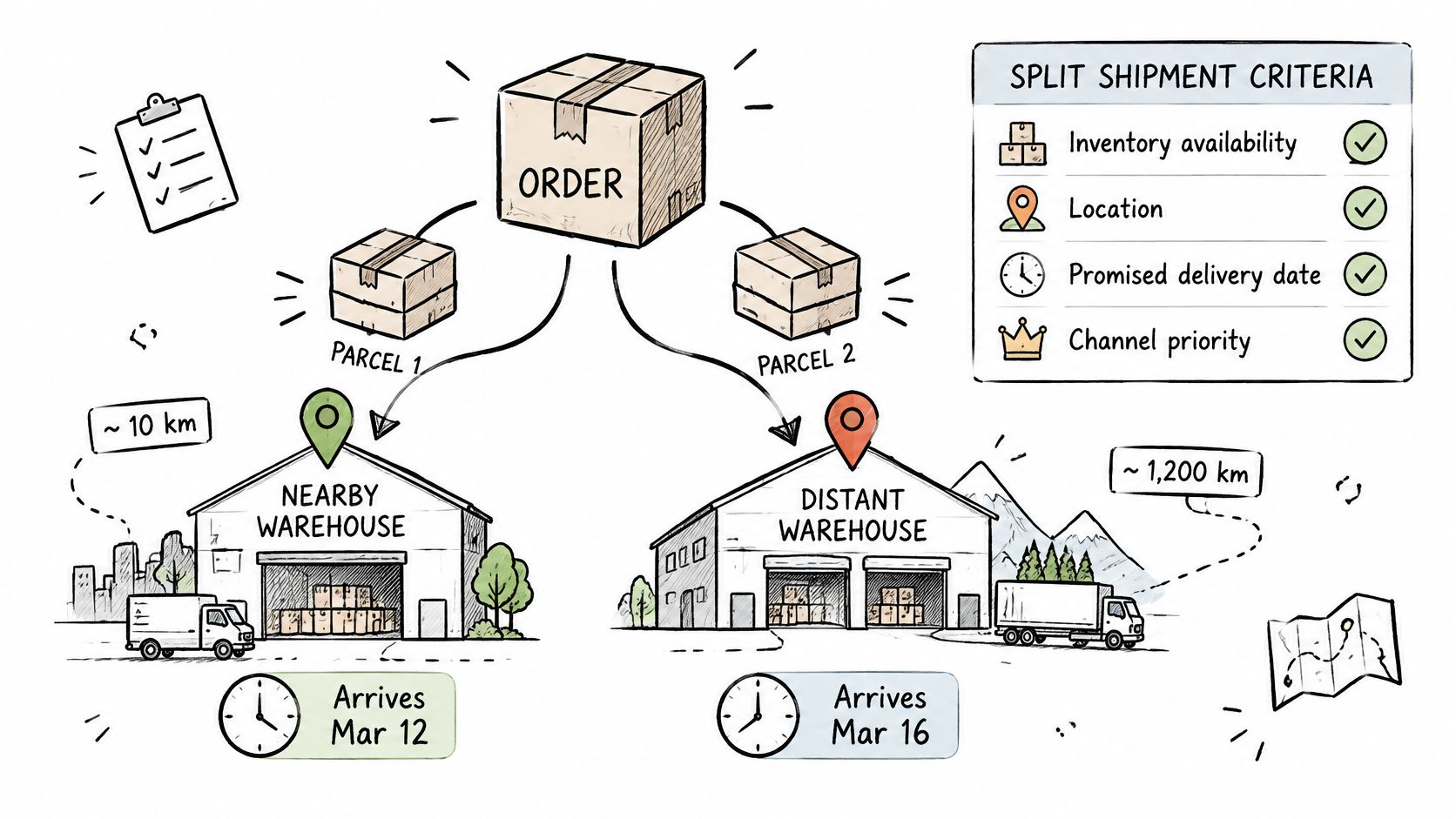
Allocation is the OMS deciding where an order ships from. It weighs several criteria at once, and each one exists because ignoring it breaks something specific.
| Criterion | What the OMS checks | What breaks if it is wrong |
|---|---|---|
| Available inventory | Reservable quantity after holds and committed orders | Overselling and cancellations |
| Location | Which warehouse, store or supplier can ship fastest | Longer delivery and higher shipping cost |
| Promised date | Whether stock can ship inside the promised window | Late deliveries and broken customer promises |
| Split-shipment cost | Extra packages compared with delivery speed | Higher cost per order |
| Channel priority | Which channel gets stock first when counts are low | Wholesale or subscription orders losing stock |
| Fulfillment capacity | Whether the chosen site can pick and pack now | Backlogs and missed cutoff times |
Take a three-item order. Two items sit in your main warehouse, the third in a store two hundred miles closer to the customer. Shipping all three from the warehouse costs one parcel but misses the promised date on the third item. Splitting costs two parcels and meets the date. The OMS resolves that trade-off against your rules, not against whoever answers the phone first.
The cause and effect here is direct, as a study of order management and warehouse digitization sets out: inaccurate inventory positions create false availability, and false availability produces overselling, cancellations and emergency reallocations. The same study reported a warehouse-technology result worth remembering, with inventory accuracy rising from 86.4% to 94.8%, average order-processing time falling from 6.2 to 4.6 hours, and picking errors cut in half after barcode-enabled digitization. Better data made better allocation, without anyone writing a smarter rule.
Four measures to put on a dashboard
- Allocation success rate, the share of orders that get a source location on the first attempt.
- Split-order frequency, watched alongside shipping cost per order.
- Pick accuracy, because a correct allocation still fails at the shelf.
- Inventory-adjustment volume by channel, which is where drift shows up first.
A production-grade OMS separates reservations from physical stock, supports partial fulfillment and backorders, and logs every allocation change so you can reconstruct why a decision was made. If your order fulfillment process can't explain last Tuesday's split, the audit trail is missing.
Returns, Inventory States and Sellable Stock
Returns are not an edge case, and any definition that stops at delivery is incomplete. A 2018 report from the U.S. Postal Service Office of Inspector General found that ecommerce purchases were returned approximately three times as often as purchases from physical stores, about 25% to 30% of online purchases against roughly 9% of brick-and-mortar purchases, and estimated that U.S. ecommerce returns represented approximately $113 billion to $132 billion annually at the time.
The same report identified fulfillment mistakes, such as shipping the wrong product, size or colour, as a contributor to returns. That links the reverse flow straight back to the accuracy of the forward one. Get the first order right and you remove part of the return volume before it starts.
The seven states of a return
- Authorized. The return is approved, with a reason code attached.
- Routed. A label or drop-off instruction goes to the customer.
- Received. The unit is scanned in at a location, which is not the same as being checked.
- Inspected. Someone confirms condition, completeness and whether it's a fraud risk.
- Resolved. A refund, exchange or credit is issued against the original order ID.
- Dispositioned. The unit is restocked, marked down, repaired, returned to a supplier or quarantined.
- Communicated. The customer is told what happened, including when money will land.
Each state needs its own record and its own timestamp. Without them, a refund gets issued twice, or a unit gets restocked before anyone looked at it.
The mistake to avoid: treating a returned item as available the moment the parcel is scanned. A returned unit is not automatically sellable stock.
Track states, not one number
"Real-time inventory" can mislead people. A live count is not a live state. If the OMS adds every return to available quantity immediately, the sweater that arrived Monday gets sold Tuesday while it's still sitting in the returns bin.
| State | Sellable now? | What the OMS must record |
|---|---|---|
| Available | Yes | Reservable quantity after holds |
| Reserved | No | Stock held for an open order |
| Committed | No | Stock promised to a released order |
| In transit | No | Stock moving between sites |
| Returned, awaiting inspection | No | Return authorized, unit not yet received or checked |
| Quarantined | No | Held for fraud review, damage or repair |
| Sellable again | Yes | Disposition decided and restock logged |
The pressure to get this right is rising. Research cited in Retail Insight Network's look at buy-online-return-anywhere estimated that 19.3% of U.S. online sales would be returned in 2025, and that 64% of surveyed merchants considered updating their returns process a priority within six months. A return that stays one auditable record across payment, POS, warehouse and accounting is the difference between a restock decision and a reconciliation project.
Clear up four common misconceptions while you're here. Real-time inventory means a live state, not just a live count. An OMS works alongside the ERP rather than replacing it, because one owns order state and the other owns the books. One order record can and should span online, retail and wholesale. And small multichannel brands face exactly the same overselling risk as large ones, just with fewer people to catch it.
Map your last ten returns against the seven states. Count how many have no disposition decision recorded. That number is your restock accuracy problem in one figure.
How an OMS Connects Customer Data
Every order should carry a customer ID that resolves to a profile: purchase history, subscription status, loyalty balance and open service tickets. The point isn't reporting. It's that a support agent should see the same status the warehouse sees, in the same screen, at the same moment.
Here's where it breaks. A customer asks where a delayed order is. The OMS shows released to fulfillment while the CRM still shows shipped, because the CRM was updated by a different integration on a different schedule. The agent picks one, guesses, and the customer contacts you again tomorrow. Two records, two answers, one unhappy person.
Three flows to keep straight
Order events update the customer profile. A shipment, a delivery and a return all belong on the customer's history, and they should arrive there from the order record rather than from a manual note.
Customer requests write back to the order. An address change, a cancellation or a swap on a subscription has to land on the order itself. If the agent updates the profile and not the order, the parcel still goes to the old address.
Returns and refunds surface in two places at once. The customer's history shows what happened, and the finance record shows the money leaving. When those two diverge, someone spends Friday afternoon matching payments to credits.
Channel boundaries make this harder. A buy-online-return-in-store return has to appear on the profile without anyone manually matching a POS receipt to a web order. The same applies to a wholesale draft order raised over the phone, which should still resolve to the same buyer record.
Pick one customer who has bought through two channels. Confirm their orders, returns and contact history show the same status everywhere those records appear. If it takes more than a couple of minutes, the customer ID isn't doing its job.
Check Your Order Record Against This Checklist
A good order record survives interrogation. Use these eight checks to audit the system you have or to question a vendor, and for each one ask a direct question and refuse a general answer. A vague reply is itself a failing grade, because the systems that can't show you a working example usually don't have one.
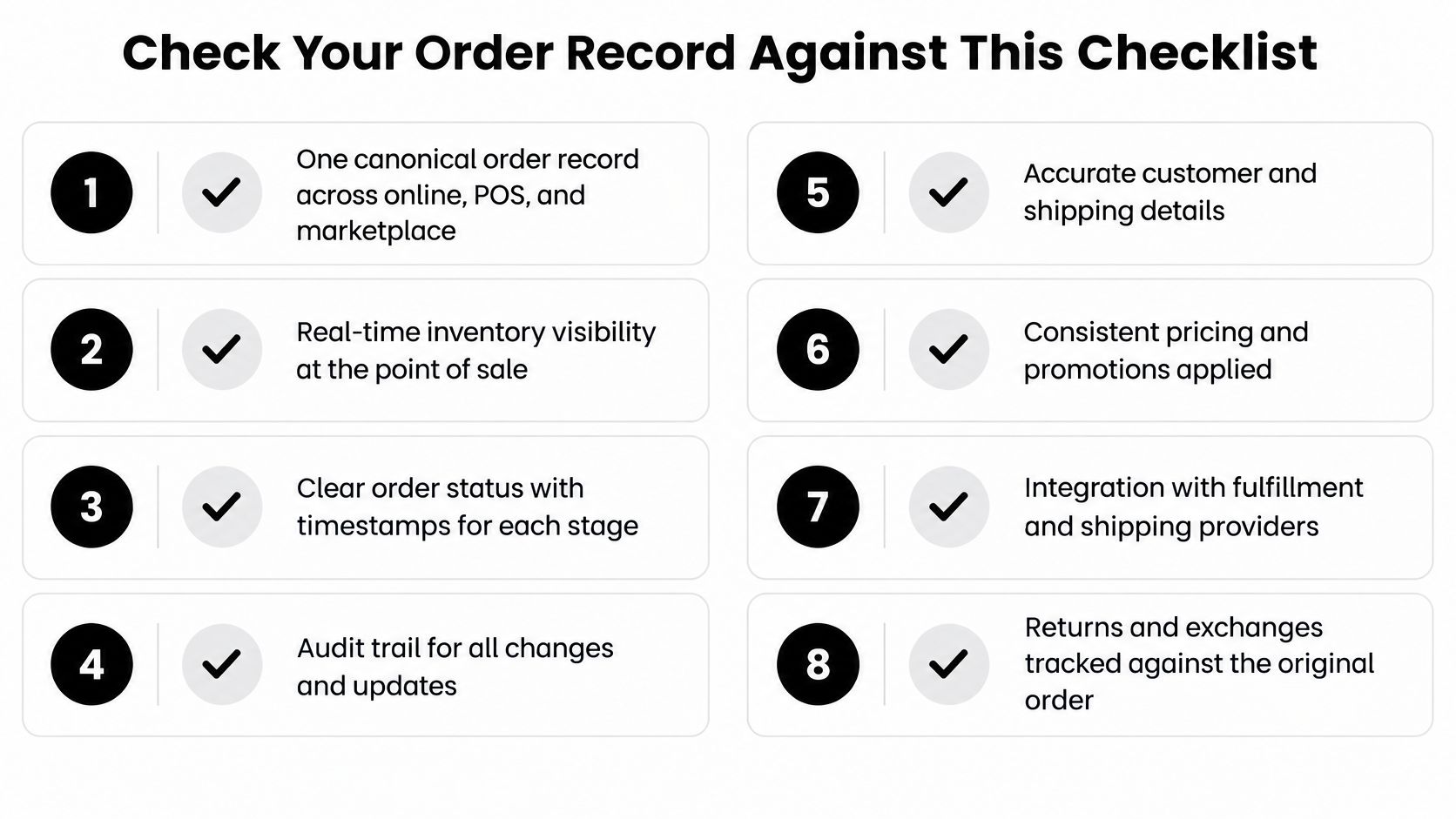
- One canonical order record across online, POS, subscription and B2B sales. Ask: "Show me the same order in all four channels."
- Separate read and write permissions for every person and every automated tool. Ask: "Which of my integrations can cancel an order, and which can only read it?"
- Approval gates on refunds and customer messages above a set amount. Ask: "Who approves a refund over my threshold, and what happens at 2am?"
- Idempotent writes, so a retried request can't create a duplicate order. Ask: "What happens if this call fires twice?"
- An audit trail for every change, including who or what made it. Ask: "Show me who changed this order's address last Tuesday."
- Rollback and a named escalation path when something goes wrong. Ask: "How do I reverse a bad refund?"
- Reconciliation that doesn't need a spreadsheet. Ask: "What percentage of orders reconcile without manual work?"
- Inventory states, not only counts. Ask: "Where does a returned unit sit before it's sellable?"
Checks four through eight deserve a second look, because they fail without warning. A duplicated order only surfaces when a customer is charged twice. A missing audit trail only hurts the day a dispute lands. Returned stock sitting in limbo distorts every count downstream of it, which is why the returned-unit question at check eight matters even for brands that handle few returns.
Why permissions matter more than they used to
Automation has moved from reading data to changing it. Software and AI agents can now create, cancel, refund and reroute orders, which turns a coordination layer into a control problem. Reporting by Digital Commerce 360 found that only 21% of surveyed organizations had complete visibility into AI-agent behaviour, permissions, tool usage or data access, while 38.6% had deployed agents at department or enterprise scale.
That gap is the reason checks two and three sit near the top. An agent that can issue a refund without a gate saves labour and adds financial risk at the same time. The fix is not slower automation. It is automation that knows where its authority ends, the way a junior employee can draft a refund but needs a manager to release the money.
This is how we build it. PlatformDTC keeps one stock ledger across locations and one order record that every other surface reads from, and the AI agent can do everything the merchant can do in the dashboard except the two things that need a human: anything that spends money, and anything that messages a customer, both of which wait for approval.
Score your current setup on the eight checks, one point each. Fix the lowest-scoring item first, because a weak link in the middle of a lifecycle fails the whole chain.
An order record is only as useful as the states it can hold, and the returns half is where most stacks fall apart. PlatformDTC keeps storefront, subscriptions, payments, inventory, returns and fulfilment status on one order record, so the seven states above don't get recreated in four systems that disagree with each other, while the merchant's own warehouse, 3PL or supplier does the physical picking and shipping. Every agent action carries a scoped key, an approval gate where money or a customer message is involved, and a full log you can reverse. Go to PlatformDTC and trace one live order through capture, allocation, delivery and return before you commit to anything.