A customer paid twenty minutes ago, your warehouse hasn't picked the order yet, and support already has a message asking where it is. Your order status page says "processing." The confirmation email says nothing about a date. The carrier has no label to track. Three systems, three partial answers, and the customer trusts none of them.
That's the usual failure. Most stores treat the page as a decorated link to a carrier site, so it can't answer questions before shipment, after a failed delivery, or when an order ships in two boxes. I'd build it differently. Treat the page as a governed view of one order record. The same record drives payment, allocation, fulfillment, carrier events, notifications, and the support screen. When those surfaces read from one source, they stop contradicting each other.
That also changes what you prioritize. Lifecycle states matter as much as the tracking widget. Notification consent matters as much as message design. Lookup security matters because a status page exposes purchase details to anyone who can guess an order number. Get those three governed, and the page starts cutting support contacts instead of generating them.
Table of Contents
- Lifecycle States Your Status Page Must Show
- Data Fields That Make the Page Trustworthy
- Keeping Carrier Status Current and Diagnosing Stale Pages
- Notifications Customers Welcome and Privacy Limits
- Protecting Order Lookups From Guessing and Leaks
- Launch Your Page and Track Support Contacts
Lifecycle States Your Status Page Must Show
| Lifecycle state | What the customer sees | Action to offer |
|---|---|---|
| Accepted | Payment cleared, order received | Edit address or items before fulfillment starts |
| Processing | Items being picked and packed | Cancel or edit while the window stays open |
| Allocated | Stock assigned to a location, split noted | Show which items ship separately |
| Shipped | Label created or first carrier scan, expected date shown | Tracking link and delivery date |
| Delayed | New expected date with the reason | Choose a new delivery window or contact the carrier |
| Delivered | Confirmed scan with location and time | Report non-arrival within a set period |
| Exception | Failed attempt, damage or address problem | Address correction, reroute, replacement or refund eligibility |
Why the early states earn their place
Accepted isn't filler. It confirms payment cleared and tells the customer edits are still possible. Once picking starts, that window narrows, so Processing should say plainly whether cancel or edit is still open rather than leaving people to test it by emailing support.
Allocated is the state most stores skip, and skipping it causes avoidable tickets. If stock is assigned from two locations, say so before two boxes arrive on different days. A customer who expects a split doesn't report half an order missing. Your state definitions need to match how work moves in practice, which the order fulfillment process guide covers from the operations side.
Where trust is won or lost
Shoppers have good reason to watch closely. In Narvar's 2025 State of Post-Purchase research, which surveyed 3,461 U.S. online shoppers in August 2025, 74% had experienced a late delivery during the prior year and 86% had encountered at least one delivery issue. When problems occurred, shoppers wanted acknowledgement and clear explanations, both selected by 46%, along with real-time updates, selected by 45%.
That's why Delayed needs a reason and a new window, not a moved date. In a four-country survey covering the US, UK, France, and Germany, 40% of consumers wanted non-food deliveries scheduled within a specific two- to three-hour window, and inaccurate notifications and inability to change delivery time or location were among the leading frustrations. Offer the reroute or window choice on the page, before the customer has to ask.
A state without an action is a dead end. Every row should answer what happened and what the customer can do next.
States also repeat and reverse. An Exception for a failed attempt should lead back to a second attempt, not sit as a final verdict. Model that loop, keep every transition on the canonical order record, and the page, emails, and support screens won't disagree.
Data Fields That Make the Page Trustworthy
Trust on this page is mostly a checklist problem. Baymard's research on integrating tracking information found that 50% of respondents considered order tracking the most important account or self-service feature, yet only 33% of tested ecommerce sites provided tracking pages containing six essential elements. Those six are an expected delivery date, a status progress indicator, the carrier name, a linked tracking number, a detailed shipping history, and a package contents summary. The same research found 25% of sites failed to reliably provide an expected delivery date.
The checklist below is the floor, not the ceiling.
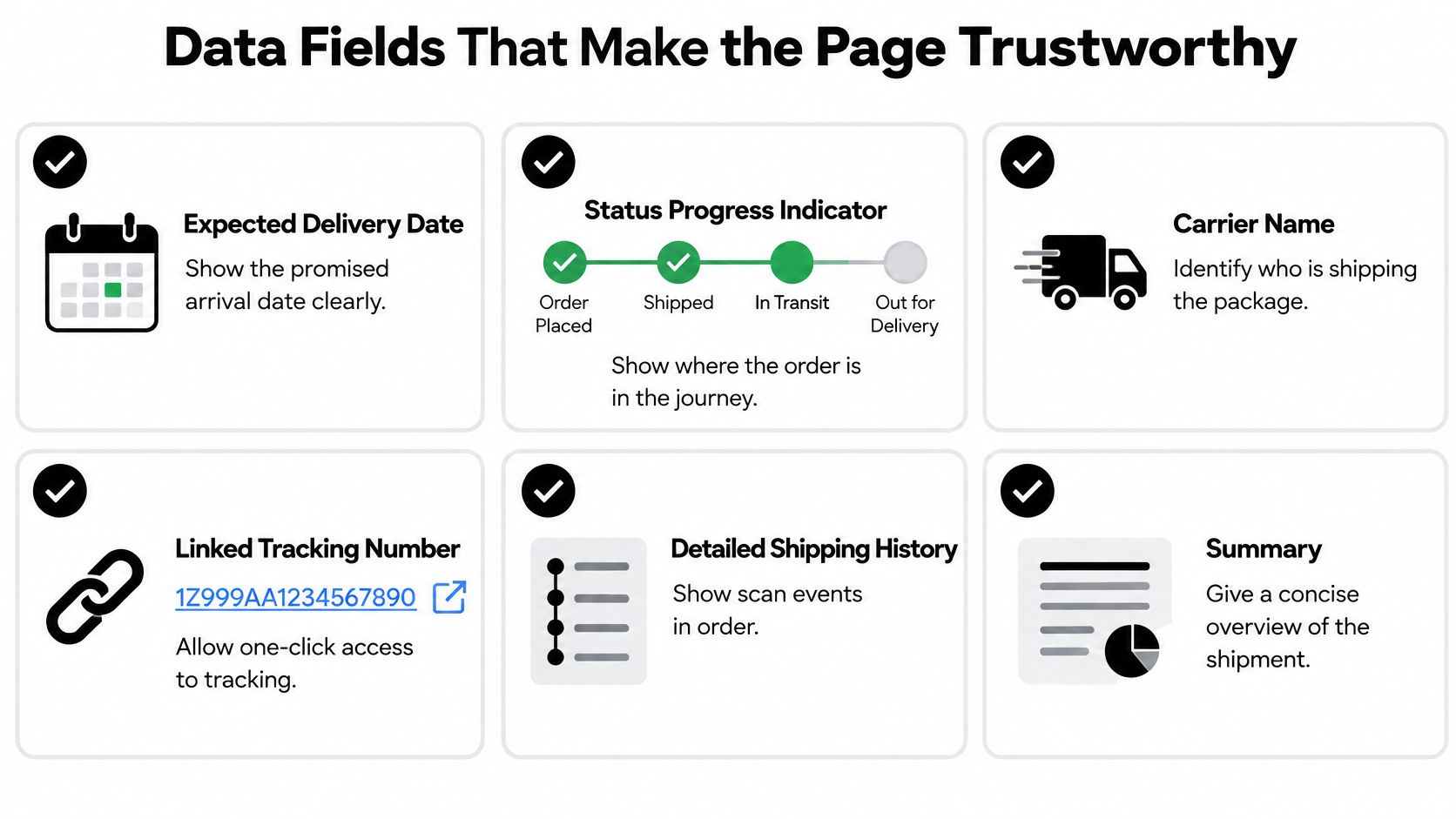
Start with the six, then add order-level data
Treat the delivery date as required. If you don't know it yet, say "date confirmed at shipment" rather than leaving a blank that looks like a bug. A stated unknown reads as honest. A missing field reads as broken.
A carrier page can't know your order, so add what only you know:
- Payment status: Cleared, pending, or partially refunded, so a held order doesn't look lost.
- Parcel contents: Which items are in which box, matched to each tracking number.
- Backorder dates: The expected ship date for items not yet allocated.
- Subscription renewal date: The next charge and shipment, shown beside the current order.
Model splits, pickup, and freshness explicitly
For split shipments, show one row per parcel under a single order header. Each row carries its own carrier, tracking number, and status. The customer sees one order with two parcels, not two unrelated deliveries.
Swap fields when the order type changes. In-store pickup needs a pickup location and a pickup-ready status, not carrier fields. B2B orders need invoice status. Forcing every order into a shipment template guarantees nonsense fields on some orders.
Show the last successful sync time beside the status. "Updated 12 minutes ago" lets a customer judge freshness and lowers the chance they'll assume a quiet tracking feed means a lost parcel.
Finish with a simple check. Can someone answer where it is, when it arrives, and what to do next from the page alone? If any answer is missing, you haven't got a copy problem. You've got a missing field.
Keeping Carrier Status Current and Diagnosing Stale Pages
Carrier tracking is an event-driven reliability problem, not a page lookup. Decide your batching strategy before you wire anything up, because it's expensive to change at volume. According to USPS developer documentation, the legacy Track/Confirm API limits each request to one tracking ID, while another USPS tracking interface supports up to 35 packages per transaction. USPS also supports subscriptions that deliver tracking events to a merchant-controlled server, which gives you webhook-driven updates with polling kept as a fallback.
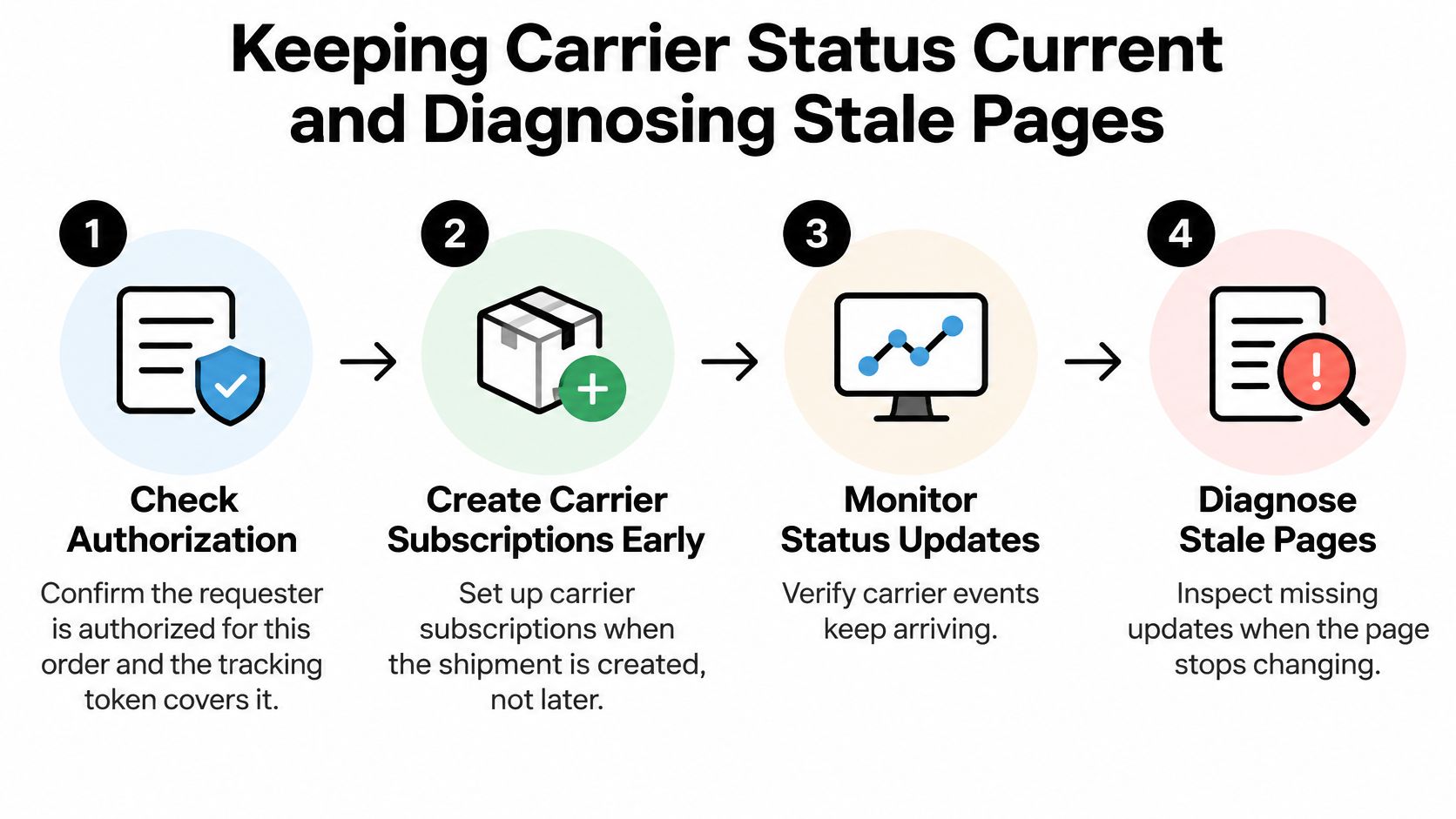
The four-stage flow below summarizes the discipline. The procedure after it is what I'd implement.
The seven-step procedure
- Validate authorization and token scope: Confirm the requester is entitled to this order and the tracking token covers it. Bad scoping here becomes a privacy incident later.
- Subscribe at shipment creation: Enqueue carrier subscriptions when the shipment is created, not when a customer first visits. Subscribe each parcel in a split order separately.
- Verify and deduplicate: Verify each webhook signature, then deduplicate using carrier event ID plus tracking number and timestamp. Carriers retry webhooks, and retries shouldn't become duplicate customer messages.
- Translate to canonical states: Map carrier-specific codes into your lifecycle states. Keep label created separate from Shipped, because a printed label doesn't mean the carrier holds the parcel.
- Reject regressions: If a Delivered order receives a late In Transit scan, reject it unless the event is explicitly marked as a correction. Out-of-order scans are routine in carrier networks.
- Run freshness timers: Calculate a freshness timer per shipment and poll any shipment that goes quiet past its promised update interval. Webhooks fail, and polling catches the gaps.
- Store the last sync time: Persist the last successful synchronization and expose it to support staff and, in plain language, to customers.
This is integration work, so build it with the same idempotency and retry discipline you'd apply anywhere else. The e-commerce API integration guide covers those patterns in a broader stack context.
Diagnose from your side first
When pages go stale, check yourself before blaming the carrier. If many orders stop updating together, your sync job or webhook endpoint is failing. If one carrier stalls while others update, check that carrier's status and expect the gap to clear when its scans resume. Don't let a carrier outage render on customer pages as a delivery delay, because you'll create tickets for an operational event customers can't act on.
Diagnostic rule: a single stale order is a parcel problem. A fleet of stale orders at the same timestamp is your pipeline.
Continuous change detection helps here. Agentable's guide to monitoring website changes is a useful reference for watching external status surfaces and detecting when expected content stops changing, which is the same thinking behind alerting on a frozen tracking feed. Publish your own state too. Our uptime monitoring is published live at status.platformdtc.com, and support should check it before escalating.
| Symptom | Likely cause | Fix |
|---|---|---|
| Delivered shown, customer says nothing arrived | Premature delivered scan | Hold the delivered state for a verification window and request proof of delivery |
| Status stuck on Shipped for days | Events not subscribed or polling off | Re-subscribe and poll shipments quiet past their update interval |
| Two emails for one shipment | Duplicate events not deduplicated | Deduplicate on carrier event ID plus tracking number and timestamp |
| Status moves backward, Delivered to In Transit | Late scan treated as new state | Reject regressions unless marked as a correction |
| Many orders stop updating together | Internal sync or webhook failure | Check your own sync and uptime before contacting the carrier |
| Label created but parcel hasn't moved | Label treated as physical possession | Keep label created as its own state, separate from Shipped |
Notifications Customers Welcome and Privacy Limits
More alerts aren't better. That default assumption is how customers end up with three messages for one scan and none for the delay that matters.
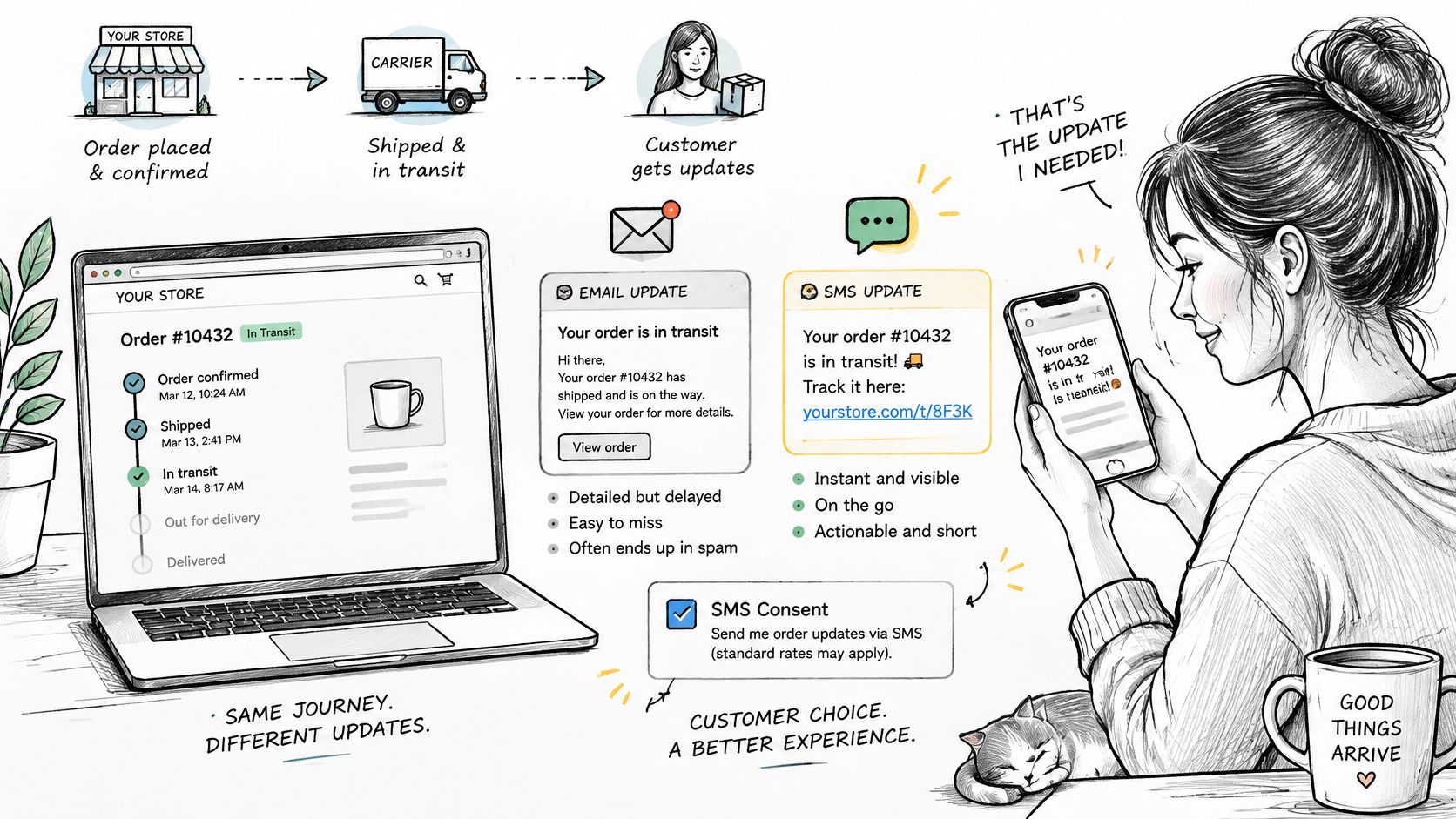
The channel gap is the first problem. In Stord's 2025 mystery-shopping study, 56% of consumers prefer SMS for order updates and tracking, while only 12% of brands meet that expectation. The same body of research reported that more than 80% of shoppers expect immediate notification when a delivery is delayed. An email-only setup misses the preferred channel and usually misses the timing too.
The illustration below maps the simple version of that journey, one update per channel at moments that matter.
Consent and classification come first
Ask for explicit SMS consent at checkout and store it separately from marketing consent. Those are different permissions, and merging them creates legal and trust problems. Classify every message as transactional or marketing before it ships. A delivery notice with a promotional banner can change category.
Respect quiet hours in the customer's local time zone for anything that isn't time-critical, and localize wording rather than forwarding raw carrier text. "Label created" means nothing to a shopper. "We've packed your order, the carrier collects it today" does.
One canonical event, one message
Limit each status change to one message per channel. A delivered scan should produce one email and one SMS, not separate events from the carrier, your platform, and your support tool all firing independently. Drive every channel from the same canonical state change and deduplication becomes manageable.
Keep sensitive details out of notifications. Item names and a link to the order are enough. Full addresses and phone numbers don't belong in a text message that may sit on a lock screen.
This short walkthrough shows how restrained, well-timed updates look from the customer's side.
Automation needs a gate too. On our platform, the AI agent can do everything the merchant can do in the dashboard, but actions that spend money or message a customer wait for the merchant's approval. That approval step is what stops a premature delivered scan from becoming a confident, wrong text message.
Consistent, actionable, permission-aware updates beat high-frequency tracking noise every time.
Protecting Order Lookups From Guessing and Leaks
The lookup form is the weakest point on most status pages. Order numbers are often sequential, and they appear in forwarded emails, screenshots, and shared inboxes. An order number alone isn't a credential.
Pair the order number with proof
Require the order number plus the billing or shipping email, or send a one-time code to that address. If you're designing that verification step, it's worth reviewing how to configure page access with OTP Plus, which lays out one-time passcode patterns for gating customer pages. The principle transfers directly. The person proving inbox ownership is far more likely to be the buyer than someone incrementing numbers.
Issue status links as signed tokens bound to one order, with a short expiry and a fresh token on every reissue. Keep customer IDs and full addresses out of the URL itself, because URLs end up in browser history, analytics, and chat logs.
Make guessing uninformative and slow
Rate-limit lookup attempts per IP address and per order. Return the same generic message for a wrong order number and a wrong email, so an attacker can't tell which half matched. That single detail closes the most common enumeration path.
Then minimize what's shown after a successful lookup:
- Show: Carrier, status, expected date, and item names.
- Don't show: Full street addresses, phone numbers, or payment details.
- Log: Every lookup and token issue, so support can trace a complaint about a leaked link.
Context matters here. When a cardholder asks their bank about a card payment, the order's details, including products, amounts, delivery address, email address and IP address, may be shared with the issuing bank. Order data already travels through payment channels, which is no reason for your public page to repeat more than the customer already holds.
Test it yourself. Enter a stranger's order number with your own email and confirm nothing leaks.
If that test shows an item, a city, or even a confirmation that the order exists, you've got work to do before launch.
Launch Your Page and Track Support Contacts
Build in dependency order. Lifecycle states and required fields first, because everything else renders them. The carrier pipeline second. Notifications third, since they should only fire on states you trust. Lookup security before go-live, not after the first complaint.
Start narrow. One channel and one carrier, working end to end, beats four carriers half-wired. Add split shipments and subscriptions once the basic path holds up under real orders.
Five numbers, reviewed weekly
- Webhook delivery rate: Are carrier events arriving and being accepted?
- Median status freshness: How old is the typical status a customer sees?
- Duplicate-event rate: Are retries leaking into customer messages?
- Orders with an actionable ETA: The percentage carrying a date customers can plan around.
- Support contacts per 1,000 shipments: The number the whole page exists to reduce.
Alert whenever freshness breaks the promised update interval. Compare support contacts before and after launch on a similar order mix, because a holiday peak can hide a real gain. Our shared customer support inbox ingests the brand's own mailbox and shows the customer's order history beside the thread, which makes that before-and-after tagging practical. The support agent also answers customers and tells them where their order is, with each agent action set to Off, Draft or Auto, so you can measure which "where is my order" contacts still need a human. The built-in support center overview explains that inbox model in more detail.
A concrete first week
Day one: Confirm the state table with operations. Days two and three: Connect one carrier and verify webhook signatures and deduplication with test shipments. Day four: Send one delivered notification template to a test list. Day five: Run the stranger lookup test. Then review the five numbers and decide whether the second carrier earns its place yet.
If your status page still depends on a carrier link and a prayer, rebuild it on one governed order record that connects storefront, checkout, subscriptions, fulfillment, and support. That's the model PlatformDTC is built on, with customer accounts that show real order and shipment status from the same record your team and agents work from. Visit us, bring your messiest split shipment or subscription edge case, and see what your customers would see.