Your app connects, the catalog appears, and the first TikTok Shop order reaches your commerce system. Then a creator drives a burst of sales, a webhook endpoint goes offline, and your warehouse ships an order whose tracking TikTok won't accept. The connection still looks healthy, but operations aren't.
A reliable TikTok Shop integration has to survive those failures without overselling, duplicating orders, or leaving finance to reconstruct refunds manually. Treat the first successful API call as a credentials check. The acceptance test is whether inventory, fulfillment, returns, and settlement still agree after something breaks.
Table of Contents
- What a TikTok Shop Integration Must Keep in Sync
- How to Register and Authorize Your App
- How to Sign API Calls and Verify Webhooks
- Choosing a Fulfillment Model and Tracking Correctly
- How to Map Orders, Inventory and Fulfillment Data
- How to Test the Integration Before Go-Live
- Confirm the Sync Before You Scale Sales
What a TikTok Shop Integration Must Keep in Sync
Data drift starts when systems disagree about who owns a record. Your warehouse marks an order shipped, TikTok still shows it awaiting fulfillment, and support sends the buyer an outdated message. Moving data faster won't fix unclear ownership.
TikTok Shop reached approximately $9 billion in U.S. GMV and $33.2 billion globally in 2024, according to Statistics Global's social commerce statistics. This is a transactional sales channel, not merely a place to publish referral links.
Use an ownership map before choosing a connector or writing endpoint handlers.
Data objects, ownership and reconciliation checks
| Data object | Source of truth | Direction | Sync method | Reconciliation check |
|---|---|---|---|---|
| Product catalog | Unified catalog | Outbound to TikTok Shop | Push on every change | Daily SKU and variant match |
| Inventory | Shared stock ledger | Outbound to TikTok Shop | Idempotent decrement per order line, then publish availability | Scheduled count comparison |
| Orders and status | Canonical order record | Inbound from TikTok Shop | Webhook plus sweep | Periodic state comparison |
| Fulfillment and tracking | Canonical order record | Outbound to TikTok Shop | Submit after shipment | Tracking acceptance check |
| Returns and refunds | Canonical order record | Inbound from TikTok Shop | Webhook with recovery checks | Post-delivery exception review |
| Settlement and fees | Finance ledger | Inbound from TikTok Shop | Settlement report import | Monthly ledger tie-out |
The canonical record is your consolidated operational record, not permission to overwrite TikTok's marketplace decisions. Preserve platform status alongside your internal lifecycle, particularly for cancellations, refunds, and disputes.
Keep price ownership explicit within the catalog flow. A successful product update doesn't prove that the intended price or variant was accepted.
Start with ownership: List every object, name the system allowed to change it, and assign an owner to resolve mismatches.
I would reconcile inventory first. A missing campaign field weakens reporting; an incorrect available quantity can promise stock you can't ship.
How to Register and Authorize Your App
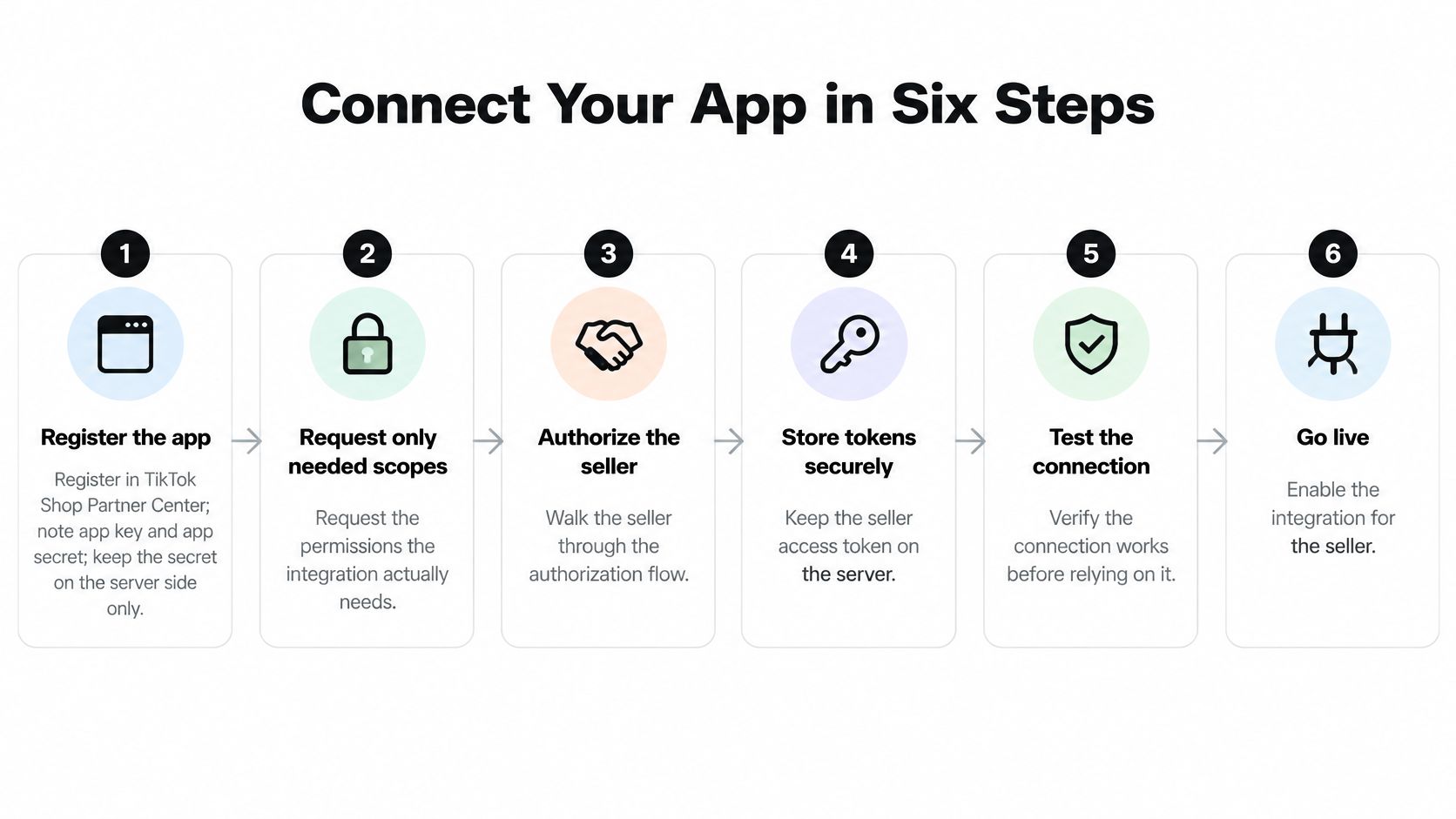
Build authorization as a maintained service, not a setup script. Your integration must distinguish the application, the seller's authorization, and the specific shop being accessed.
Keep development and production credentials separate. Otherwise, a successful test can hide the fact that your deployed worker is using another environment's configuration.
Establish the authorization boundary
-
Register the application in TikTok Shop Partner Center. Record the app key and app secret, keeping the secret in server-side secret storage. The common slip is placing credentials in browser code, a mobile bundle, or a shared configuration file.
-
Request the permissions your workflows use. Map scopes to catalog, order, inventory, and fulfillment operations rather than requesting everything available. Excess permissions widen exposure if credentials leak, while missing permissions produce a connection that reads successfully but fails when it tries to write.
-
Send the seller through OAuth authorization. Validate the callback's state value and associate the authorization code with the tenant that initiated the flow. Don't attach an incoming callback to whichever account happens to have an active browser session.
Persist credentials and prove shop identity
-
Exchange the authorization code for seller credentials. Store the access token, refresh token when supplied, and returned expiry information encrypted on the server. Implement refresh handling before rollout, because a token that works during setup can expire while unattended jobs continue reporting apparent success.
-
Resolve and save the authorized shop context. Persist the shop ID and
shop_cipherfrom the applicable authorization and shop-discovery responses, keyed to the correct tenant. Don't assume every token response contains every shop field, or that a seller account represents only the shop you intended to connect. -
Perform a shop identity read. Use the applicable authorized-shop or shop-details endpoint and compare the returned identity with the seller's selection. A successful response from the wrong shop is a failed connection, even when authentication passes.
Use explicit credential states such as authorized, refresh required, and reauthorization required. When refresh fails permanently, pause affected jobs and notify the operator instead of repeatedly submitting doomed requests.
Test concurrent refresh attempts, too. Background workers shouldn't overwrite a newly rotated credential with an older value, so serialize refresh operations or protect updates with version checks.
Success means the token refresh path works, the shop context belongs to the correct tenant, and a clean read returns the intended shop. None of those checks proves that order processing or fulfillment is ready.
How to Sign API Calls and Verify Webhooks
A framework can break a valid webhook before your handler sees it. If middleware parses JSON and then reconstructs the body, it may change whitespace, key order, or encoding. The business content looks identical, but the signed bytes aren't.
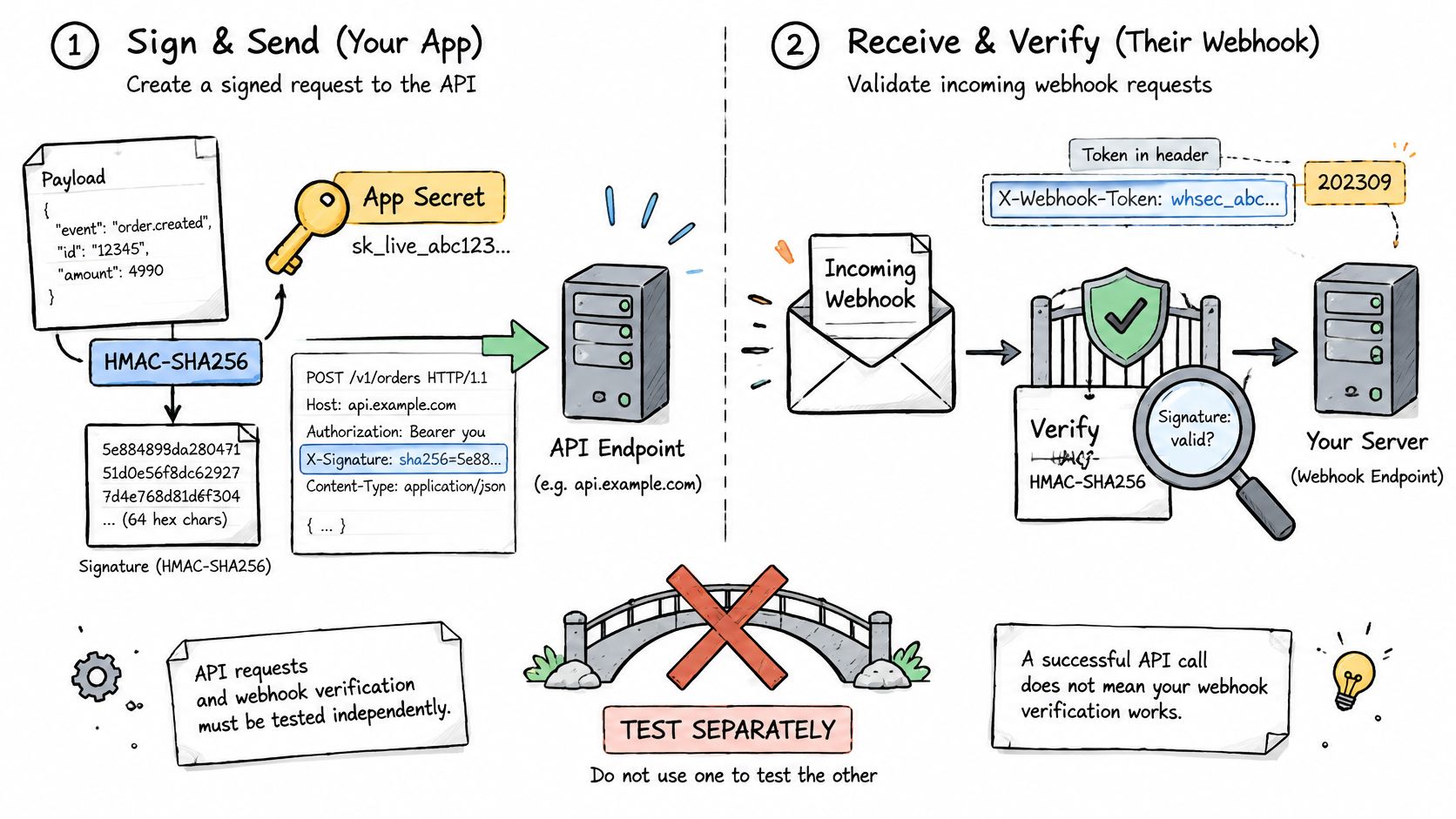
Treat outbound request signing and inbound webhook verification as separate security boundaries. Sharing cryptographic utilities is sensible; assuming the same message-construction rules apply to both is not.
Sign outbound requests centrally
TikTok Shop's API signing documentation specifies HMAC-SHA256 using the app secret; for API version 202309 and later, the seller access token belongs in x-tts-access-token and is excluded from signature generation.
Build centralized middleware that assembles the app key, UTC Unix timestamp, required shop context, canonicalized query parameters, and generated sign value. Follow the endpoint's documented signing rules for the path and body rather than improvising a universal string-concatenation scheme.
Sign the final request representation. If another layer changes parameters or body encoding afterward, you're sending something different from what you signed.
This separation of authentication, transport, and business mutations is also useful across a broader e-commerce API integration. Keep endpoint-specific handlers out of the business of constructing signatures.
Verify inbound bytes before parsing
Capture the raw request body first. Compute the webhook HMAC over app_key + raw_request_body using the app secret, compare it with the supplied Authorization value using a timing-safe comparison, and reject invalid signatures.
For valid events, persist the receipt durably, acknowledge promptly, and let a worker perform business processing. Don't acknowledge success before you've secured the event somewhere recoverable.
- Preserve evidence: Retain protected raw payloads and relevant headers, with secrets redacted and access restricted.
- Separate failures: Distinguish signature rejection from queue failure and downstream business rejection.
- Test altered bytes: Change the body without changing the signature and confirm that verification fails.
A passing outbound API call says nothing about whether your webhook receiver can authenticate an incoming event.
Finish with a replay test using an authentic signed payload. Verification should succeed, while downstream duplicate protection prevents another business mutation.
Choosing a Fulfillment Model and Tracking Correctly
Choose fulfillment by asking who controls the stock, label, tracking events, and return decision. A familiar warehouse workflow isn't enough if nobody owns the marketplace-facing shipment update.
Pipe17's TikTok Shop fulfillment guide describes TikTok-held inventory, merchant or third-party logistics fulfillment using TikTok labels, and seller-arranged shipping; it also notes commission, shipping-program, and transaction charges, with refund, return, and dispute activity remaining relevant for 14 days after delivery. Don't interpret that period as a universal cutoff for every liability: confirm the applicable program terms.
Fulfillment models and who carries each responsibility
| Model | Holds inventory | Issues label | Submits tracking | Return exposure |
|---|---|---|---|---|
| TikTok-held inventory | TikTok | TikTok | TikTok | Confirm seller liability and program responsibilities in applicable terms |
| Merchant or 3PL with TikTok label | Merchant or 3PL | TikTok | Merchant or 3PL scan events | Seller exposure under applicable return and shipping terms |
| Seller-arranged shipping | Merchant | Merchant | Merchant with valid carrier and tracking | Seller exposure under applicable return and shipping terms |
Choose control deliberately
TikTok-held stock suits an allocation you're willing to separate from your shared warehouse pool. Don't advertise those units as immediately available to your own site unless your operating arrangement supports that availability.
TikTok labels make sense when your merchant warehouse or 3PL can ingest the labels and preserve the required shipment events. Verify this capability rather than assuming an existing warehouse connection supports the workflow.
Seller-arranged shipping gives you control over carrier contracts, but your integration must validate carrier, service, and tracking identifiers before submission. A warehouse dispatch confirmation isn't the same as marketplace acceptance.
Map these handoffs into your order fulfillment process, including who responds when a shipment update is rejected.
Separate stock from money
Maintain distinct states for allocated stock, TikTok-held stock, shipped units, platform-controlled refunds, seller-funded refunds, and post-delivery disputes. These are separate stock positions and financial exposures, not quantities to combine into available inventory.
Set channel safety stock so retail, wholesale, and website orders can't consume units already committed to TikTok buyers. Release returned stock only after the warehouse confirms receipt and sellable condition, not merely because a refund occurred.
Reconcile settlement against orders, refunds, and fees monthly as an internal control, rather than reviewing only payout totals. Pick a fulfillment model for each SKU group and record who owns tracking exceptions and return liability.
How to Map Orders, Inventory and Fulfillment Data
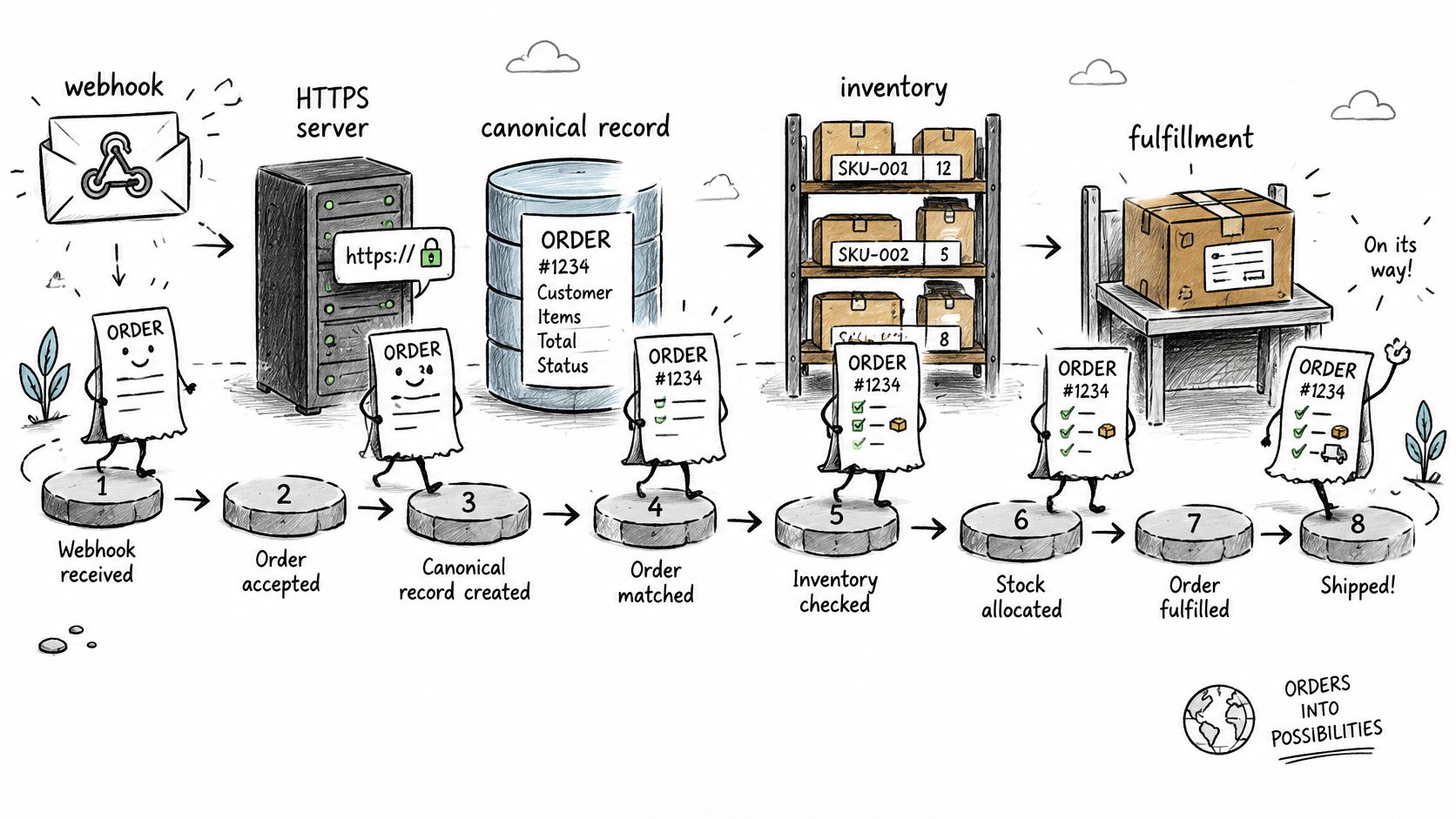
Use an event-driven pipeline with a recovery path. TikTok Shop's Orders and Fulfillment API guidance identifies webhooks as the primary notification mechanism and recommends reconciliation to recover missed deliveries.
A webhook is a signal to update your understanding of an order. It shouldn't become an unchecked instruction to deduct stock or dispatch a package.
Carry the order through a controlled pipeline
-
Subscribe on a public HTTPS endpoint. Register the order-status webhook for the intended shop and environment. Confirm routing reaches the deployed receiver, not an abandoned development endpoint.
-
Authenticate and record the event. After verification, persist its event ID or an equivalent deduplication key before processing. Scope that key to the provider and shop so unrelated tenants don't collide.
-
Fetch full order details. Retrieve the authoritative fields needed for processing rather than assuming the notification contains a complete order. Preserve the source status and relevant timestamps.
-
Resolve each SKU and variant. Map TikTok identifiers to your unified catalog using an explicit mapping table. Send unmatched lines to an exception queue, because guessing from a product title can ship the wrong item.
-
Apply the inventory transition idempotently. Key the mutation by shop, order, line item, and operation. Distinguish reservation from shipment consumption so the same unit isn't deducted at both stages.
-
Create or update the canonical order. Use the lifecycle shared by your other channels while retaining TikTok-specific fields. An order management system should preserve operational history, not flatten every external status into a generic paid or shipped flag.
-
Submit fulfillment after shipment. Send the validated shipment identifiers and retain the response. Mark the marketplace update accepted only when the response confirms acceptance.
-
Run a periodic reconciliation sweep. Compare TikTok order state with your canonical record and route differences to recovery jobs or operator review. Use an overlapping retrieval window so a boundary timestamp doesn't strand a changed order.
Recover without rewriting history
The common failure is subscribing to notifications without building the sweep. After an endpoint outage, an apparently empty queue can mean nothing arrived, not that nothing happened.
Don't let a delayed event regress a completed order to an earlier state. Where event ordering is ambiguous, fetch current order details and apply a permitted lifecycle transition.
Recovery rule: Repair missing business state through the same guarded mutation path used for normal processing, not through an untracked database patch.
How to Test the Integration Before Go-Live
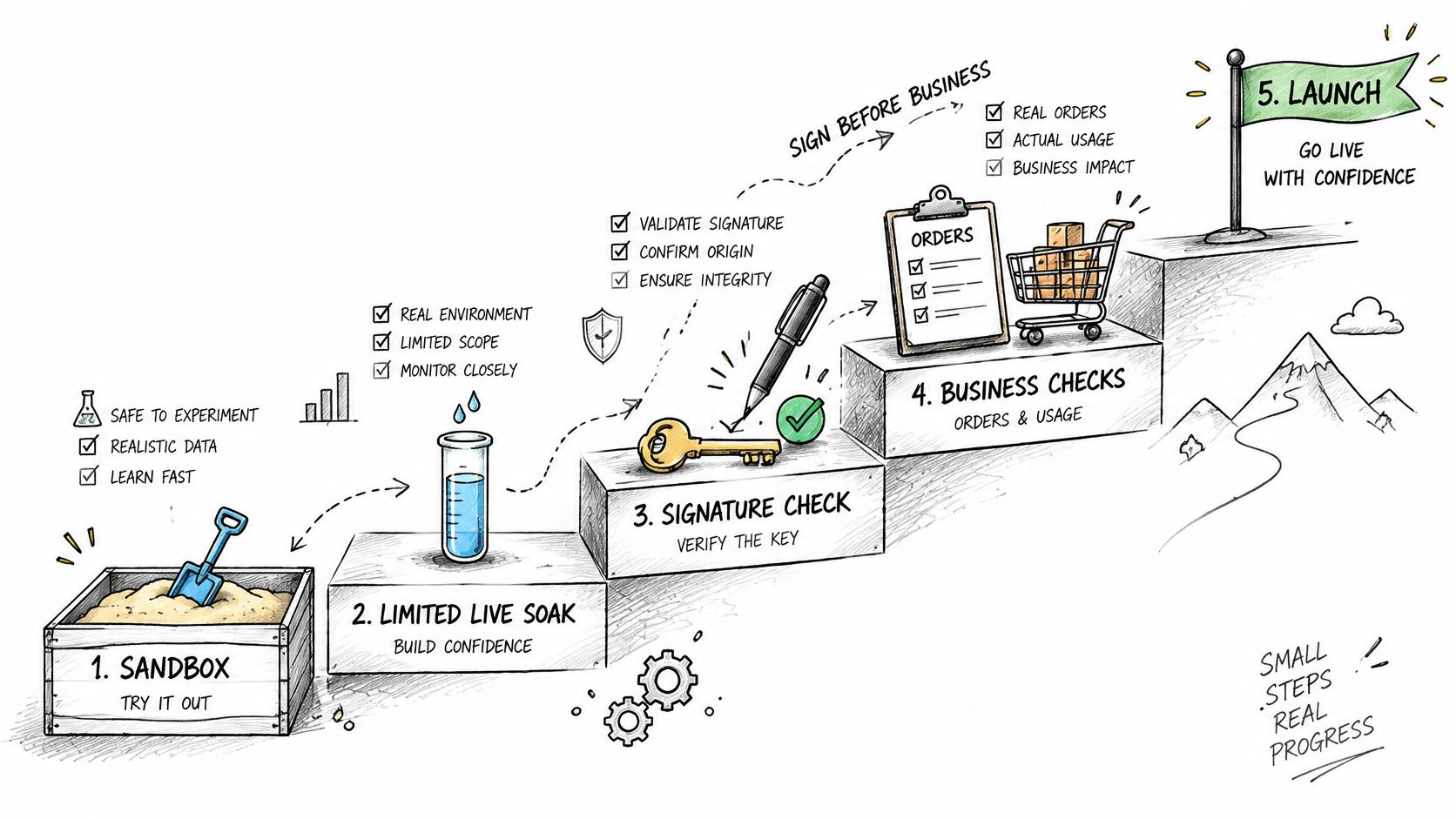
Start in the available sandbox or test environment, then move to a tightly limited live rollout. Run authentication checks before business checks, because a rejected signature prevents you from learning anything about inventory or order mapping.
Test both the endpoint response and the canonical record. A successful HTTP response doesn't prove that a worker completed the intended mutation.
Go-live tests with expected results and failure signs
| Test | Expected result | Failure sign |
|---|---|---|
| Replay a signed webhook | Processed once | Duplicate order created |
| Send a tampered payload | Rejected | Payload processed |
| Re-send the same event ID | No second mutation | Inventory decremented twice |
| Simulate an endpoint outage | Sweep recovers missed orders | Orders missing from canonical record |
| Submit shipment with an invalid carrier | Blocked before submission | Tracking rejected by TikTok Shop |
| Compare a day's order counts | Matches within defined tolerance | Divergence above threshold |
Make failures deliberate
For the outage test, disable delivery to your receiver in a controlled environment while generating test activity. Restore the endpoint and require the reconciliation job to find the missing records without manual insertion.
For inventory, replay an event after the worker has committed its change but before the queue message is considered complete. That boundary exposes handlers that appear idempotent during ordinary retries but duplicate mutations after a crash.
Exercise a refund after shipment, too. Confirm that finance records the adjustment without automatically returning an unreceived item to sellable stock.
Inspect evidence, not dashboard color
- Keep immutable logs: Preserve request and response evidence with correlation identifiers, protected customer data, and redacted credentials.
- Alert on actionable divergence: Route inventory differences and rejected tracking updates to named owners, not an unattended mailbox.
- Define comparison rules: Use the same shop scope, timezone, order population, and cutoff when comparing daily counts.
- Separate pending from missing: Allow explicitly understood processing lag, but investigate every unexplained difference.
- Test recovery: Repeat the check after a worker restart, token refresh, or temporary downstream failure.
During the live soak, use genuine low-volume orders that your team can inspect individually. Continue long enough to observe shipment acceptance and operational handoffs, and keep settlement validation open until the relevant report is available.
Don't treat the first clean run as acceptance. A test passes only when the system also reaches the correct result after the failure you intended to provoke.
Confirm the Sync Before You Scale Sales
I would start with a single market, a narrow SKU group, and a chosen fulfillment model. That boundary gives engineering, warehouse operations, and finance a manageable set of records to verify.
Authorize the selected shop and confirm that its shop context belongs to the correct tenant. Run the acceptance suite in the available test environment, then enable a restricted live flow with staff ready to inspect exceptions.
Require evidence before expansion
- Order integrity: No duplicate records or unexplained missing orders.
- Operational agreement: Status changes reach the correct lifecycle state without manual correction.
- Shipment acceptance: Every live shipment has an accepted tracking update.
- Financial agreement: Settlement entries tie to orders, fees, and adjustments.
- Named ownership: Someone can resolve each remaining exception before catalog expansion.
Keep scope restricted until reconciliation remains stable across ordinary operating cycles. Don't expand merely because sales are arriving.
Businesses without a PlatformDTC Store can get started through the Get started link on our fraud solutions page. To accept payments through our platform, create a PlatformDTC account and complete Stripe Connected Account onboarding; that's separate from TikTok Shop seller authorization.
Choose your first SKU group and fulfillment model, then run a live order through shipment, marketplace acceptance, and financial reconciliation.
PlatformDTC brings catalog, inventory, fulfillment, and customer orders into a shared record model, giving your integration a consistent operational foundation. Visit PlatformDTC to explore that foundation and define the order, stock, and settlement checks you'll require before scaling TikTok Shop sales.