
Customer email is where a commerce platform usually stops. You get orders, subscriptions and payments in one system, and then the question “where is my order?” arrives in a completely different one — a helpdesk that knows the customer’s email address and nothing else about them.
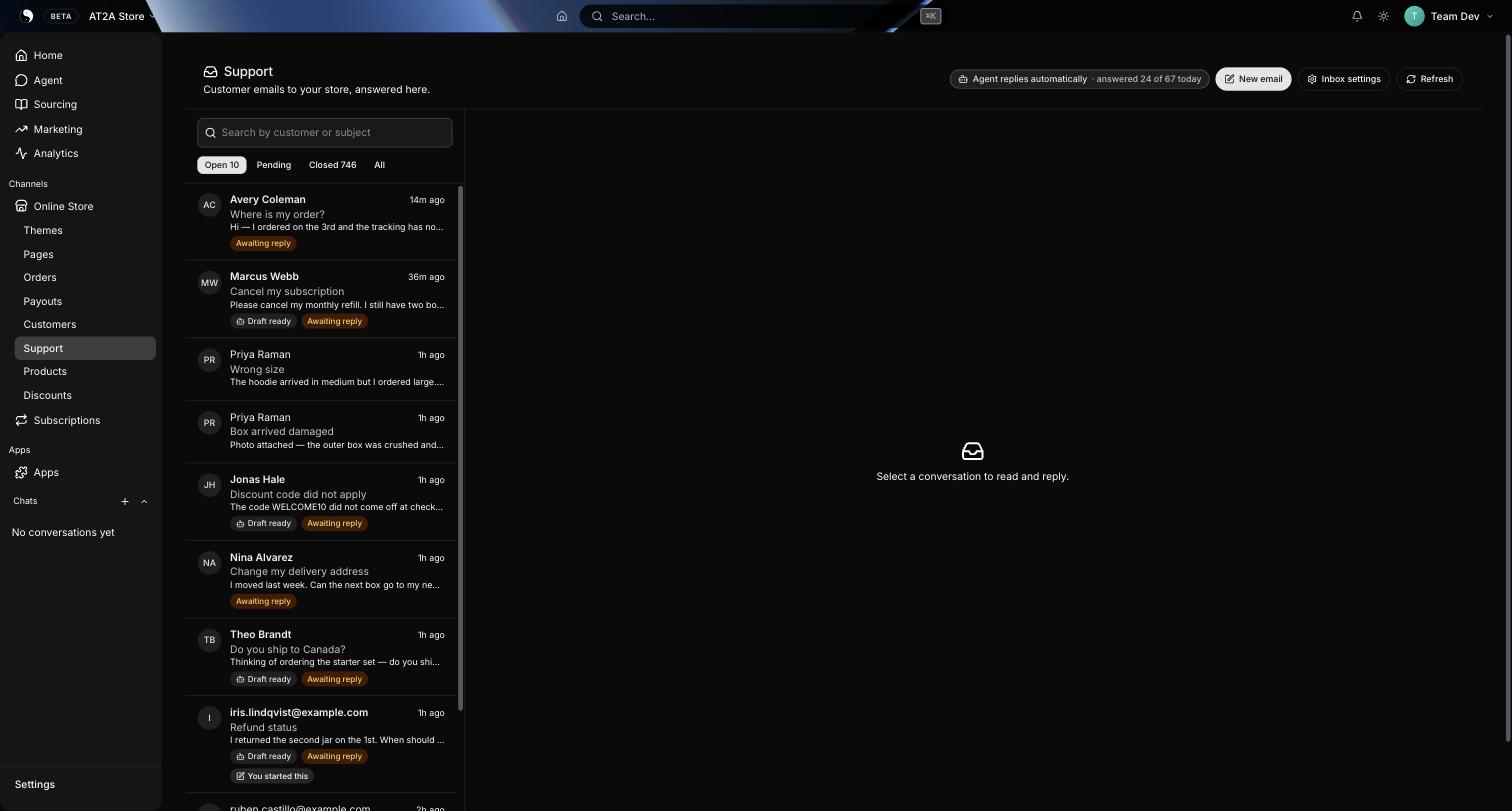
PlatformDTC now answers that mail itself. Support sits in the dashboard beside Customers: your store’s own address, the whole thread, and the customer’s orders, lifetime spend, subscription and tracking open beside it. An agent can draft the reply, or send it, or stay out of the way entirely — per action, at your choice, off until you say otherwise.
Connect the mailbox you already have
Support → Inbox settings takes the address customers already write to — contact@yourstore.com — with its IMAP host and password. The credentials are tested before they are stored: a wrong password is refused at the form rather than saved and quietly failing at three in the morning. The page also reports the domain’s MX records, because a domain set up to send as your brand cannot necessarily receive, and that distinction is where most support-email setups go wrong.
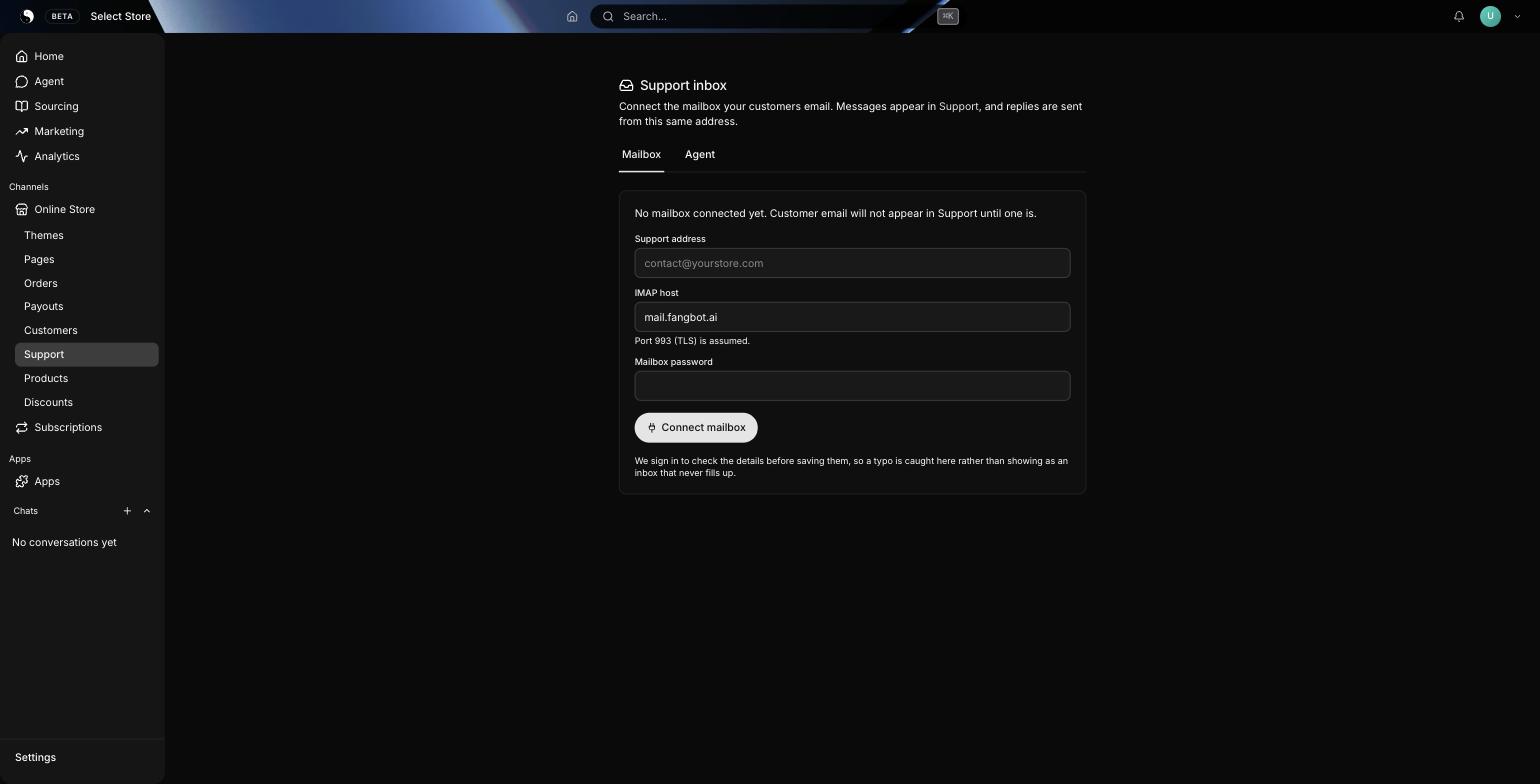
Reading is strictly read-only. Messages are fetched without setting flags, nothing is marked read, nothing is moved, nothing is deleted, and we track our own position in the mailbox. Connecting does not take the mailbox away from you. If you or an existing helpdesk are already reading that inbox, both keep working, and you can decide over weeks rather than in one migration.
Replies go out from your mailbox, over authenticated TLS submission — from contact@yourstore.com, never a platform no-reply address — carrying the threading headers, so your answer lands inside the existing conversation in the customer’s own mail client instead of opening a fresh, subject-only message. A store with more than one mailbox sends from the one on its own domain.
Mail is not allowed to go missing
Three rules, and they all point the same way — a stalled inbox you can see beats a tidy inbox that lost something.
- Nothing is skipped. The read position only advances over messages actually filed, and it stops at the first one that fails. A message that cannot be stored holds the queue until it can, rather than being stepped over and never seen again.
- Nothing is duplicated. Messages are de-duplicated on their RFC message id per store, so re-reading part of a mailbox costs nothing.
- A reply to a notification finds its thread. When a customer replies to an order confirmation or a shipping email, that reply is matched against the notification it answers, so it opens on the right conversation with the right customer attached.
The connection is watched rather than assumed. If a mailbox starts refusing us, the fault is raised as an alert instead of sitting unread in a database column; if the polling sweep itself stops, a watchdog restarts it — but deliberately refuses to restart when polls are happening and failing, because an expired password survives any restart and turning a diagnosable fault into a flapping service helps nobody. Polling adapts too: a busy inbox stays on a two-minute cycle, a quiet one eases off, and a failing one backs further off so we are not hammering a mail host that has already started refusing connections.
Bounces are not tickets
A support mailbox receives far more machine mail than customer mail. One live store’s inbox held dozens of “Undelivered Mail Returned to Sender” notices, each filed as an open conversation badged awaiting reply — as though someone owed a bounce an answer. That is not an inbox, it is a log.
Bounces, delivery-status notifications and machine reports are now filed as spam on arrival. They are kept — a bounce is real evidence about a customer’s address, and it feeds suppression so you stop mailing a dead one — they are simply not presented as work. Mailing lists and out-of-office replies are deliberately not junked: a person may well want to see those. Only the mail no person would ever answer is hidden.
The thread, and everything beside it
This is the part a standalone helpdesk cannot do without an integration, a sync and a set of stale fields. Open a conversation and the right-hand panel is the customer as the platform knows them: total orders, lifetime spend, subscription status with the next charge date, and the last few orders with where each one actually is — in transit, dispatched, delivered — its tracking number and a one-click copy of the tracking link.
“Where is my order?” is answered from the same screen you read it on.
The rest is the helpdesk furniture, and it is all there:
- Internal notes on the thread, visibly amber, never sent to anyone.
- Saved replies per store, inserted into the reply box.
- Status and snooze — open, pending and closed with live counts, and a snooze that brings a thread back tomorrow morning instead of asking you to pick a date.
- Search by customer or subject across every conversation.
- A phone that works — the list and the thread swap panes below a laptop width, so a conversation opened on a phone can actually be read and answered.
Inbound HTML is never rendered as markup. You read the message, not whatever the sender wanted your browser to run.
Including the photograph of the damaged box
Attachments arrive with the message: stored in a private bucket that is not the storefront CDN, with no public URL anywhere, and shown in the thread. That includes images the customer’s mail client marked inline — the first real customer attachment this ever ingested was a photo dragged into Apple Mail, which files it exactly the way it files a signature logo, so a rule that hid inline parts would have hidden the evidence and shown the letterhead.
Nothing is treated as an image unless the bytes really are that image, whatever the file name and declared type claim; everything else downloads as an opaque attachment. You can attach files to a reply too, and images are embedded so they display in the customer’s client rather than arriving as a cold download. A picture that fails to load draws nothing at all — no grey tile, no broken-image glyph — because the file row beneath it already tells you what is there.
The contact form is the same channel, not a second one
The contact page in your theme files into this inbox. The shopper gets an acknowledgement from your support mailbox, and when they reply to that, their answer threads back onto the same conversation instead of opening a second, contextless ticket. A copy goes to your mailbox with Reply-To set to the shopper, so a merchant who lives in their mail client never has to open the dashboard to see an enquiry.
You can also start the conversation. New email searches your customers, sends from the store mailbox and files the thread — and a double-clicked Send sends once, because the one moment this feature could embarrass you in front of a customer is by emailing them twice.
The agent: off, drafting, or answering — per action
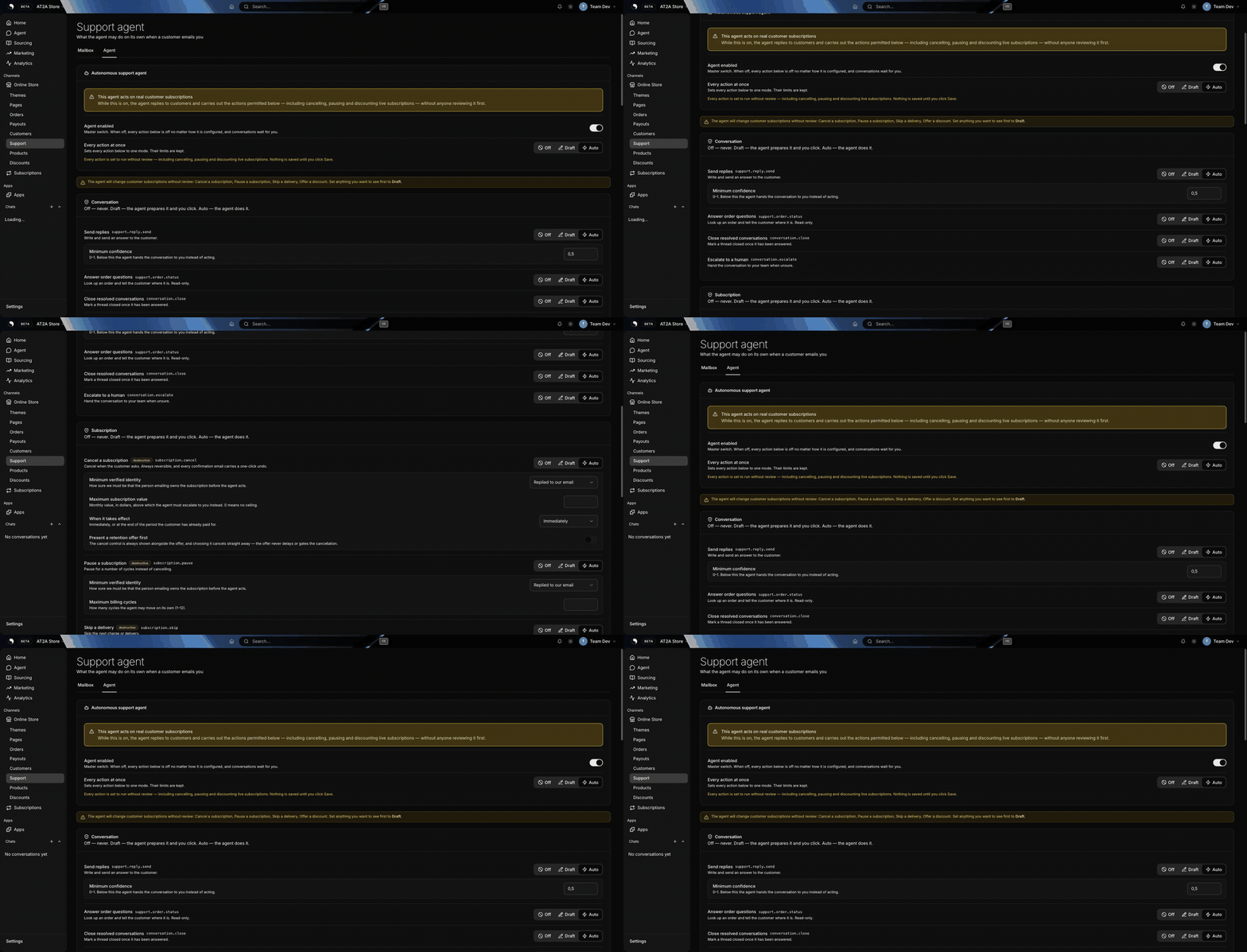
Every action the agent can take is a separate permission with three states, not a switch. Off, draft (it prepares the reply and a human sends it) or auto. Draft is the state most merchants actually want first, and collapsing it into on/off would force a choice between no help and full autonomy.
The catalogue is closed and visible in Support → Settings → Agent: send replies, answer order questions, close a resolved conversation, escalate to a human; and on subscriptions, cancel, pause, skip, resume, offer a discount. Each destructive one carries its own limits — a minimum identity level, a confidence threshold, a cap on discount percentage and duration, a ceiling on the monthly value it may act on.
Refunds are deliberately absent. A refund moves money through a processor and cannot be undone by flipping a column, so it does not share the property that makes an autonomous cancellation defensible. A cancellation here is a status change we own end to end: reversible in seconds, and every confirmation carries a one-click undo.
Nothing is on until you turn it on. Permissions start empty per store, and every subscription action defaults to off.
It refuses to answer what it has no facts for
The hard lesson of building this: a model fabricates when the context is thin, no matter what the prompt says. Told to use only the facts it was given, handed a customer with no orders, and asked whether their order had shipped, it answered that the order had shipped and tracking would update within 24 hours.
That was fixed structurally rather than by rewording the prompt. Before anything is composed, the run checks whether we actually hold the fact the question needs. No order on file for that address, and the question goes to you. An order but no dispatch, no tracking and no carrier scan — having an order is not having a shipping fact — and it goes to you as well, with the reason written on the thread in plain English rather than a blank screen.
Identity is gated separately, and the ladder is ordered on purpose. A From address matching one of your customers is necessary and never sufficient, because From is trivially forged; a reply to mail we sent to that address is genuine evidence of possession; a signed, single-use link the customer clicked is stronger again. Each action states a minimum, and an unreadable requirement resolves to the safe default rather than to no requirement at all.
One more guard sits between the draft and the customer: replies point at your own branded tracking page rather than pasting a raw carrier code back into the thread. A draft that names one is handed to a human with the wording intact, rather than being silently edited — a customer who reads “your tracking number is .” learns that something is wrong with your store, not where their parcel is.
Timing, and the one thing that is never delayed
An automatic reply is held for a short, natural interval inside business hours instead of landing 30 seconds after the customer pressed send. The thread shows the countdown and a Don’t send button for the whole hold, the draft is editable before it goes, and if one of your team answers first the held reply is dropped.
The action is never held. If a customer asked to cancel and the agent is permitted to cancel, the cancellation happens immediately and only the wording waits. A retention-shaped delay on a cancellation request is exactly the conduct subscription regulators have started writing rules about, and it is not a thing we will let a reply cadence introduce by accident.
What the header tells you, and why it changed
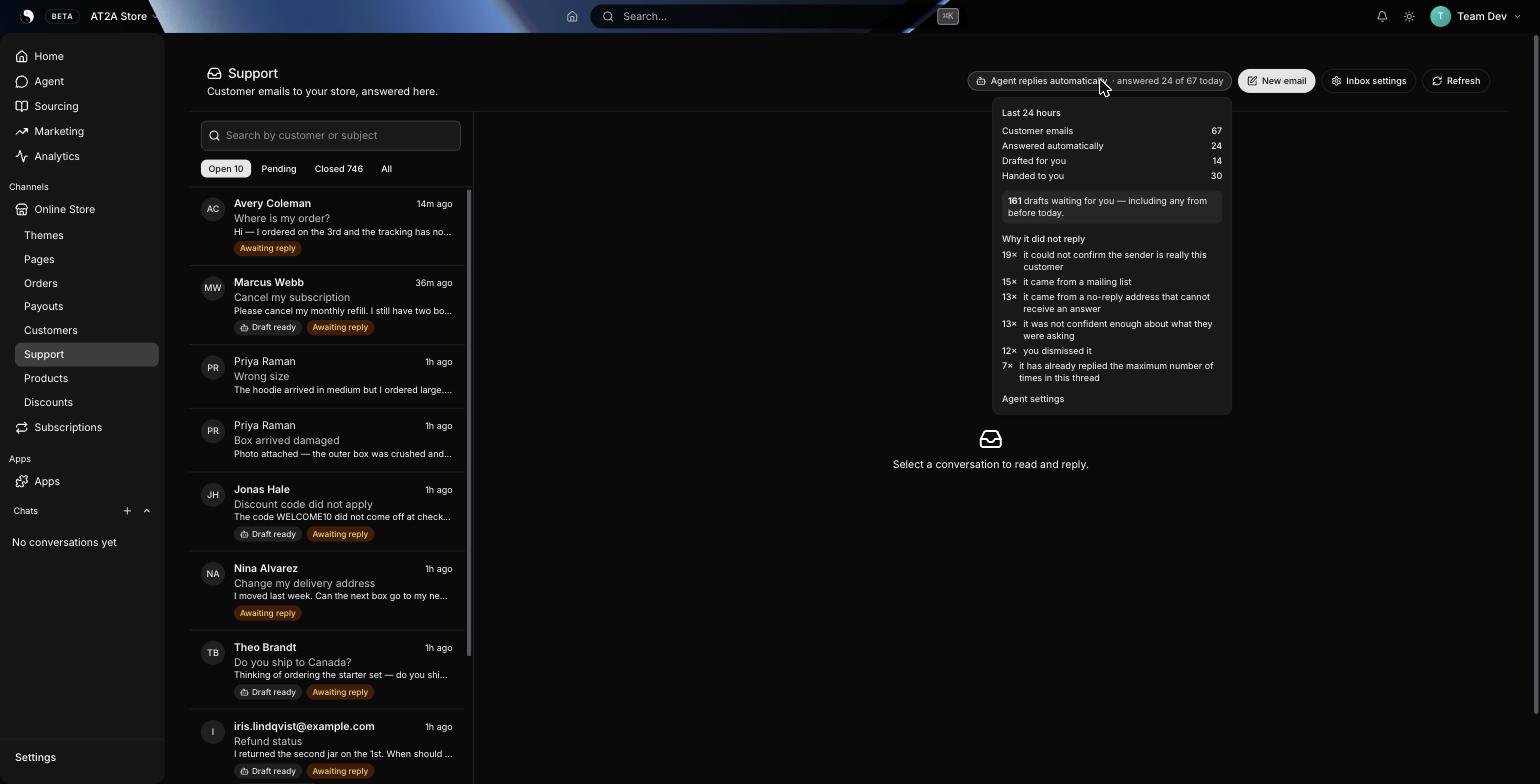
The status chip used to read “Agent replies automatically”. That was true, read straight from the enforced policy, on a day the agent answered two conversations out of nine — the rest had hit a model timeout or a grounding refusal, all of it recorded, none of it visible. Every component was green while the outcome was bad.
It now states the outcome: answered 9 of 18 today, and opens a card with the counts, the standing draft backlog — not windowed, because a draft from last week is still waiting for you — and the ranked reasons it did not reply, in sentences rather than codes. Health checks were added to match: an alert fires when a store with the agent enabled answers none of its eligible mail, and a sweep every fifteen minutes picks up any run that stalled and either replays it or hands it to you, so a customer email cannot be silently dropped by a worker restart.
What it does not do yet
The honest list, as of today. None of it is hypothetical — these are the gaps we know about.
- No CC or BCC on a reply. Inbound CCs are recorded; outbound ones are not built.
- The storefront contact form cannot carry a file. Email attachments work in both directions; the form is text only.
- No assignment, SLA timers or macros beyond saved replies. Assignment exists in the data model with no interface on top of it.
- The classifier’s largest bucket is still “other” — pre-sales questions, billing confusion, general enquiries. Those mostly reach you rather than being answered, and we are not lowering the confidence gate to change that number. Auto-sending replies a classifier admits it does not understand is not an improvement.
- Autonomous subscription cancellation is off, and we are not recommending it. The permission exists, the undo exists, the audit trail exists; the mode stays off until a merchant asks for it with their eyes open.
Where to find it
Support in the dashboard, under Customers. Support → Inbox settings → Mailbox connects the address; the Agent tab beside it holds every permission described above. There is no separate helpdesk to buy, no seat count, and no integration to keep in sync — the inbox reads your mailbox, and the panel beside the thread reads the same orders and subscriptions the rest of the dashboard does.