A shopper taps your Instagram link and buys a lamp. They collect another item at your store, then request a lamp return online later. Your warehouse says the lamp shipped, your payment dashboard shows a charge, and your returns tool says a refund is pending. You're left opening tabs to answer a simple question: what happened to this order?
An ecommerce order management system should make that answer visible without detective work. Its value isn't just moving orders faster. It's keeping stock, payment, delivery promises and returns connected when customers and systems take different paths.
Table of Contents
- Why Every Online Order Needs One Shared Record
- How an Order Moves Through Connected Systems
- Keeping Stock True and Promising Delivery Dates
- Preventing Double Charges and Duplicate Orders
- Handling Returns Without Breaking Inventory and Cash
- Confirm Your Order Flow Before You Choose a System
Why Every Online Order Needs One Shared Record
For the lamp purchase, the storefront records what the shopper bought, the payment provider records the transaction, and the warehouse records the shipment. The store's point of sale handles the collection separately. Without coordination, each team can have an accurate local record but an incomplete view of the customer's experience.
An order management system (OMS) is software that captures orders across channels and coordinates stock, payments, fulfillment and returns. Think of an air traffic controller: orders are planes, stock is runway capacity, fulfillment locations are gates, and payment approval is clearance. The controller needs visibility across all of them, not just confirmation that a plane exists.
Coordination is different from selling everywhere
Multichannel means selling through several channels. Omnichannel means connecting those channels into a coordinated customer and operational experience. That distinction matters when someone buys online but collects or returns goods in a store.
The operational scale is substantial: Transport Intelligence's market report puts the global ecommerce logistics market at €521.9 billion in 2024, representing 13.6% year-over-year growth, according to the report listing.
How an OMS differs from adjacent systems
| System | Main job | Gap it leaves for orders |
|---|---|---|
| Storefront platform | Catalog, cart and checkout | Captures orders but may lack a timeline across channels |
| Point of sale (POS) | In-store sales and tills | Store sales stay invisible to online stock and returns unless linked |
| Warehouse management system (WMS) | Picking, packing and bin control | Usually doesn't coordinate demand across sales channels |
| ERP | Accounting, purchasing and finance | Financial records alone don't provide checkout promise logic |
| Order management system (OMS) | Coordinates orders, stock, payments, fulfillment and returns across channels | Requires reliable integrations with adjacent systems |
Those boundaries aren't universal. Some platforms combine several jobs, so evaluate actual workflows rather than product labels.
Consistent identifiers matter, too. The explanation of data cleaning at Used Mobiles 4 U offers useful context for preparing records before connecting systems. An OMS can't reliably coordinate a lamp listed under incompatible product identifiers.
How an Order Moves Through Connected Systems
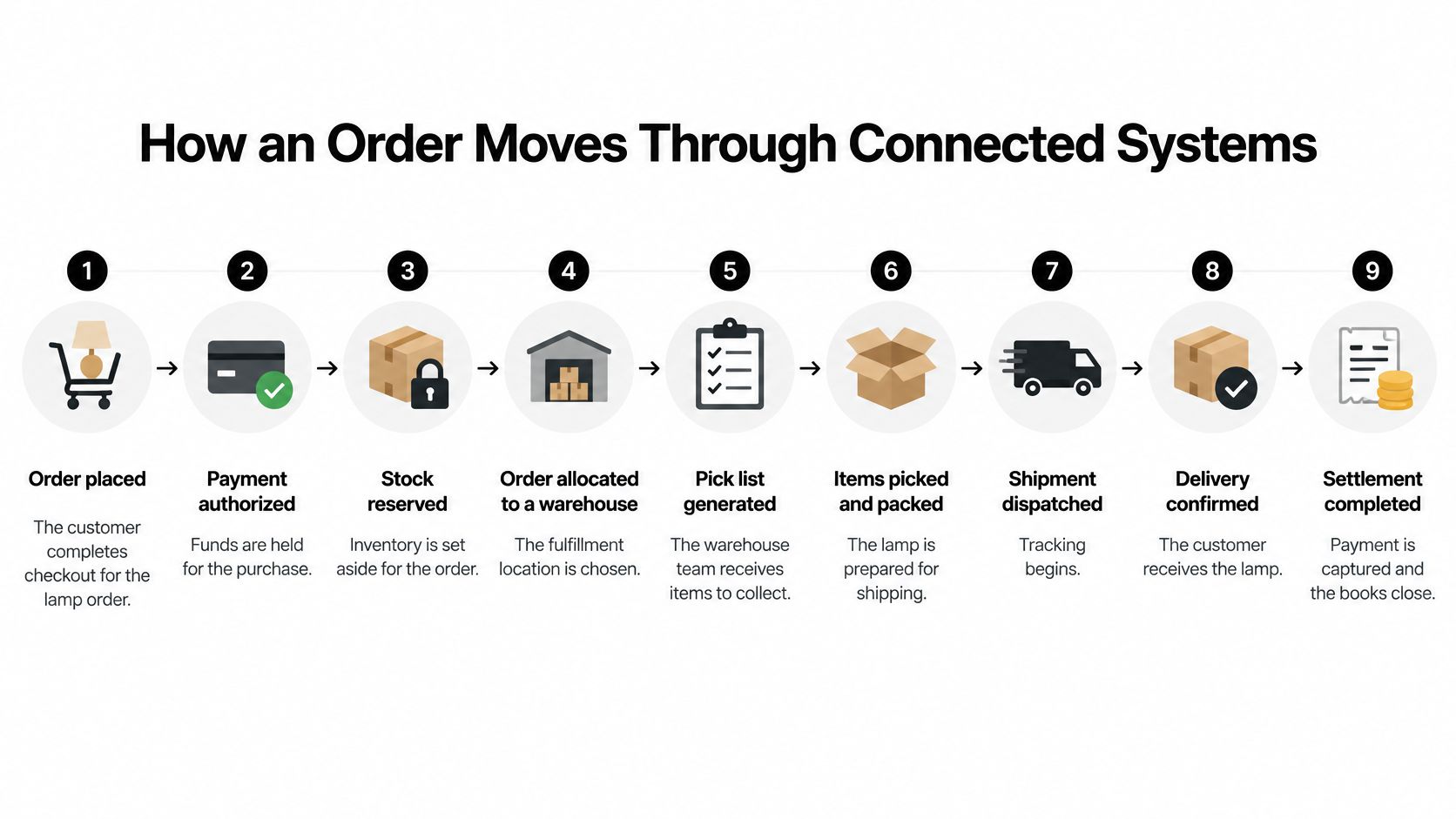
Follow the lamp from checkout. The shopper submits an order, but that doesn't mean the warehouse should immediately pack it. The OMS first needs enough information to confirm that the purchase is valid, payment is approved, and stock can be committed.
This flow illustrates the forward journey, including the warehouse work between allocation and dispatch.
Read the order as an event history
An order isn't a row that changes from new to complete. It's a record of events. Each event should identify what happened, when it happened, which order lines it affected, and which connected systems received the update.
Order events and the systems each one updates
| Order event | What the system records or does | Systems it updates |
|---|---|---|
| Order placed | Creates an order with lines, customer and channel tag | Storefront, CRM, analytics |
| Payment authorized | Requests a funds hold and links the payment ID to the order | Payment provider, order ledger |
| Stock reserved | Sets aside units against the order | Inventory ledger, storefront stock display |
| Order allocated | Picks the fulfillment node: warehouse, store or supplier | Warehouse system, store POS, supplier feed |
| Shipment confirmed | Records carrier and tracking; consumes the corresponding reservation | Carrier integration, inventory ledger, customer notifications |
| Delivered | Records fulfillment completion and applies the return-window policy | Customer service, reporting |
| Return requested | Opens a return linked to the original order lines | Returns portal, inventory workflow |
| Refund issued | Records a reversal against the original payment method where applicable | Payment provider, accounting |
| Settlement | Matches payouts to transactions, refunds and fees | Finance, bank reconciliation |
The table is a lifecycle map, not a requirement that every event happens in that exact order. Settlement can happen before a customer requests a return. A later refund then creates another financial event to reconcile.
At order placed, the OMS needs line-level detail, not just a total. If the customer keeps the collected item but returns the lamp, staff must distinguish those outcomes without cancelling the whole purchase.
At order allocated, the system assigns responsibility for fulfillment. A warehouse needs a pick instruction; a store needs a collection or shipping task; a supplier needs an accepted order message. Recording an allocation without confirming that the receiving system accepted it leaves work unassigned.
Different entry points, consistent records
Website checkout, POS sales, B2B draft orders and subscription renewals should create compatible order records with a channel tag. A renewal also needs its subscription reference, while a wholesale order may need an invoice reference. Consistency doesn't mean stripping away those differences.
For a channel-specific example, Carbon 6 Brewing's explanation of DTC ecommerce for craft breweries provides context for thinking through direct sales. The practical task is to identify where each purchase enters your operation and who must act next.
This video provides another way to visualize connected order handling.
Missing events reveal operational leaks. A shipped lamp whose reservation remains open can leave stock unnecessarily blocked. A refund without its original payment reference leaves finance unable to explain the reversal confidently.
Practical rule: One order, one timeline, with every operational and financial event traceable within it.
Keeping Stock True and Promising Delivery Dates
Suppose a store's system shows lamps available, but the shelf is empty. Checkout accepts another purchase and promises shipment. Staff discover the discrepancy only when they try to pick the order, after the customer has already received confirmation.
That's phantom stock: inventory that exists in software but can't be fulfilled. McKinsey's omnichannel delivery analysis reports that store inventory accuracy commonly ranges from 70% to 90%, while distribution centers typically exceed 99.5%. Store-based fulfillment therefore needs controls that address uncertainty, not just a connection to the store's stock feed.
Separate physical stock from sellable stock
A quantity on a shelf isn't necessarily available to the next shopper. It might be committed to another order, held for an exchange, damaged, or awaiting inspection.
Track inventory by SKU, location and state. The states below describe different operational facts; they aren't quantities you should blindly add together.
Inventory states in an order management system
| Stock state | What it means | Changed by |
|---|---|---|
| On-hand | Physical units present at a location | Receiving and cycle counts |
| Reserved | Units held for a cart or a pending payment | Checkout and reservation-expiry rules |
| Allocated | Units assigned to a fulfillment node | Routing rules |
| Picked | Units pulled from shelf or bin for an order | Warehouse scan |
| Shipped | Units that have left the location | Carrier handoff |
| Returned | Units received back, not yet sellable | Returns receiving and inspection |
Available-to-promise means the quantity you can responsibly offer, not the entire physical count. Calculate it using eligible stock, existing commitments, safety buffers and stock-condition rules. Avoid subtracting the same commitment again merely because it moved from reserved to allocated.
Reservations must also be atomic: competing checkouts shouldn't both claim the same remaining item. Give temporary holds an expiry rule, and release them when payment fails or the customer abandons the purchase.
Store sales need to participate in that process. Understanding POS integration helps operators identify how counter transactions, inventory changes and online orders should stay synchronized. A nightly spreadsheet won't protect an online promise made while store staff are selling the same stock.
Route against the promise, not just distance
The closest location isn't automatically the best choice. It may have missed its dispatch cutoff, lack packing capacity, or hold inventory with low count confidence.
Routing should evaluate:
- Sellable availability: Exclude damaged units, active commitments and protected stock.
- Dispatch readiness: Check picking capacity and fulfillment cutoffs.
- Delivery feasibility: Compare destination, carrier service and expected transit time.
- Cost and risk: Weigh shipping expense against the likelihood of fulfillment failure.
Prefer a location that can fulfill the promised service. Split an order when necessary, but account for extra shipping costs and explain separate arrivals to the customer.
Dropshipping needs the same discipline. When a customer orders from the store, the store automatically sends the order to the dropshipping supplier, which prepares it and ships it directly to the customer. Supplier stock updates, order acceptance and dispatch timing must therefore feed the promise calculation.
Make uncertainty visible before checkout
A delivery estimate combines inventory confidence, preparation time, dispatch cutoff and transport expectations. If supplier confirmation is pending or carrier capacity is uncertain, show a defensible date range rather than an exact date you can't support.
The consequences reach checkout: DHL's U.S. shopper findings indicate that 68% abandon purchases when products are out of stock or unavailable, while 66% abandon when delivery offerings fail expectations.
Record carrier delays, address changes, failed payments, split shipments and customer-selected lockers against the affected shipment. Preserve the original promise alongside revisions so staff can explain what changed.
A delivery promise is only useful if the operation can still fulfill it after other customers buy, stores sell and returns arrive.
Monitor inventory-adjustment frequency, reservation leakage, cancellation-after-confirmation rate and order-line fill rate by node. Together, these measures reveal whether incorrect counts, stuck holds or routing decisions are causing broken promises.
Preventing Double Charges and Duplicate Orders
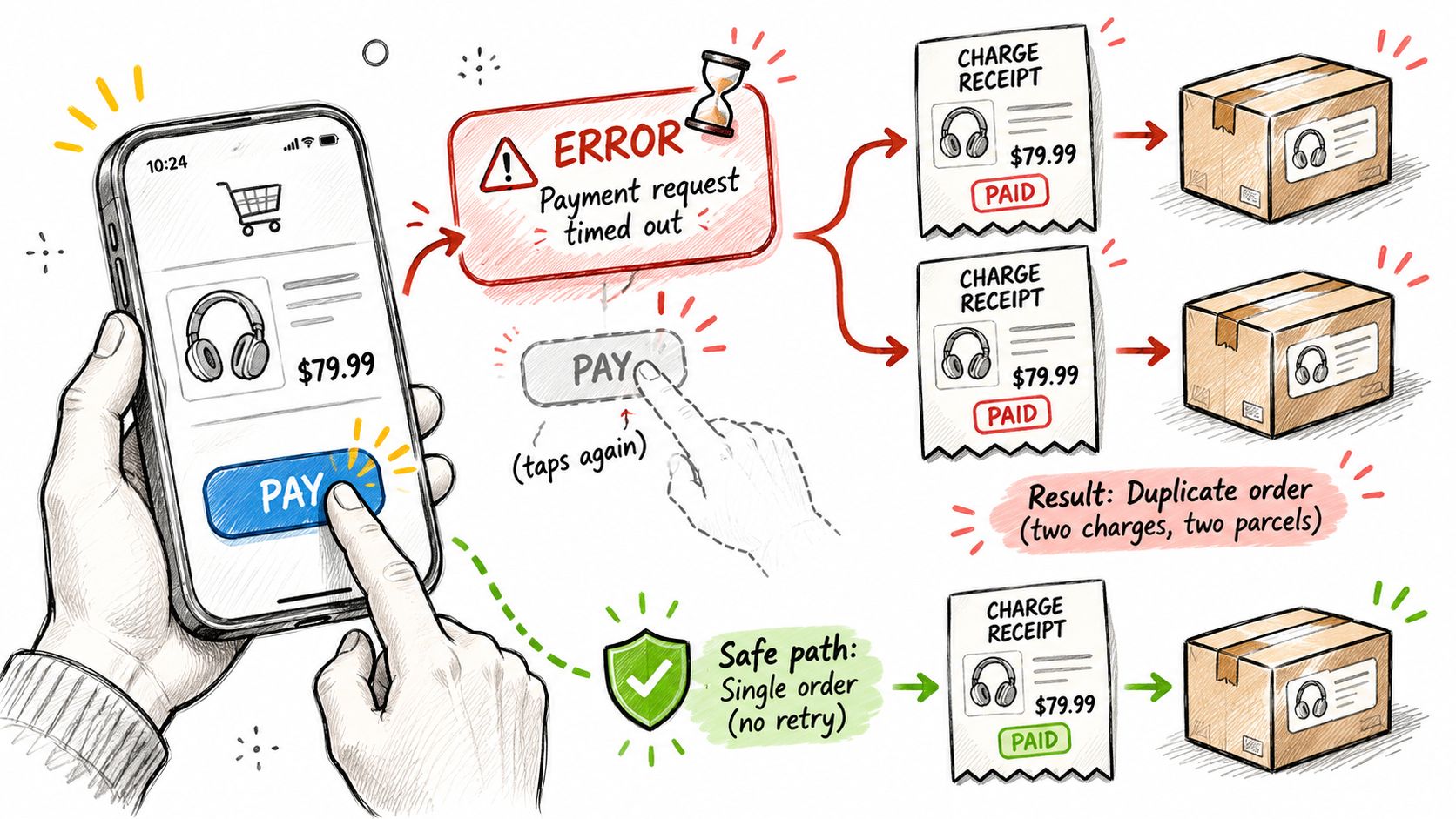
A shopper taps Pay. The connection times out, the screen shows an error, and they tap again. The first request may already have succeeded, even though the browser never received confirmation.
Without safeguards, that retry can create another charge or another fulfillment task. A timeout means the outcome is unknown, not necessarily that the operation failed.
Give each operation a durable ticket
Think of a coat-check ticket. Presenting the same ticket again shouldn't produce another coat. An idempotency key gives a business operation a comparable identity.
Stripe's engineering guidance recommends generating a unique idempotency key before making a payment request. Apply that principle separately to checkout submission, subscription renewal, capture, refund and shipment confirmation.
The receiving API should store:
- The key: The identity of this specific operation.
- A request fingerprint: Enough information to detect changed instructions.
- Processing status: Whether work is pending, successful or failed.
- The response: The durable result to return on an identical retry.
Reusing the key with the same request returns the original result. Reusing it with conflicting details should fail rather than perform a different action.
Protect the entire chain
Idempotency at checkout isn't enough. Payment webhooks can replay, and message queues can redeliver events. Warehouse and accounting consumers must deduplicate messages using stable operation or event identifiers.
A sound ecommerce API integration also distinguishes authorization, capture, fulfillment release, refund and settlement. Authorization approves a funds hold; capture submits the charge for processing; settlement concerns the resulting financial transfer. None alone proves that the lamp shipped.
For a subscription renewal, retain the renewal operation's key when retrying after a bank timeout. A new billing attempt following a confirmed failure needs explicit handling, not an accidental duplicate of an unresolved request.
Run reconciliation daily to compare payment-provider transactions with the internal order ledger. Flag unmatched captures, missing orders, unexplained refunds and unexpected amounts for investigation.
Track duplicate-mutation rejection rate, webhook replay safety, payment-to-order reconciliation variance and time to resolve unmatched transactions. Test replay safety deliberately; a quiet error dashboard doesn't prove retries are safe.
Handling Returns Without Breaking Inventory and Cash
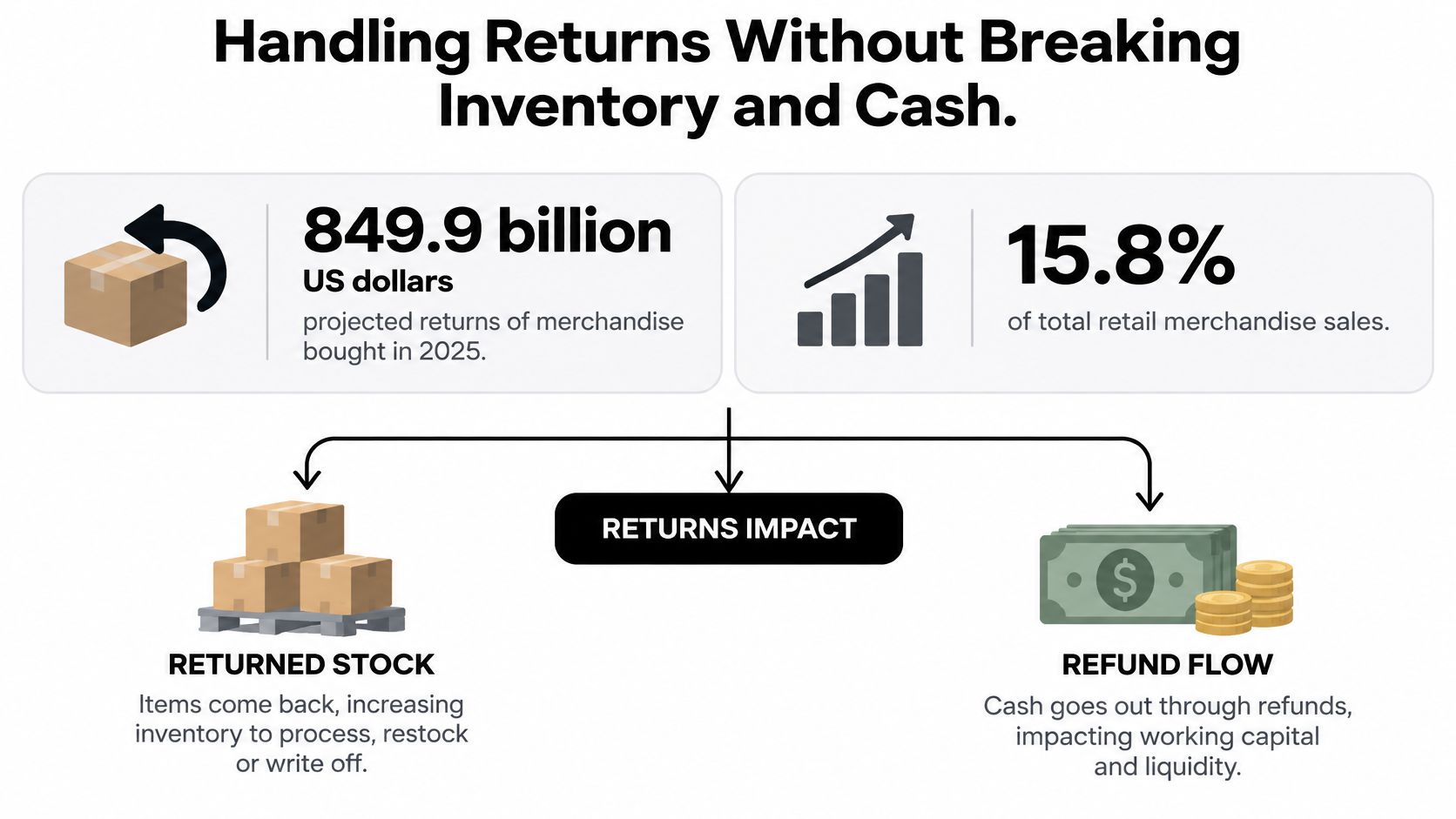
The National Retail Federation projected that U.S. consumers would return approximately $849.9 billion of merchandise purchased in 2025, representing 15.8% of total retail merchandise sales, as reported by Digital Commerce 360. Returns aren't an occasional customer-service exception. They're an inventory and cash workflow.
A return may begin online, at a store counter or through a carrier. Wherever it starts, link it to the original order lines, shipment, customer and payment before staff decide how to resolve it.
The scale makes the inventory and financial effects inseparable.
Track item condition separately from refund progress
The returned lamp isn't sellable merely because a carrier delivered it to the warehouse. Someone must confirm the correct item arrived, inspect it and assign a disposition.
Return statuses and their inventory and money effects
| Return status | Inventory effect | Money effect |
|---|---|---|
| Requested | No stock increase; reserve replacement stock if an exchange is chosen | No refund yet under a receipt-based policy |
| In transit | Not sellable yet | Refund held until receipt under that policy |
| Received | Logged at the node; not sellable | Refund may release under merchant policy |
| Inspected | Graded as sellable, damaged or for disposal | Supports the refund or partial-credit decision |
| Restocked | Added back to sellable inventory | Approved refund finalized if not already issued |
| Discounted | Made available as open-box or outlet stock | Lower expected recovery than full-price resale |
| Liquidated | Transferred for bulk resale | Recovery recorded at the agreed liquidation value |
| Written off | Removed from inventory value | Loss recorded in accounts |
These are possible statuses and outcomes, not a mandatory sequence. A restocked lamp doesn't subsequently need to be liquidated. Nor should the refund amount automatically equal the item's resale value: customer entitlement and inventory recovery are separate decisions.
An exchange creates linked work. Reserve the replacement, record any price difference, and keep the incoming item's inspection independent from the outgoing shipment.
Optimize recovery, not just the return rate
Reducing returns isn't always the best objective. A transparent policy can help shoppers buy confidently, while slow inspection can leave recoverable stock sitting unavailable. The Returns in 2026 report emphasizes return-processing time and return-to-stock performance as operational priorities.
Measure what happens after the parcel arrives, not just how many customers send parcels back.
Subscription returns need a specific renewal reference. Returning a delivery shouldn't cancel future renewals, and cancelling a subscription shouldn't automatically refund goods already supplied.
For POS-originated returns, record where staff accepted the item and where it will be inspected. Don't assume that accepting an online return at a counter makes it immediately available for another store sale.
Give inspection staff clear grading criteria, a named owner for exceptions and a dedicated queue. Connect that work to the order fulfillment process so approved stock becomes available without another manual handoff.
Review return volume, return-to-stock rate, return processing time and recovery value together. Faster refunds alone won't reveal whether usable products remain stranded in the returns area.
Confirm Your Order Flow Before You Choose a System
Evaluate a system with real order paths, not just a feature checklist. Include awkward cases: partial collection, a delayed supplier shipment, a subscription return and a payment timeout.
Product details deserve testing too. Gradshop's cap and gown sizing tips offer a useful reminder that correct variant selection begins before checkout. Confirm that size and other variant attributes survive import, picking and exchange.
Run an operational acceptance check
- Map entry points: List storefront, marketplace, POS, B2B, subscriptions and social links. Confirm each preserves its channel tag.
- Check fulfillment locations: Compare a shelf or bin's physical count with the system, then inspect discrepancies.
- Trace a return: Follow request, receipt, inspection, restock and refund. Time the inspection queue.
- Replay a payment: In staging, submit an identical operation again and verify that it creates only the intended charge and fulfillment task.
- Inspect controls: Require timestamps, actor identities, scoped permissions and approval gates for sensitive automated actions.
- Verify migration: Check catalog imports and run the replacement stack in parallel before cutover.
At PlatformDTC, we consolidate storefront, checkout, subscriptions, payments, inventory, fulfillment and POS within a single system. Checkout, support, fraud protection, ads, loyalty and a supplier network are included; our AI agent can perform dashboard actions, but actions that spend money or message customers wait for merchant approval.
Start this week with the staging payment-retry test. Keep the request, response, payment record and fulfillment task together as evidence that the operation ran only as intended.
PlatformDTC brings commerce operations onto a shared order model, with governed agent actions and merchant approval for spending or customer messages. Visit PlatformDTC to evaluate your checkout, stock, fulfillment and returns workflows against the connected order flow your team needs.