You've got designs ready, a supplier's price list open, and people asking when they can buy. Then you price the packaging, check postage, and realize a returned shirt could wipe out the profit from an otherwise successful order.
To sell merchandise online profitably, start with what you keep, not what you collect. Rank each decision by contribution margin after refunds, shipping, returns, fees, and acquisition costs. A good launch isn't one that sells out. It's one you can afford to repeat.
Table of Contents
- Choose a Merchandise Model Before You Build
- Plan Returns and Shipping Costs Before You Price
- How to Set Up Your Store in Six Steps
- Payments, Taxes and Payouts to Set Up
- Promote Merch Without Burning Your Budget
- Confirm Your First Sales Before You Scale
Choose a Merchandise Model Before You Build
Buying inventory means paying before you know which designs customers want. Dropshipping reverses that cash sequence: you don't pay for products until they've sold. When a customer orders, the store automatically sends the order to the supplier, which prepares the package and ships it directly to the customer.
That difference matters more than how quickly you can publish a storefront. Unsold inventory ties up cash; supplier fulfillment reduces that exposure but gives you less control over the experience.
Merchandise selling models compared
| Model | Upfront cost | Who holds stock | Margin pressure | Control over product and delivery |
|---|---|---|---|---|
| Own inventory | High, pay for stock upfront | You or a third-party warehouse | Lowest unit cost at volume, but unsold stock costs money | Direct control over quality checks and dispatch |
| Print-on-demand | Low, pay per order | Supplier holds blanks and makes finished goods after purchase | Lower margin per item | Supplier controls production quality and dispatch timing |
| Dropshipping | Low, pay after the sale | Supplier | Thin margins, set partly by supplier pricing | Low control over packing and delivery |
| Marketplace only | Low to moderate, plus platform fees | Marketplace or seller | Fees reduce margin | Platform rules constrain selling and access to customer data |
Marketplace-only selling is a channel choice, not a manufacturing method. You can combine it with owned inventory or supplier fulfillment, so don't mistake marketplace convenience for a complete operating model.
Match the model to the uncertainty
Print-on-demand suits a broad design range with uncertain demand because you aren't committing to finished stock. Own inventory becomes more attractive when a bestseller has dependable demand and a bulk purchase improves the economics after storage, packing, and potential markdowns.
Order samples before choosing either supplier-led model. Inspect print alignment, fabric feel, packaging, tracking messages, and the condition after washing. A cheap supplier price isn't useful if you have to fund replacements.
The channel is substantial: the U.S. Census Bureau estimated that e-commerce represented 16.4% of U.S. retail sales in 2025. Build for recurring orders, not just a launch-day rush.
Cash-risk test: Choose a model you could keep operating through a month without sales.
I'd start with a short design list and write down every cost that arrives before the customer pays. If that commitment makes you uncomfortable, reduce inventory exposure before spending time on the storefront.
Plan Returns and Shipping Costs Before You Price
Use a returns provision before treating gross sales as spendable cash. The National Retail Federation estimated that 16.9% of retailers' 2024 annual sales would be returned. Applied as a planning scenario to $1,000,000 in annual online sales, that produces $169,000 in merchandise value potentially subject to returns, before shipping, inspection, markdowns, or replacements.
Return provision at the NRF 2024 rate of 16.9%
| Annual online sales | Return provision at 16.9% |
|---|---|
| $1,000,000 | $169,000 |
This is a starting provision, not a prediction for your particular catalog or a claim that all returned merchandise becomes a loss. Replace it with your own product-level evidence as orders mature.
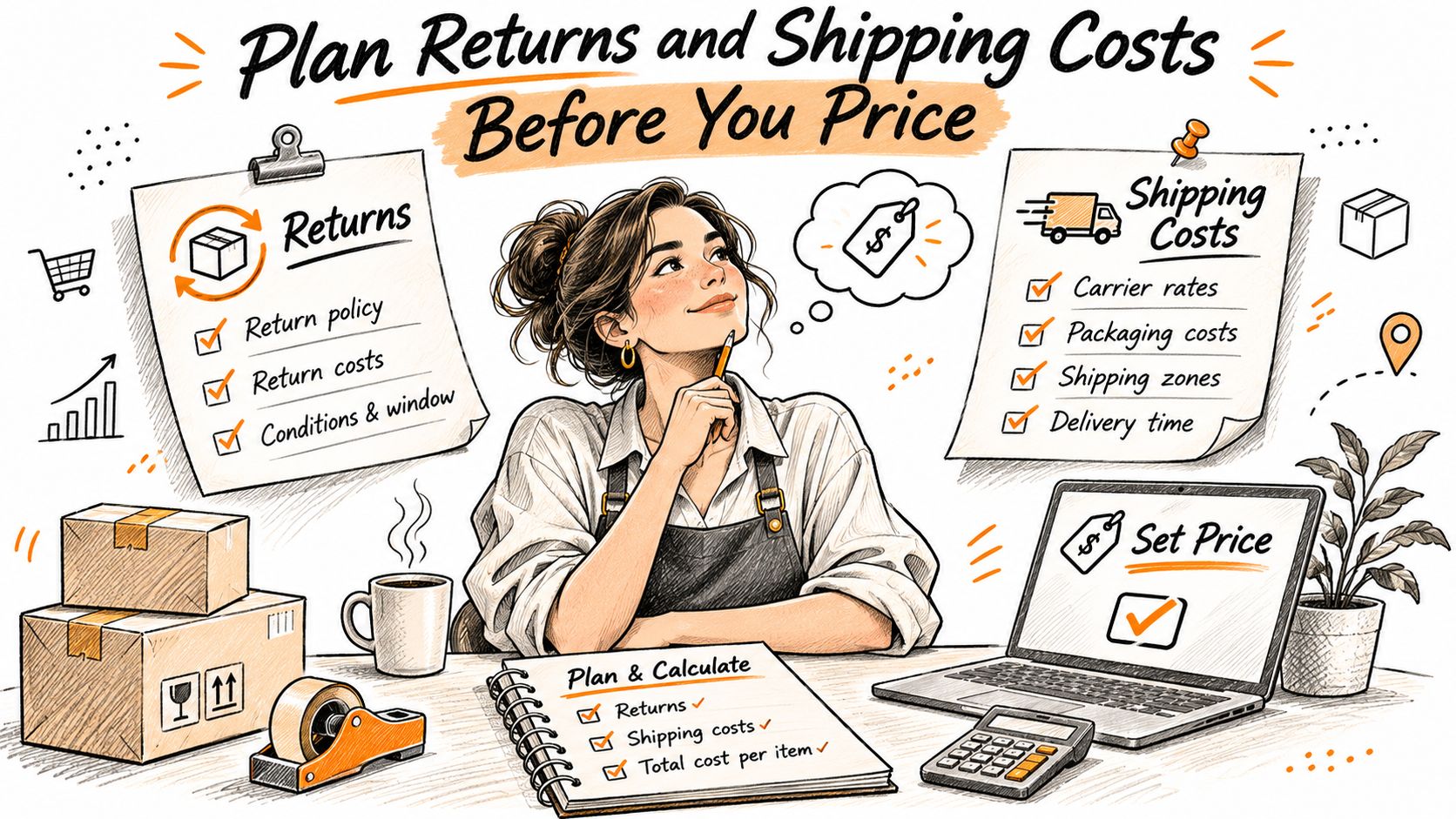
Build the shipping and returns worksheet before setting retail prices.
Separate refund exposure from handling costs
Classify products by fit sensitivity, condition on return, and resale potential. Fitted apparel needs different controls from an accessory without sizing, and a printed tee shouldn't automatically be treated as low risk merely because it's inexpensive.
Publish eligibility, deadlines, fees, exchange rules, and refund timing on the product page. Brand owners may exclude accessed digital goods, personalized products, perishables, fully rendered services, and final-sale items when clearly disclosed at purchase, subject to applicable consumer law.
Route received items into sellable, refurbishable, liquidation, or loss. Tie each return authorization to its original order, then update stock after inspection rather than immediately when a refund is requested. Build that routing into your order fulfillment process.
Use the video alongside your written workflow when reviewing the operational steps.
Price the destination, not just the product
Compare actual packed dimensions and weights rather than advertised postage starting prices. Sendaparcel lets you get delivery quotes without subscription plans, which is useful when evaluating shipping costs before committing to a service.
For international orders, calculate product cost, packaging, outbound freight, duties, taxes, and a usable return route. Show who pays import charges before payment.
Contribution margin should deduct refunds and variable costs from revenue, including outbound and return shipping, processing, fraud losses, and acquisition. Credit recovered inventory appropriately so you don't count its full cost as a permanent loss. Keep a destination open only when its economics justify the service promise.
How to Set Up Your Store in Six Steps
Build the smallest storefront that can answer a buyer's questions, accept payment, and produce a fulfillable order. Extra apps and elaborate navigation won't rescue an unclear size chart or a payment error.
In Baymard's benchmark of 344 leading U.S. and European e-commerce sites, 65% had mediocre-or-worse checkout usability. Treat checkout as an operating system to test, not a design task to finish.
Build the buying path
-
Define the range. Start with a deliberately narrow assortment and record each design, size, color, supplier cost, and intended selling price in a spreadsheet. Give every variant a unique SKU so a size exchange doesn't become a manual guessing exercise.
-
Build the essential pages. Create a home page, collection page, product page, cart, and checkout, then apply your logo and brand colors. Keep navigation focused on buying and answering questions rather than filling the site with empty categories.
-
Make product pages useful. Include photographs showing scale, garment measurements, materials, care instructions, and realistic dispatch expectations. Distinguish production time from transit time so a made-to-order item doesn't appear ready to ship.
-
Configure destination rules. Define supported shipping zones, unavailable destinations, package sizes, and delivery services. Test a proposed free-shipping threshold against heavy baskets, remote addresses, and discounted orders, not just the cheapest shipment.
-
Connect payments and test the complete order. Place live test orders from a phone and desktop, then verify the receipt, stock adjustment, fulfillment record, and refund process. Check failed payments and address corrections too, because a successful payment alone doesn't prove the workflow works.
-
Launch to a controlled audience. Invite existing followers or subscribers before broad promotion, and capture checkout starts, validation errors, payment authorizations, and completions. Segment failures by device, destination, and payment method so you can reproduce the problem.
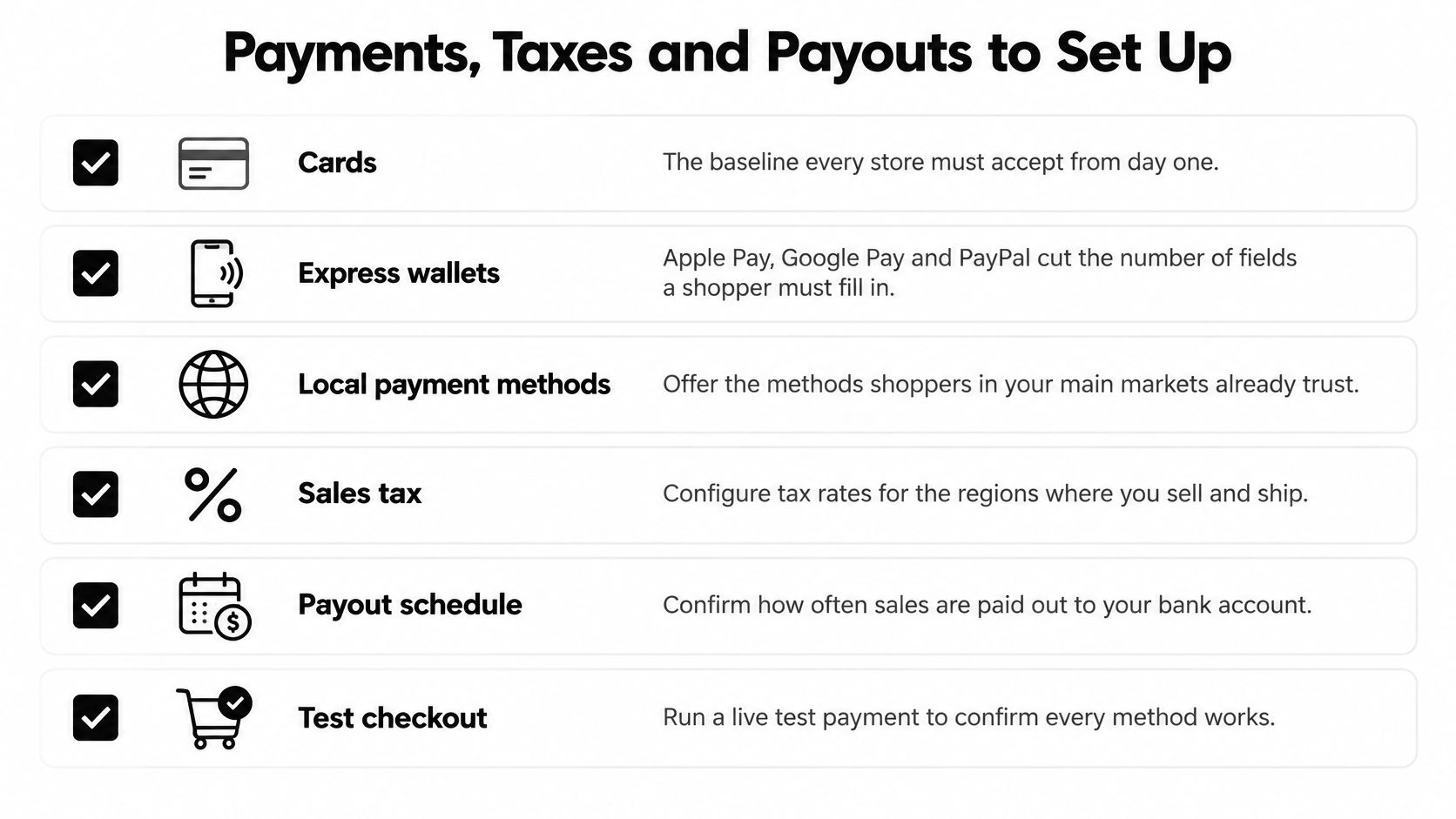
Use this checklist while configuring payment settings.
Fix friction without hiding costs
Show shipping charges, applicable taxes, delivery expectations, and return terms before payment. Offer guest checkout, address autocomplete, and an alternative payment method when authorization fails.
Don't spend the entire optimization budget polishing the cart while leaving address validation or payment recovery untouched. Reproduce the failing journey, change a specific source of friction, and check whether the improvement produces profitable completed orders rather than merely more checkout attempts.
A checkout change is useful when customers can complete the right order, not when they reach the payment screen faster.
Keep support messages attached to the relevant order. A repeated question about fit or delivery is a product-page improvement waiting to happen.
Payments, Taxes and Payouts to Set Up
Cards provide a familiar payment route, while express wallets reduce manual entry. Offer methods your customers recognize, but don't enable options without understanding their fees, settlement timing, refund behavior, and dispute process.
There's a trade-off between checkout convenience and operational complexity. Every method needs a tested reconciliation path, not just a working button.
Know what the bank deposit represents
A payout isn't the same as revenue. It may combine sales from different dates, subtract processing charges, and include refunds, disputes, or adjustments relating to earlier orders.
Reconcile payouts weekly against order records. Keep separate columns for gross sales, discounts, customer refunds, payment fees, dispute losses, and the amount deposited, with order identifiers wherever possible.
Reconciliation rule: If you can't explain a deposit, don't use it to judge whether a design is profitable.
Keep tax collections separate from merchandise revenue in your reporting. Otherwise, money owed to a tax authority can look like available operating cash.
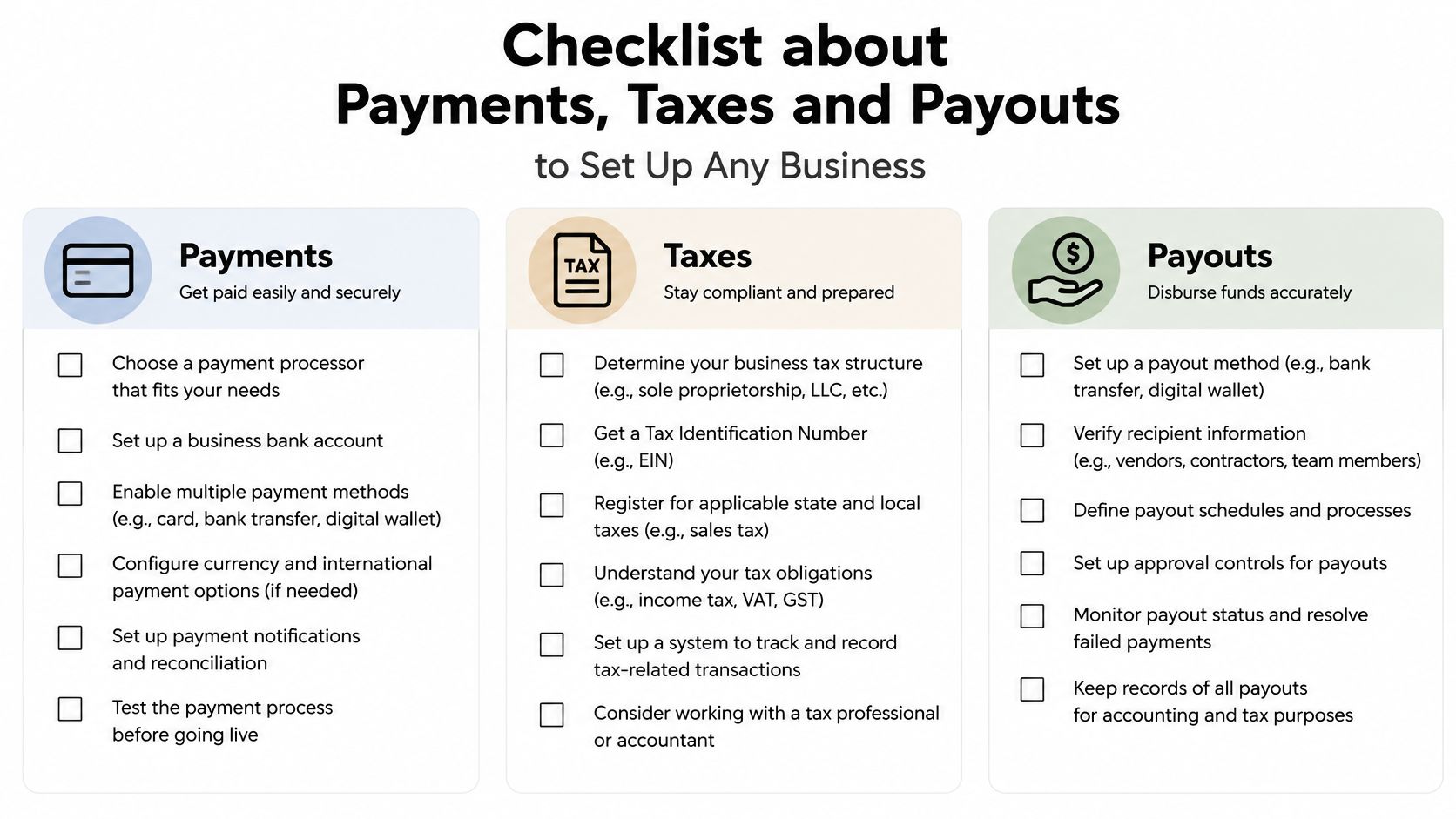
Build a tax and payout checklist
Selling into another jurisdiction can create obligations beyond configuring a checkout rate. Marketplace activity can also affect sales-tax exposure, so review combined channel sales rather than assuming each storefront stands alone. The ConnectBooks e-commerce overview highlights economic-nexus exposure as an operational consideration for expanding sellers.
Use Chicago Brandstarters' guide to navigating taxes on online store sales as an orientation, then confirm current requirements with the relevant tax authority or adviser.
- Banking: Use a business account and confirm the settlement currency and payout schedule.
- Registration: Record applicable tax registrations and the jurisdictions you need to monitor.
- Documentation: Retain invoices, refund records, fee statements, and payout reports.
- Ownership: Assign someone to review tax exposure monthly and resolve unmatched transactions.
For qualifying U.S. merchants, Stripe issues Form 1099-K on our behalf when IRS thresholds are met. Merchants must provide W-9 information for U.S. businesses or W-8 information for non-U.S. businesses when prompted. A reporting form doesn't replace your bookkeeping or determine every tax obligation.
Keep the operating checklist accessible to whoever manages finance.
Promote Merch Without Burning Your Budget
Start with people who already know why your brand exists. An existing audience gives you a practical place to test the offer without immediately paying to explain the brand to strangers.
Show the merchandise being worn or used, not only floating on a mockup. Explain the fit, material, intended use, and reason for the design, then make the purchase path obvious. Use e-commerce email marketing to separate interested browsers, buyers, and customers who shouldn't receive another acquisition message.
Let product evidence decide the next run
Say a shirt brand launches a small collection to its subscribers. Most purchases concentrate on a handful of designs, while another design attracts attention but generates fit complaints and refunds.
The next production decision shouldn't follow likes or even gross sales. Reorder designs with healthy post-return contribution, repair the fit problem before buying more stock, and stop promoting products that require discounts to move.
That's also how to choose paid-ad candidates. Give Meta or Google a design that has already demonstrated a workable offer, then set a fixed budget and compare acquisition cost with contribution before advertising.
Return on ad spend isn't profit. It doesn't, by itself, tell you what remained after product costs, fulfillment, refunds, and payment charges.
Choose promotions with a clear cost limit
- Paid creative: Test different product demonstrations or messages without changing the offer simultaneously. Stop when the test reaches its spending limit, even if the platform recommends more budget.
- Creator partnerships: Agree on commission, attribution, usage rights, and treatment of refunded orders. Samples, production fees, and licensing can still create upfront costs.
- Event promotion: Treat physical merchandise as an acquisition expense when it's given away. Custom Mark's examples of low cost trade show giveaways can help with format selection, but shipping and distribution belong in the campaign budget too.
- Limited drops: Confirm channel inventory synchronization before announcing scarcity. Reserve stock for replacements so an exchange doesn't require canceling another customer's order.
Track add-to-cart behavior, checkout completion, refund reasons, and later purchases by acquisition source. A design that sells once can still be commercially useful, especially for an event, but don't forecast ongoing replenishment from launch excitement alone.
Buy more traffic only when you understand what remains from the traffic you've already bought.
Confirm Your First Sales Before You Scale
I'd run a 30-day test as a bounded operating experiment, not as a promise that a month proves long-term demand. For this proposed test, choose a single fulfillment model, a tightly capped design range, and a primary sales channel.
Write down the spending ceiling before launch. Include samples, creative production, packaging, and promotional costs, not just advertising. Decide in advance what evidence would justify another production run.
Run the test in stages
- Opening week: Complete the catalog and operating checks, assign ownership for support, and make sure each order can move from payment to dispatch without improvised spreadsheet handoffs.
- Audience launch: Release the offer to people who already know the brand. Record customer questions and distinguish lack of interest from technical failure.
- Controlled acquisition: Add a paid or creator campaign with a hard spending cap. Keep campaign identifiers attached to orders so acquisition costs can be assigned to the designs that generated them.
- Closing review: Calculate contribution by design and channel. Separate completed returns from orders still inside their return window, and keep a provision against unresolved exposure.
The calendar is a review deadline, not permission to ignore late returns. If delivery or return windows extend beyond the test, label the margin provisional and revisit it when those orders mature.
Make an explicit keep, fix, or stop decision
Keep designs that produce positive contribution with repeatable fulfillment. Fix products with identifiable sizing, photography, specification, or supplier problems, then retest before ordering.
Stop designs that can't clear their variable costs at a credible selling price. Don't assume a larger advertising budget will repair a product-level loss.
The go decision requires a profitable design and enough cash to cover expected refunds and outstanding obligations. If nothing qualifies, revise pricing, assortment, or fulfillment before expanding channels.
PlatformDTC buy links work without a full store, so you can begin this test through social media or chat. Each product gets a shareable checkout link that lets shoppers pay and sends you the order.
Signing up, building a store, and publishing it on PlatformDTC cost nothing; you pay only when you make a sale. Visit PlatformDTC to publish your first merchandise offer, connect checkout, and test demand before committing to a larger inventory purchase.