In 2025, half of U.S. online adults had canceled a subscription during the previous 12 months, and 41% said subscriptions were too difficult to cancel, according to Forrester's 2025 analysis of U.S. subscription shoppers. That frustration is global: in 2024, 40% of consumers worldwide had already unsubscribed or planned to unsubscribe from recurring services within the following 12 months, per the Adyen Index Digital Report.
Most commerce teams react to those numbers by adding exit-intent coupons or hiding the cancel button deeper in account settings. That approach misunderstands how to manage subscriptions without losing long-term revenue. A durable recurring program treats every subscriber state as a separate operational task rather than tossing active renewals, paused plans, declined cards, and deliberate exits into one monthly churn bucket.
Frictionless cancellation and failed-payment recovery aren't rival initiatives pulling in opposite directions. They're two parts of the same retention system. When you configure subscriber records cleanly at signup, recover declined payments with precision, and honor every pause or exit without roadblocks, you protect active revenue and earn the trust that brings former buyers back.
Table of Contents
- Set Up Each Subscription Plan Correctly
- Subscription Statuses and the Action for Each
- Recover Failed Payments Before Customers Leave
- Handle Pauses, Skips and Cancellations Cleanly
- Keep Compliance Proof for Every Change
- Audit Subscriptions and Fix One Retention Metric
Set Up Each Subscription Plan Correctly
Almost every billing dispute, accidental renewal, or messy chargeback traces back to an incomplete subscriber record created at checkout. In the UK government's consultation response on the new subscription contracts regime, research cited roughly 5.8% of active subscriptions as unwanted, equal to an estimated 9.7 million contracts, while EU consumer-protection guidance reported that 69% of surveyed consumers ran into technical difficulty cancelling online contracts. The UK's Digital Markets, Competition and Consumers Act (DMCCA) framework requires clear pre-sign-up information, renewal reminders in specified circumstances, online exit wherever enrollment occurred online, and a cooling-off period after certain renewals, alongside the EU's 14-day withdrawal right for many distance contracts.
Getting the foundational data right before your first renewal fires stops most downstream errors before support ever hears about them.
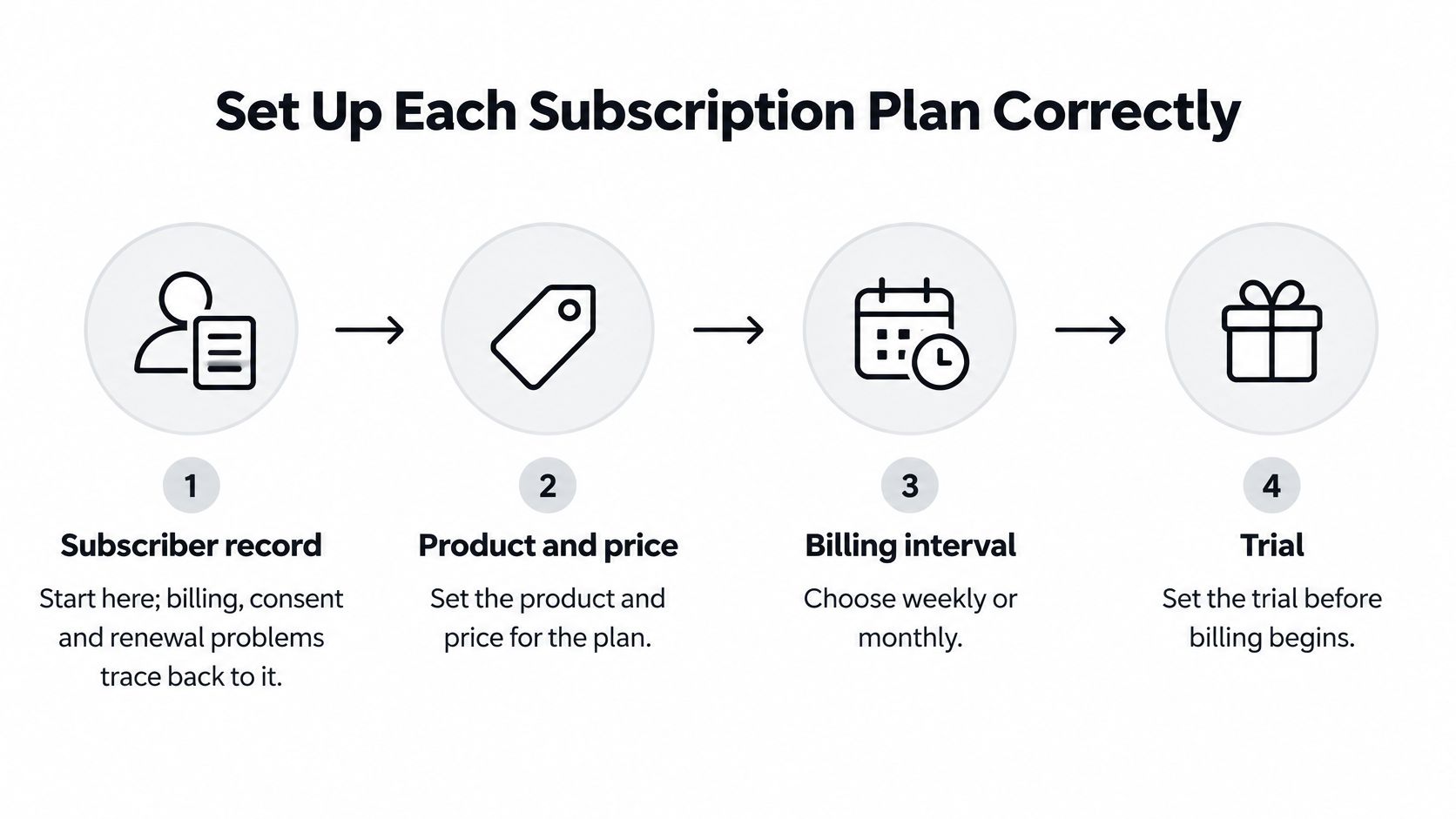
Five steps to configure a clean subscriber record
- Lock in the core plan fields before launch. Define the exact product SKU, recurring price, billing interval (such as weekly or monthly), and trial end date inside your billing system. Finalize your subscription-based pricing structure first, because a common slip is creating duplicate promotional plans that split identical subscribers across incompatible plan IDs.
- Capture an immutable consent snapshot at enrollment. Save the offer version, price, next renewal date, consent timestamp, and the exact disclosure text shown to the shopper at checkout. Without those stored fields, you can't prove what a buyer agreed to during a dispute, and teams often overwrite checkout copy globally without versioning the original text.
- Send an immediate confirmation email with renewal terms. State the billed amount, the exact next charge date, and the direct self-service path to edit or cancel the plan. Leaving the exit instructions out of the welcome receipt forces customers to hunt through menus later, which drives unnecessary support queues and bank disputes.
- Configure your default retry schedule and payment-update prompt up front. Set the rules for declined charges and build the card-update email before your first paying subscriber reaches renewal one. Teams frequently leave dunning settings untouched at launch and only notice the gap after an entire cohort of renewals fails without notice.
- Test one complete lifecycle in a staging copy. Push a test account through a scheduled renewal, a skipped order, a plan swap, and a cancellation, then inspect the database log after every event. Checking only the initial checkout form misses broken webhook listeners that leave cancelled accounts billing on the following cycle.
Updating live plans without breaking trust
The fastest way to trigger mass cancellations and disputes is raising the price of a live plan without telling existing subscribers. Active customers should stay on their agreed terms until you email them ahead of the change with the effective date and the new cost.
Structured upfront terms matter just as much outside standard consumer checkouts. In B2B and wholesale recurring programs, Tecton Ketones™ lays out clear eligibility and enrollment expectations in its practitioner and coach partnership setup, showing how transparent onboarding prevents billing friction later.
Clean setup benchmark: Open any random subscriber record in your database. It should display one price, one billing interval, one next charge date, and an attached consent timestamp.
Subscription Statuses and the Action for Each
Every subscriber sits in exactly one state at a time, and each state calls for a specific operational action rather than a generic follow-up.
| Status | What it means | What to do |
|---|---|---|
| Active, renewing normally | Next charge runs on schedule | Watch first-retry and failure rates |
| Order skipped | Next order moves to the following cycle | Confirm the new order date in the record |
| Plan or frequency changed | New price applies from the next cycle | Confirm the new price in the confirmation email |
| Paused | No charge while the subscription is paused | Set a reminder to resume or cancel |
| Payment failed | Renewal was declined by the issuer | Start the retry schedule and send a payment-update prompt |
| Cancellation requested | Customer asked to stop future renewals | Stop renewals and send written confirmation with the effective date |
| Cancelled, access continues | Access ends at the end of the current billing cycle | Keep access active until the end date |
| Refund issued | Money returned to the original payment method | Record the amount, date and reason |
Why reporting must separate every status
Lumping every missed renewal into a single churn count hides what's broken in your business. A failed payment and a deliberate cancellation both reduce billed revenue this month, yet the operational fix for one will backfire on the other. A 2023 benchmark cited by Curlec reported 3.27% monthly churn overall, made up of 2.41% voluntary churn and 0.86% involuntary churn.
When your analytics blend those two buckets, growth teams waste discounts trying to win back buyers whose bank cards expired. At the same time, keeping skipped orders, pauses, and frequency changes distinct from cancellations shows you how many subscribers still value your product and just need a slower delivery cadence.
Run a weekly status reconciliation check
Once a week, pull a count of subscribers in each status from the table above and sum them up. Compare that combined total against your master active subscriber count.
If the two numbers don't match, stop and investigate immediately. A mismatch almost always means either a gateway status code isn't mapped into your reporting dashboard or a group of subscriber records got stuck in an unmonitored state where neither billing nor customer support will ever touch them.
Recover Failed Payments Before Customers Leave
Recurring revenue leaks fastest from buyers who never intended to quit. Industry benchmarks summarized from Recurly data on JustPricing's subscription economy statistics indicate that involuntary churn from expired cards, insufficient funds, or bank declines can account for 40% or more of total churn, depending on the business model.
The main causes of failed renewals happen routinely across every consumer brand, even when customer satisfaction is high.
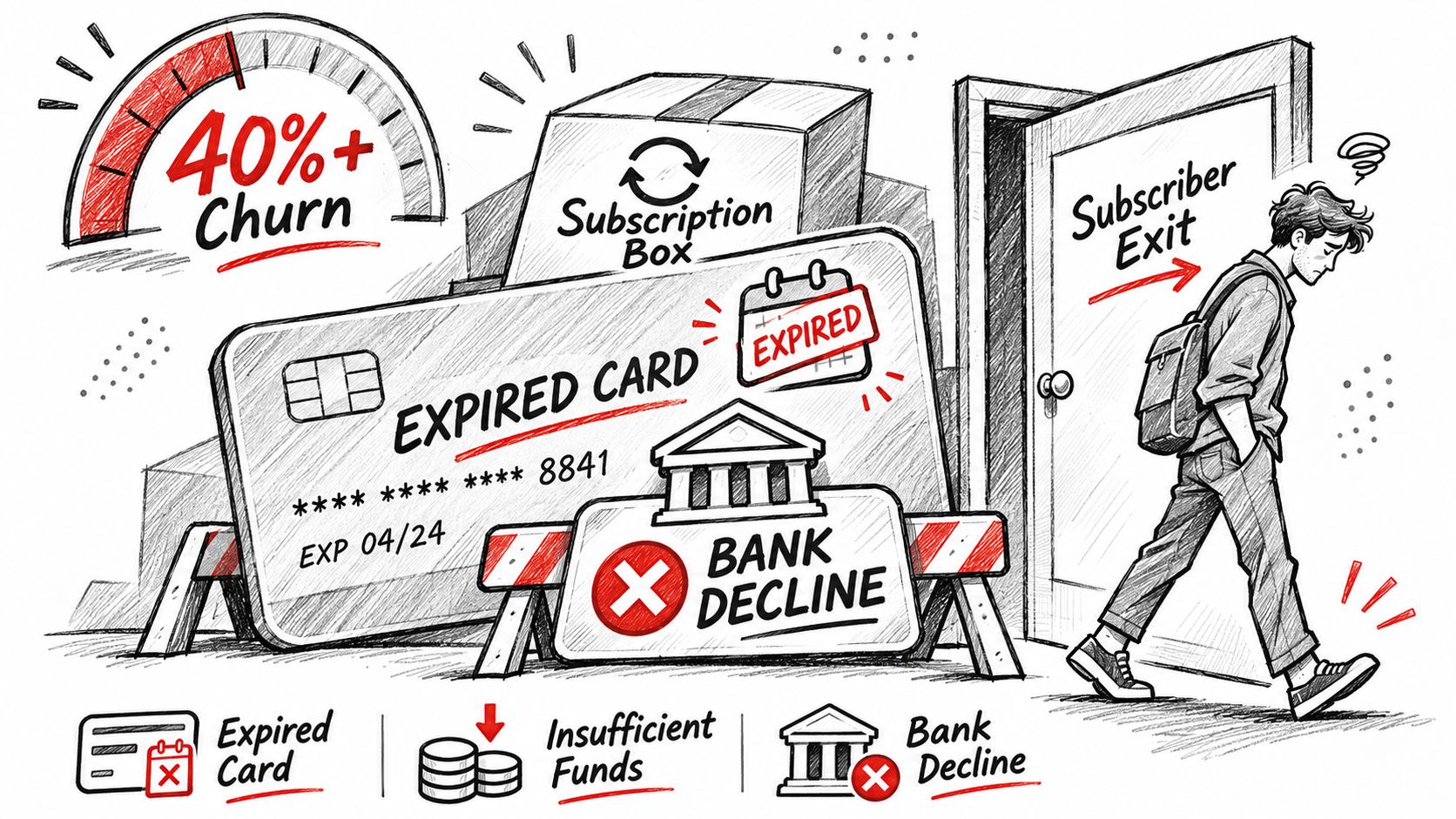
Five steps to build a disciplined payment recovery workflow
Treating payment recovery as a standalone operational workflow starts with understanding how dunning works at the transaction level rather than flipping a single toggle in your gateway settings.
- Tag every failed renewal with its specific decline reason. Record an idempotent transaction ID on each attempt and classify the outcome into hard decline, soft decline, expired credential, insufficient funds, fraud review, or customer-initiated cancellation so retries never double-charge or misroute a card.
- Refresh stored card credentials before retrying. Trigger network-token updates or an account updater check on eligible cards prior to the next billing attempt; issuers routinely push updated expiration dates and reissued card numbers, allowing the charge to clear with zero customer effort.
- Retry soft declines on a widening, bounded schedule. Give temporary balance or issuer glitches breathing room by spacing attempts further apart, for example retrying on days one, three, five, and seven, then halting automatically once you reach your maximum retry cap.
- Halt retries immediately on hard declines. Re-submitting a closed account or stolen card won't produce revenue and drags down your overall issuer approval rate; move straight to requesting a fresh payment method instead.
- Send clear pre-failure and post-failure messages with a direct update link. Tell the subscriber the exact charge amount, the last four digits of the card, and link straight into an authenticated payment-update screen. When a failed renewal overlaps with a mid-cycle change, resources like Fitness GM's guide on how to handle proration and cancellations illustrate how to keep partial cycle adjustments and billing rules aligned without confusing the customer.
Common recovery pitfalls and the metrics to track
Seeing how decline codes, retry intervals, and customer outreach work together makes it much easier to spot where a payment recovery pipeline breaks down.
Most failed-payment leakage stems from four avoidable mistakes: triggering retry storms that provoke stricter issuer declines, treating every decline code as retryable, sending vague "action required on your account" emails that look like phishing, and failing to reconcile asynchronous processor webhooks back to your order record.
Keep failed-payment analytics strictly separated from voluntary cancellations, and monitor three core metrics every week:
- Recovery rate by failure reason: Track expired-card recovery separately from insufficient-funds recovery so you can adjust retry spacing and email timing by root cause.
- Recovered revenue ratio: Divide total recovered renewal dollars by initially failed renewal value to measure true cash saved rather than raw transaction counts.
- Post-failure cancellation rate: Watch how many subscribers cancel immediately after receiving a payment alert; a jump here often means your dunning copy feels pushy or caught a customer who was already ready to leave.
A payment retry or card-update link recovers an accidental loss. It won't win back a subscriber who no longer sees value in what you ship.
Handle Pauses, Skips and Cancellations Cleanly
Putting friction in front of a customer who wants to leave isn't a retention strategy anymore; it's a compliance risk that poisons future reacquisition. On October 16, 2024, the U.S. Federal Trade Commission announced its final Click-to-Cancel rule, requiring sellers to make cancellation as easy as signup after recurring-subscription complaints climbed from 42 per day in 2021 to nearly 70 per day on average in 2024.
Retention should come from ongoing value and flexible delivery options, not from trapping buyers inside phone trees or buried links. When a customer has an extra bottle of supplements sitting in the pantry, forcing them to choose between an unwanted shipment and a hard-to-find exit button guarantees you lose them permanently. Brands that document subscriber self-service options openly, such as Pure Paw Labs in its DA-1 subscription management guide, make pauses and frequency swaps easy to find without obscuring how to leave.
Five design rules for self-service exit and flexibility
- Put cancellation in the same place as signup. If a customer enrolled on your website or mobile app, let them cancel from that same authenticated portal without opening a support ticket or making a phone call.
- Stop future renewals the instant a request is submitted. Never leave a cancellation sitting in a manual queue while the next scheduled charge fires.
- Send written confirmation showing the effective date. Deliver an email receipt that states when billing stopped and when remaining access or shipments conclude.
- Separate cancel, pause, skip, downgrade, and refund controls. Each action needs its own clear label and outcome so a pause never flips back into an unexpected renewal, and a cancellation never gets downgraded to a skip without explicit consent.
- Keep retention save offers strictly opt-in. Presenting a skip or lower-cost tier can preserve an economically valuable customer, but never preselect the offer or disguise the final cancellation button.
Track the complete cancellation funnel
Counting only finished cancellations hides usability bugs and missed retention opportunities. Instrument the entire exit journey from the first click on "manage subscription" to the final confirmation screen, and segment your cancellation completion rate by device, country, acquisition channel, and plan.
- Attempted versus completed cancellations: If mobile shoppers drop off far more often than desktop shoppers during cancellation, inspect your mobile layout for broken buttons or blocked modals rather than assuming those buyers changed their minds.
- Save-offer acceptance and pauses: Measure how many customers pick a skip or pause, then verify whether they complete their next resumed renewal rather than cancelling two weeks later.
- Refunds and repeat reactivations: Track post-exit refund requests alongside buyers who resubscribe down the line; clean, respectful exits keep the door open for seasonal returns.
Hold your team to one firm operational standard: honor the exact effective date the customer requests, and record that date accurately in the unified customer and order record.
Keep Compliance Proof for Every Change
Generic instructions like "go to account settings" no longer cover modern recurring-billing obligations, because cancellation and notice rules now diverge across states, countries, sales channels, and payment methods. According to Wiley Law's analysis of state negative-option legislation, new or updated automatic-renewal requirements were reported in 2025 across Arkansas, California, Colorado, Connecticut, Maryland, Massachusetts, Minnesota, and Utah. Typical state mandates require online cancellation through the same website or app used at enrollment, one-step cancellation mechanics, and dedicated in-app cancel buttons when the buyer subscribed inside an app.
Confusing exit flows create real consumer friction that regulators scrutinize closely. That same legal overview highlights a South Korean survey showing that 46.7% of smartphone-app users who struggled to cancel couldn't locate the cancellation control, while 30.3% found the cancellation confirmation confusing or ambiguous.
Treating compliance as an auditable evidence system rather than a single UI button keeps your operation ready for any regional rule change.
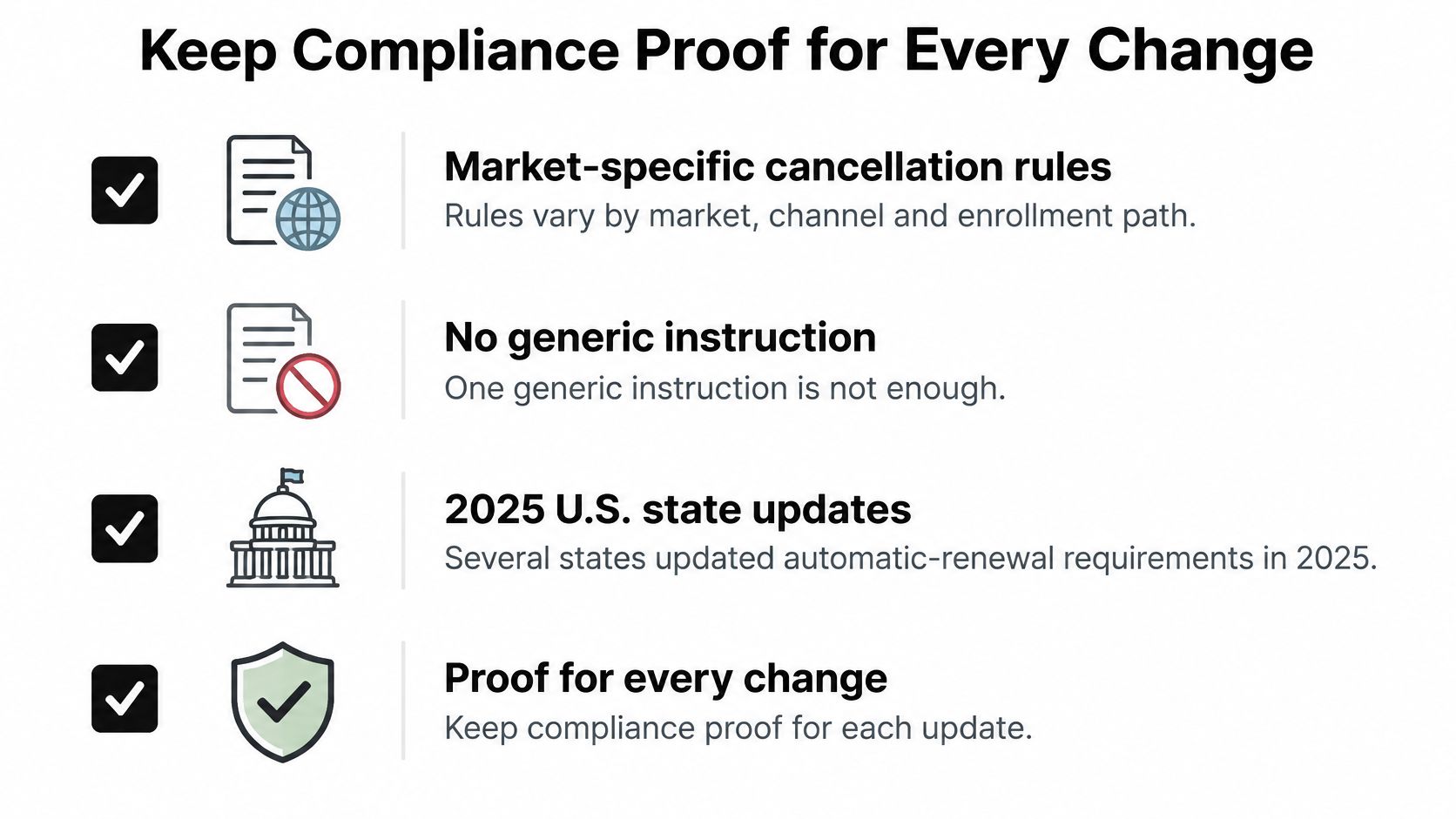
Six records to keep for every subscription event
Every change to a recurring plan should write an immutable record tied to the order history so your team never relies on scattered support tickets to prove what happened.
- Consent record and disclosure version: Store the exact disclosure text version and signup timestamp to prove clear pre-enrollment authorization if a regulator or card issuer questions the charge.
- Renewal reminder log: Save the sent date, billed amount, and upcoming charge date for every trial-ending or renewal notice to verify you met advance-notice requirements.
- Cancellation timestamp: Record the exact time the customer submitted a termination request so you can demonstrate that billing stopped immediately.
- Refund eligibility rule applied: Log which policy rule governed each refund decision (such as a cooling-off window or non-refundable partial cycle) so support agents apply terms consistently across disputes.
- Billing channel origin: Tag whether billing is handled directly by your merchant account, the Apple App Store, or Google Play, since cancellation paths and refund authority vary by platform.
- Post-cancellation receipt: Archive the confirmation message sent to the subscriber so there's zero ambiguity about whether the plan ended.
Evidence rule: If you can't pull the consent, notice, and status record for a single recurring charge on demand, treat that charge as a risk and audit the workflow before the next billing cycle runs.
Audit Subscriptions and Fix One Retention Metric
Understanding how to manage subscriptions well starts with seeing recurring charges through your customer's eyes. CNET's 2025 subscription survey found that U.S. adults spend an average of $1,080 annually on subscriptions, including nearly $200 on unused subscriptions; 74% said recurring charges are easy to forget, and 42% had stopped using a service while continuing to pay. At the same time, 82% of surveyed consumers said they're more likely to subscribe when cancellation is easy, and 78% wanted pause or swap options.
Those findings explain why rigid "renew or cancel" systems leak revenue from both ends: customers hate paying for waste, yet many only want a temporary pause or a different SKU rather than a permanent break. On PlatformDTC, merchants can sell subscriptions at checkout, renewals charge automatically, and failed payments are retried automatically, while subscribers can skip the next order, swap the product, change the frequency, or pause the subscription on their own.
Run the subscriber-side waste audit
Whether you're auditing your own company's recurring software stack or designing self-service nudges for your customers, start with a plain usage check:
- List every recurring charge across all billing channels. Capture the merchant, annualized cost, renewal date, and last actual use date across credit cards, app stores, and shared accounts.
- Flag dormant services. Mark any subscription with no real usage or consumption over a defined threshold, for example the past 60 days.
- Choose the right disposition for each flagged plan. Decide between cancel, pause, downgrade, product swap, or usage-based pricing based on whether value still exists, rather than cancelling seasonal tools you'll pay switching costs to rebuild later.
Run the operator retention audit
Once you understand how customers evaluate value, pair that lens with a disciplined subscription cohort analysis to fix your single worst operational leak instead of juggling six half-finished projects.
- Pull subscriber status counts from the last 90 days. Break out active renewals, pauses, skips, failed payments, and completed cancellations side by side.
- Calculate involuntary churn as a share of total churn. Compare failed-payment losses directly against voluntary exits over the same 90-day window.
- Compute first-retry recovery and cancellation completion rate. Review both numbers together so payment health and exit usability sit on the same scorecard.
- Pick the one metric furthest from your target. Ignore secondary tweaks until your biggest operational gap closes.
- Ship one targeted fix this month. Add a pre-expiration card reminder if involuntary churn dominates, or repair a low-completing mobile cancel flow if completion lags on phones.
- Re-measure the exact same metric in 30 days. Compare the fresh cohort against your starting baseline to confirm the fix held.
End every audit by writing down three specifics in your operating doc: the single metric you're moving, the named owner responsible for shipping the fix, and the exact calendar date 30 days from today when you'll review the result.
PlatformDTC unifies checkout, recurring renewals, automated failed-payment retries, self-service subscriber controls, and order-level analytics in one system so every subscriber state stays accurate and auditable. Instead of piecing together disconnected billing apps and guessing where recurring revenue slips away, your team runs one clean lifecycle from enrollment through renewal, pause, or exit. See how the full subscription stack works at PlatformDTC.