A common recommendation for wholesale operators is to start with a polished self-service portal. That advice is incomplete. A portal can make ordering easier while leaving payment terms, invoice workflows, inventory data, and sales-rep coordination dangerously fragmented.
The right ecommerce platform for wholesalers should function as an order-orchestration and working-capital system, not merely as a catalog with a checkout. Buyers may place an order online, ask a representative to revise it, submit a purchase order offline, and later request an invoice. Your platform must preserve the same account, pricing, inventory, and order state across every path.
| Evaluation area | What to prioritize | What to reject |
|---|---|---|
| Buyer access | Portal, rep-assisted, mobile, and offline workflows | A portal that forces every buyer into one path |
| Pricing | Account-specific, negotiated, and tiered pricing | Manual discount overrides |
| Finance | Payment terms, credit controls, invoicing, and purchase orders | Card-only checkout logic |
| Operations | Accurate inventory, fulfillment status, and order history | Stale stock and disconnected shipment data |
| Architecture | Shared data across B2B, DTC, POS, and back office | Plugins that create separate records |
| Ownership cost | Transparent platform, payment, app, and maintenance costs | A low entry price with hidden operational overhead |
Table of Contents
- The Self-Service Myth in Wholesale Commerce
- Core Enterprise Requirements for B2B Buyers
- Unified Architecture Versus Fragmented App Stacks
- Operational Trust and the Cost of Bad Master Data
- Mapping Buyer Personas to Platform Capabilities
- Calculating the True Total Cost of Ownership
- Strategic Recommendations for Platform Migration
The Self-Service Myth in Wholesale Commerce
The industry keeps treating self-service ordering as the finish line. It isn't. Self-service is one buying mode, and a useful one, but wholesale customers also care about credit, invoicing, negotiated terms, and access through multiple channels.
A 2025 buyer-expectations report found that 78% of B2B buyers consider payment terms a key consideration, while 84% want suppliers active across several sales channels. The same report found that 100% want the option to self-serve some or all of the purchase process, but 61% prefer a completely rep-free sales experience. These findings point to a more demanding requirement, buyers want choice without losing commercial consistency. (DHL's 2025 B2B ecommerce trends report)
A retailer may begin with a saved reorder, ask a sales representative to change quantities, and finish with an invoice rather than a card payment. If those interactions happen in separate systems, the account can receive the wrong price, duplicate an order, or lose the approved payment terms. The buyer experiences that failure as unreliability, not as an integration problem.
Practical rule: Self-service should be an entry point into the same order lifecycle used by sales representatives, finance teams, and fulfillment staff.
Treat the platform as a financial workflow
Wholesale commerce affects working capital. Payment terms determine when cash arrives, invoice accuracy affects collections, and order changes influence allocation and fulfillment. A storefront that handles products beautifully but cannot carry account-level terms into the final order is not enterprise-ready.
Look for support for:
- Invoice management, including invoice visibility and order-to-invoice continuity.
- Account-specific payment terms, rather than a checkout that assumes immediate card payment.
- Rep-assisted orders, where a representative can create or edit a draft without losing the buyer's pricing.
- Offline and multi-channel continuity, so phone, email, portal, and field orders share one record.
- Order-state preservation, including approvals, backorders, partial fulfillment, and changes.
Wholesale operators also need better market intelligence before deciding which accounts to prioritize. A resource such as CapyScout ecommerce prospecting can help teams identify ecommerce prospects, but prospecting data only becomes commercially useful when the resulting account can enter a disciplined pricing, credit, and ordering workflow.
The winning ecommerce platform for wholesalers doesn't maximize self-service at the expense of human support. It lets buyers move between digital and assisted channels while keeping price, terms, inventory, and order history intact.
Core Enterprise Requirements for B2B Buyers
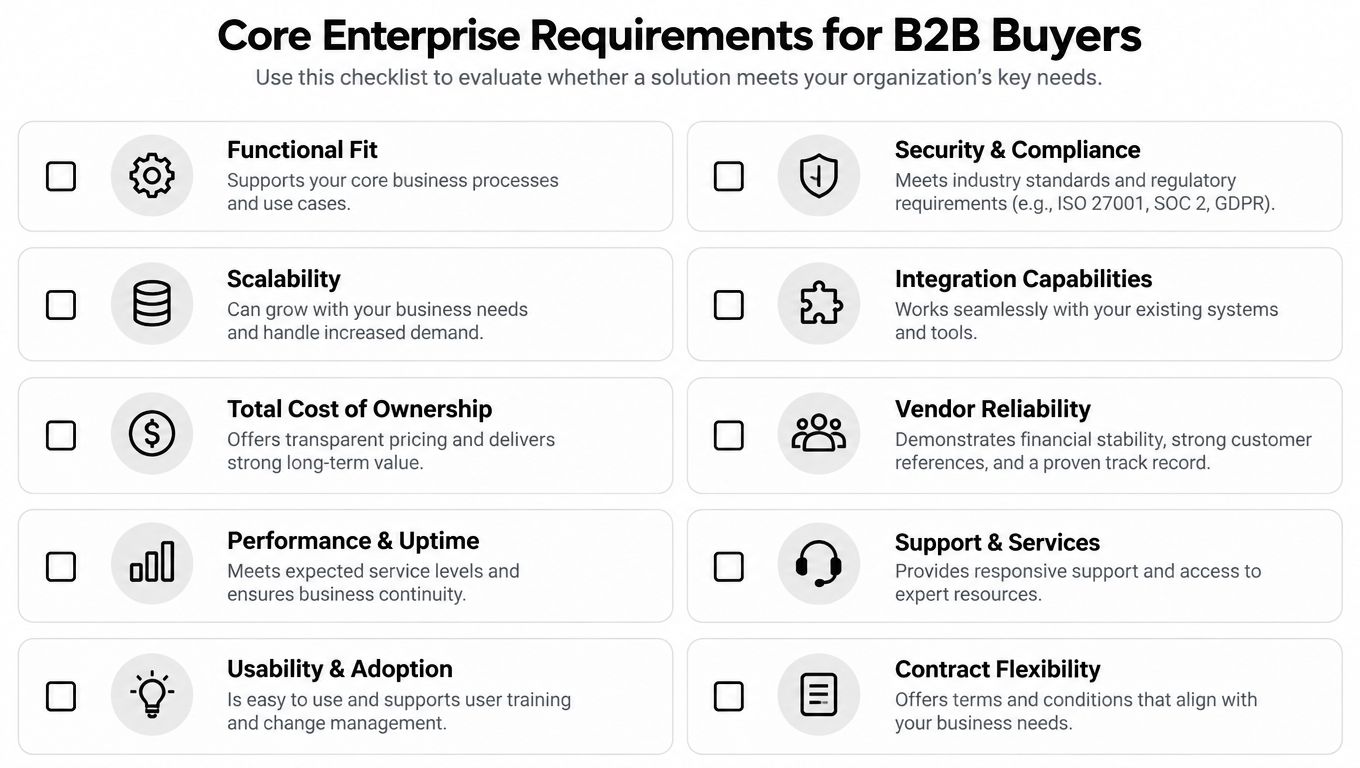
Wholesale buyers don't purchase from a simple consumer cart. They purchase through companies, departments, branches, buying groups, and negotiated agreements. The platform must understand those relationships before it displays a price or accepts an order.
Business buyers commonly expect account hierarchies, customer-specific pricing, tiered pricing, self-service reordering, EDI or ERP integration, and multi-location inventory visibility. These requirements are repeatedly identified as core needs in B2B and wholesale workflows, where account-based access and negotiated pricing are standard. (Capterra's analysis of B2B ecommerce software)
Account structure and commercial rules
A buyer may belong to a parent company but order for a specific location. A regional manager may approve purchases while a local employee creates the cart. A sales representative may see only assigned accounts. These aren't edge cases. They define who can browse, which products appear, what price is shown, and who can approve an order.
Your shortlist should support:
- Company hierarchies, with parent, subsidiary, branch, and department relationships.
- Role-based access, separating buyers, approvers, finance users, representatives, and administrators.
- Customer-specific catalogs, so each account sees relevant products and commercial terms.
- Tiered and negotiated pricing, applied consistently in portal, rep, and offline workflows.
- Approval paths, especially where credit limits, purchase orders, or internal authorization apply.
A vendor demo should use your actual account structures and pricing rules. Don't accept a generic demonstration with one customer group and one public price. Ask the vendor to show how a branch user, parent-company approver, and representative interact with the same order.
Reordering and operational visibility
Repeat purchasing is where a wholesale platform earns its keep. Buyers need quick order forms, saved lists, order histories, and the ability to reorder without rebuilding a large basket. Sales teams need visibility into those actions so they can intervene when an account changes its buying pattern or needs a substitute.
Inventory must be visible by location and connected to the systems that control stock. If the storefront shows a total quantity without explaining warehouse availability, allocation, or expected fulfillment, buyers can't make reliable commitments to their own customers.
Before selecting an ecommerce platform for wholesalers, test these workflows:
- A buyer reorders a previous purchase.
- A representative changes the order without replacing the buyer's price.
- Finance applies the correct payment terms and invoice details.
- Inventory is reserved at the appropriate location.
- The buyer sees the same status after fulfillment begins.
A platform that handles these steps natively deserves priority over one that requires a chain of paid extensions. For a broader overview of implementation patterns, see B2B ecommerce solutions for complex buying workflows.
Unified Architecture Versus Fragmented App Stacks
A fragmented stack often looks affordable at the beginning. The operator selects a storefront, adds a wholesale pricing plugin, connects an inventory app, installs an invoicing tool, and adds another extension for international selling. Each decision solves a local problem. Together, they create multiple versions of the customer, product, price, inventory, and order records.
A unified platform takes the opposite position. It keeps major commerce domains in one administrative and data model, then exposes integrations where the business genuinely needs them. The distinction matters because native B2B breadth is a major differentiator. Platform comparisons note that some enterprise suites combine B2B, DTC, and POS in one admin, while other systems depend on paid plugins for multilingual, multi-currency, and B2B features. The same comparison highlights 150+ country coverage from a single store in one system, compared with extension-dependent internationalization elsewhere. (Shopify's enterprise ecommerce platform comparison)
Architecture comparison
| Feature Area | Unified Platform | Fragmented Stack |
|---|---|---|
| Customer records | One account model across channels | Separate records across apps |
| Pricing | Shared rules for portal, reps, DTC, and POS | Plugins may calculate different prices |
| Inventory | Central availability and reservation logic | Delayed synchronization between tools |
| Orders | One lifecycle from draft to invoice and fulfillment | Multiple statuses and reconciliation jobs |
| B2B features | Native account, pricing, and payment workflows | Added through extensions |
| Internationalization | Shared catalog and localization controls | Separate apps with separate data rules |
| Reporting | Cross-channel order and customer view | Manual joins and disputed attribution |
| Maintenance | Fewer integration points to monitor | More updates, credentials, and failure modes |
Where fragmentation creates drift
The most damaging drift isn't visual. A broken banner is inconvenient. A discount mismatch, stale stock number, or duplicated order can damage a customer relationship and force staff to repair records manually.
Common failure patterns include:
- The inventory system reserves stock after the storefront has already promised it elsewhere.
- A promotion applies online but not to a representative-created order.
- A customer sees one currency while finance invoices another.
- A POS sale reaches the inventory system late.
- A payment status changes in one application but not in the order record.
- Analytics attributes the same customer to separate profiles.
A unified architecture doesn't eliminate the need for integrations. ERP, warehouse, accounting, tax, and logistics systems may still remain essential. It does reduce the number of systems that independently interpret core commerce events.
This guide to unified commerce offers useful context on why shared customer and transaction data matters across touchpoints. For wholesale operators, the practical question is simple: which system owns the truth, and how quickly do other systems receive it?
Choose fewer boundaries, not fewer capabilities
Modularity can be valuable when each service has a clear responsibility and a reliable contract. The problem begins when the business adds apps because the primary platform cannot represent a basic wholesale rule. A third-party plugin may support customer-specific pricing, but another app owns invoices, while an integration service translates the resulting order into ERP language.
Evaluate unified commerce platform architecture by asking where the order record lives, who calculates the price, and which system controls inventory reservation. If the answers change by channel, your team is buying complexity, not flexibility.
Operational Trust and the Cost of Bad Master Data
A beautiful wholesale storefront cannot compensate for incorrect product, pricing, or fulfillment data. In fact, digitizing a broken process can increase the speed at which customers encounter errors.
A 2025 B2B commerce survey reported that 33% of online B2B orders contained errors, while 31% of buyers reported inconsistent delivery times, 29% cited pricing inaccuracies, and 28% cited stock-level inaccuracies. The same survey found that 46% consider real-time inventory updates a must-have, 64% say accurate agreed pricing is essential, and 81% identify detailed product specifications and guided selling as especially helpful. It also reported that 52% want automated delivery tracking as standard. (Sana Commerce's B2B ecommerce trends and challenges report)
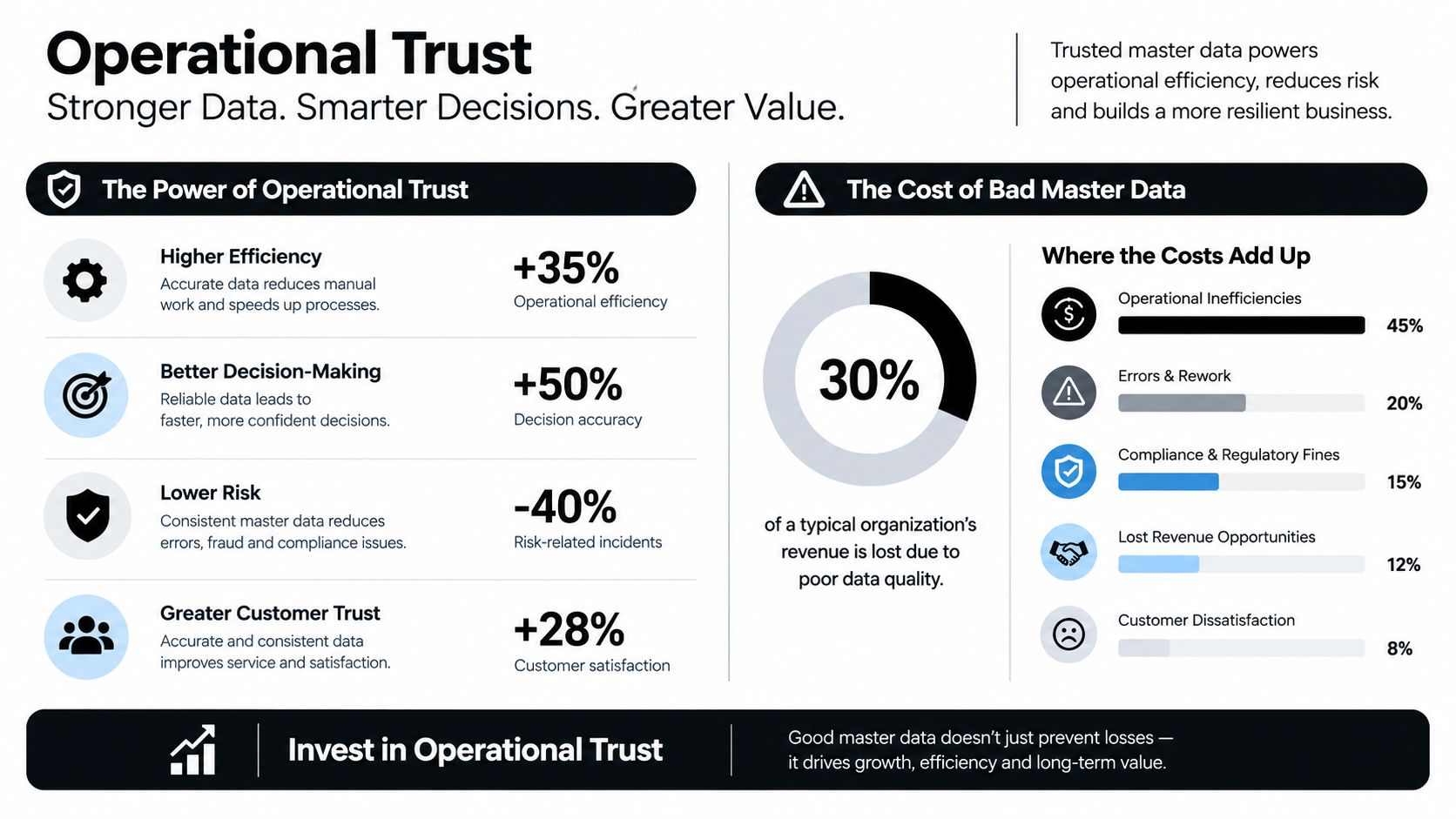
Master data is part of the product
A wholesale buyer needs more than an image and a product name. They may need dimensions, pack configuration, technical specifications, case quantities, compliance documents, lead times, and substitution rules. If those details are incomplete, a buyer can't judge whether the item fits their own operation.
Pricing data carries the same weight. Account-specific terms must map to the right customer, product, quantity threshold, currency, and effective date. A platform that displays a price without showing how it was calculated leaves sales and finance teams exposed to disputes.
Inventory data needs context as well. The available quantity may differ by warehouse, reservation status, channel allocation, or expected receipt. A reliable platform should communicate what can ship, from where, and under which fulfillment promise.
Test the promise, not the interface
During evaluation, ask vendors to demonstrate failure scenarios rather than only successful checkout flows:
- A product is missing a required specification.
- An account has a negotiated price that differs from its customer group.
- A warehouse runs short after the buyer adds an item.
- A delivery date changes after order approval.
- A representative creates an order while the buyer has an open draft.
- A return or partial shipment changes the invoice total.
Operational standard: Don't approve a platform until your team can trace a product, price, inventory quantity, order, shipment, and invoice through the same business event.
Master data ownership must also be explicit. Decide whether the ERP, PIM, inventory system, or commerce platform owns each field. Then define validation rules, update frequency, exception handling, and audit history. A platform can expose excellent features while still failing if it publishes weak data.
The evaluation criterion is therefore not storefront polish. It is whether the system can keep agreed pricing, available inventory, product truth, and delivery promises synchronized across every order type.
Mapping Buyer Personas to Platform Capabilities
A wholesale buyer isn't a single user type. The owner of a small boutique, a procurement officer at a chain, and a field representative may all use the same commerce system differently. A platform earns adoption when it supports those differences without creating separate records or rules.
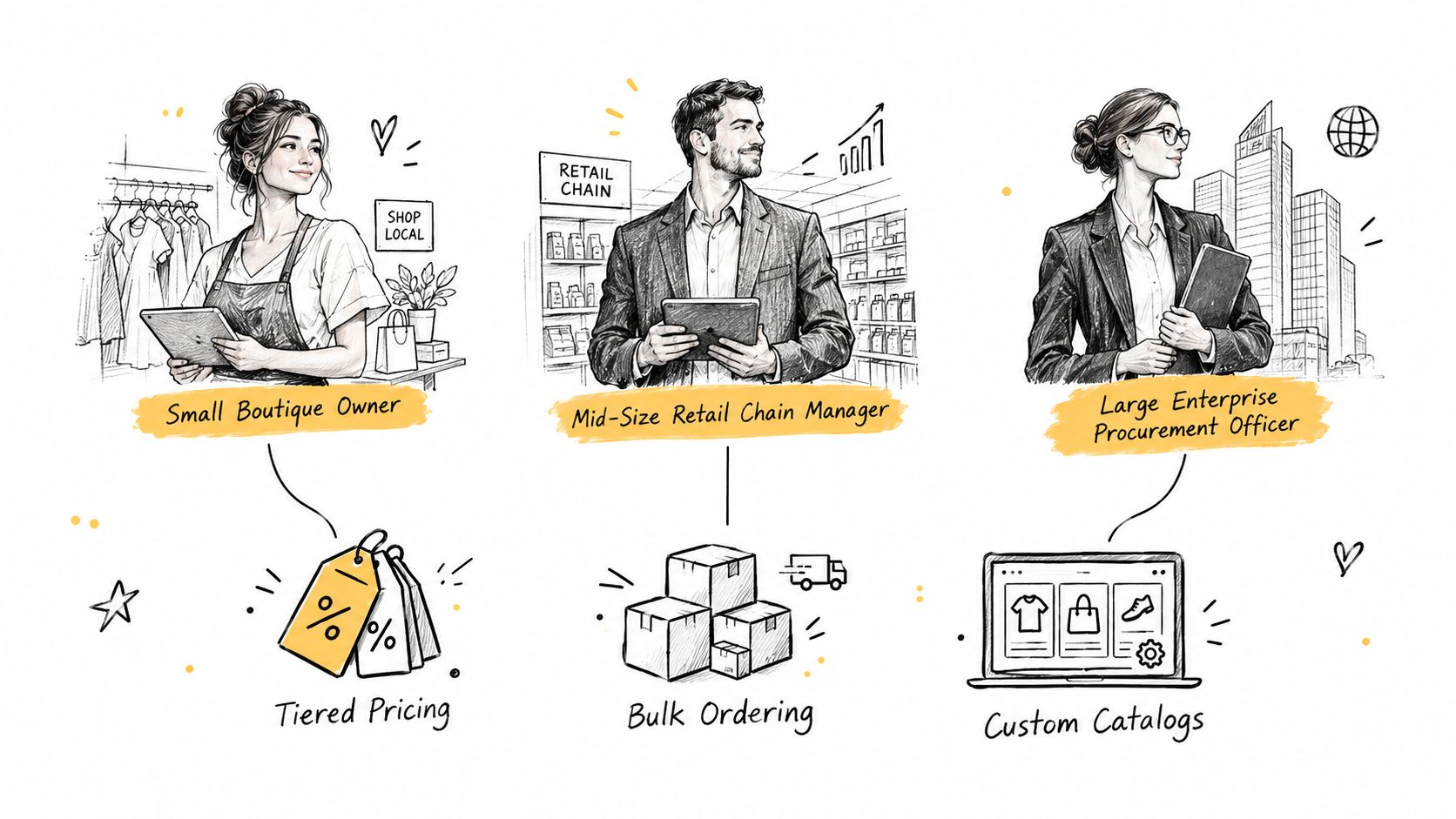
The mobile boutique owner
A boutique owner often values speed over configuration. They want to open a phone, find familiar products, check availability, repeat a previous order, and move on. A long registration process or a catalog that hides account pricing will push them back to email.
The relevant capabilities are mobile-friendly reordering, saved lists, quick quantity entry, order history, and clear delivery status. The buyer shouldn't need to contact a representative for routine replenishment, but they should be able to request help without starting a second order in another system.
The procurement officer
An enterprise procurement officer has a different problem. They may buy for multiple locations, require approval from a manager, submit a purchase order, and need an invoice matched to internal records. Their organization may also require EDI or ERP integration.
This user needs account hierarchies, role permissions, approval workflows, location-aware inventory, purchase-order support, and invoice continuity. A simple self-service portal won't satisfy the workflow if the platform can't distinguish the person placing the order from the entity responsible for payment.
The sales representative
A representative needs to advise rather than merely process. They may create a draft order during a meeting, propose substitutions, apply an approved account price, and hand the order back to the buyer for confirmation. If the representative sees stale inventory, the conversation becomes a promise the warehouse can't keep.
The commerce system should expose live account data, current pricing, product specifications, draft orders, notes, and order status. The representative and buyer must work from the same order record, even when one starts the transaction and the other finishes it.
The following video provides additional visual context for how commerce teams can think about connected workflows:
Design for handoffs
The most important persona isn't always the buyer. Finance teams need invoice accuracy, operations teams need fulfillment clarity, and customer service teams need the complete conversation and order history. Each handoff should preserve the same customer identity and commercial terms.
Use a workflow test that begins with a mobile reorder, moves to representative assistance, passes through approval, and ends with invoice and shipment visibility. If the platform forces a new order at any point, it isn't supporting an omnichannel wholesale process. It's routing users between disconnected forms.
Calculating the True Total Cost of Ownership
The subscription price is only the first line in a wholesale platform budget. A serious total cost of ownership model includes the money and staff time required to keep pricing, payments, integrations, and data synchronized.
Start with a baseline that captures:
- Platform fees, including the core commerce subscription and required enterprise tiers.
- Payment margins, such as processor costs, platform payment charges, and settlement requirements.
- B2B extensions, including pricing, invoicing, purchase-order, and account-management tools.
- Integration maintenance, covering ERP, WMS, accounting, CRM, tax, and marketplace connections.
- Engineering overhead, including debugging, upgrades, data mapping, and custom workflow changes.
- Operational correction, including staff time spent fixing duplicates, pricing errors, and failed synchronizations.
Build the comparison in layers
First, document every current application and what business capability it provides. Don't list only software invoices. Record who owns each integration, which team handles failures, and how often employees export or reconcile data manually.
Next, identify overlapping ownership. If the storefront, pricing app, ERP, and sales tool can all modify a price, the business has a governance problem as well as a software cost. The same applies to inventory and order status.
Then model the replacement scenario. A unified system may reduce app licenses, but it still requires implementation, data migration, testing, training, and support. Compare those costs against the cost of maintaining the current architecture over the period that matters to your business.
Use operational scenarios
Don't compare vendors with a feature checklist alone. Price the workflows that consume staff time:
- Correcting a customer-specific pricing error.
- Reconciling an order that failed to reach the ERP.
- Updating inventory rules across several channels.
- Rebuilding an invoice after a partial shipment.
- Testing an extension after a platform release.
- Training a new employee across several administrative tools.
A lower monthly fee can become expensive when every new B2B rule requires custom work. The better commercial question is, how much will it cost to operate the platform correctly at your current complexity and expected channel mix?
Require vendors to show platform fees, payment costs, app replacement, implementation, and support as separate lines. Transparent comparison makes margin erosion visible before the contract is signed.
Strategic Recommendations for Platform Migration
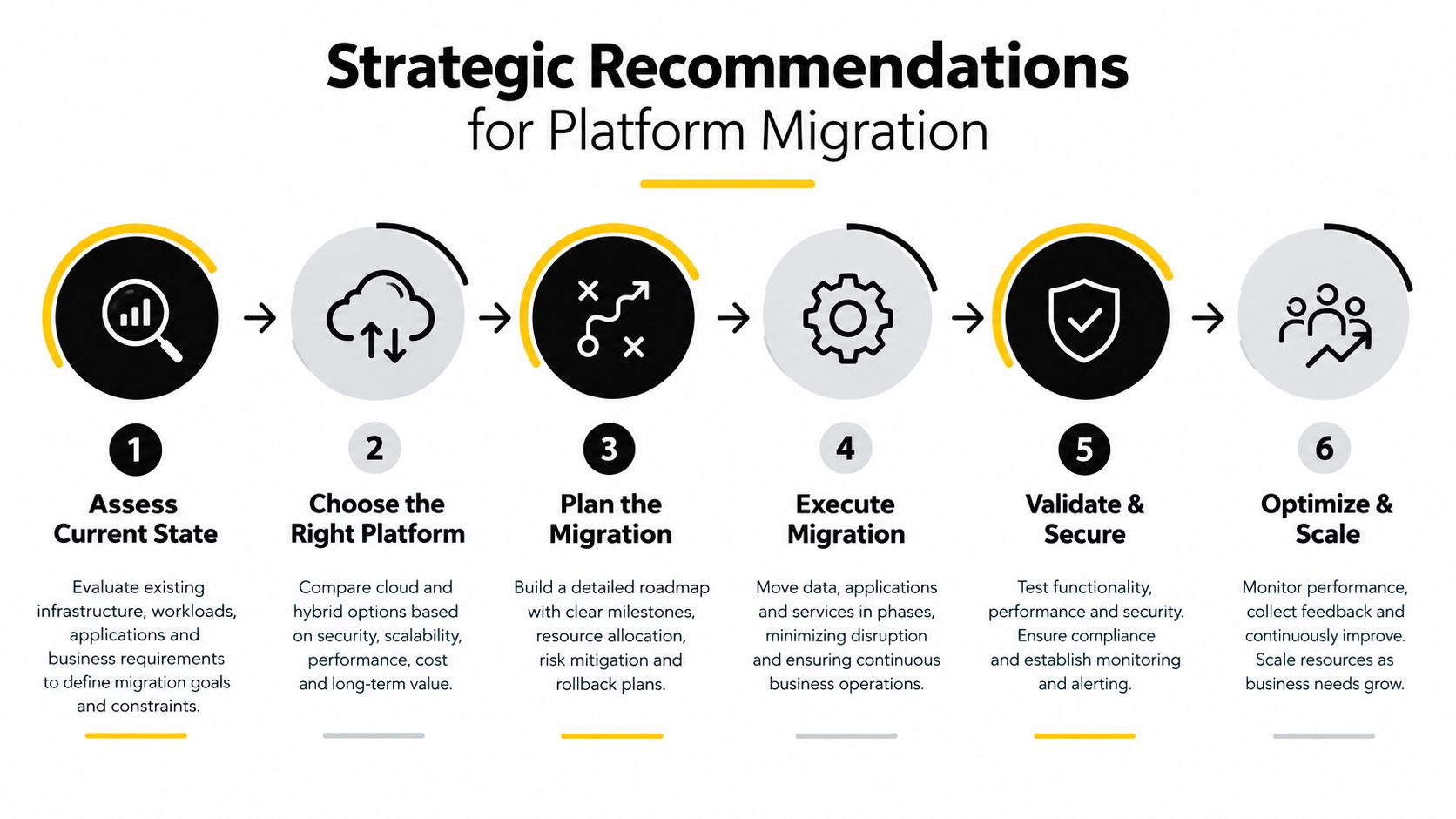
Migration should be treated as a revenue-protection project, not a storefront redesign. The sequence matters because pricing, account access, inventory, order history, and payment terms all affect active customers.
Start with a readiness assessment. Map every source of truth, list the fields that drive pricing and fulfillment, identify active integrations, and document the order states that finance and operations rely on. Don't begin by importing a catalog before deciding which system owns customer, product, inventory, and invoice data.
Use a practical decision matrix
Choose a unified platform when your business runs multiple channels, has account-specific pricing, relies on rep-assisted orders, or spends too much time reconciling systems. The case is stronger when B2B, DTC, POS, payments, inventory, and fulfillment need to share one order record.
Choose a modular architecture when your team has the engineering capacity to govern service boundaries, maintain integrations, and test every data contract. Modularity should be a deliberate operating model, not a workaround for missing platform capabilities.
Stay on the current platform temporarily when master data is still unreliable. Migration won't fix incorrect product attributes or inconsistent pricing. Clean the source data first, define validation rules, and then move it.
Migrate in controlled stages
A disciplined migration typically includes:
- Catalog import: Move product records, variants, specifications, media, and category relationships, then validate them against the source.
- Account migration: Preserve company relationships, users, roles, pricing groups, payment terms, and approved access.
- Order and finance mapping: Decide which historical orders, invoices, credits, and statuses must remain available in the new system.
- Integration testing: Test ERP, inventory, fulfillment, payment, tax, CRM, and communication events with realistic records.
- Parallel running: Operate the new stack alongside the existing one long enough to compare pricing, inventory, order status, and invoices.
- Verified cutover: Move traffic only after buyers, representatives, finance, and operations have signed off on their critical workflows.
- Post-launch monitoring: Track failed events, pricing exceptions, inventory mismatches, abandoned drafts, and support requests.
Migration utilities that support catalog import, parallel operation, and verification can reduce the risk of switching revenue-critical workflows too quickly. The detailed ecommerce platform migration guide is a useful reference for structuring that work.
The best ecommerce platform for wholesalers is the one that matches your operating reality. If your business depends on negotiated pricing, payment terms, multiple locations, sales representatives, and repeat orders, choose the architecture that preserves trust across every channel, even when the order starts offline and ends online.
PlatformDTC helps brands and wholesalers consolidate storefront, checkout, payments, inventory, fulfillment, messaging, analytics, POS, and B2B workflows into a shared commerce system. If fragmented apps are creating pricing drift or order reconciliation work, visit PlatformDTC to evaluate a unified path and plan a controlled migration.