
Your store just had its best sales day this quarter, and you're still staring at a bank balance that doesn't match the celebration. That gap between a good-looking revenue chart and tight cash is where most founders get stuck. An ecommerce analytics dashboard closes that gap when it shows every sales number next to what the sale cost you and what it left behind.
Table of Contents
- What an Ecommerce Analytics Dashboard Shows Beyond Sales
- The Core KPIs Every Ecommerce Dashboard Tracks
- Layering Your Dashboard and Segmenting Customers
- Reading the Checkout Funnel Stage by Stage
- Reading Campaign Performance Beyond Platform ROAS
- Retention and Returns as Profit Signals
- Diagnosing Checkout Abandonment and Sudden Metric Shifts
- Confirm the Numbers Before You Act
What an Ecommerce Analytics Dashboard Shows Beyond Sales
March ends with record gross revenue. Ad spend is climbing, returns are piling up by the packing bench, and cash is tight. The store is selling more, but you can't tell if it's growing profitably.
That confusion is normal when revenue sits alone. Revenue works like a car's speedometer. It tells you how fast you're moving, not whether the engine is overheating. Contribution margin, return costs, checkout losses, and payment failures are the temperature and oil gauges.

A useful dashboard links orders, customers, campaigns, checkout events, and costs on one record. You can follow a single order from the ad click through payment, fulfillment, and any return, then see what remained. That full path is the point, not another chart of sessions.
Definitions decide whether you can trust that path. If one report counts domestic orders only and another adds cross-border orders, or if one cuts the day off at your timezone and another doesn't, the totals will disagree and look like growth when they aren't. Scale makes this harder. UNCTAD's global ecommerce estimate shows businesses in 46 developed and developing economies recorded nearly $28 trillion in e-commerce sales in 2024, up 5.5% from 2023. UNCTAD also reports that from 2016 through 2024, e-commerce sales in developing economies grew at more than twice the average annual rate in developed economies, based on economies with available data. A single global total hides that split, which is why geography belongs next to revenue.
A useful dashboard answers three questions in order: what changed, where it changed, and why it changed.
Read it in that order each time. Core KPIs come first, then layers and segments, the checkout funnel, campaigns, retention and returns, and a short setup checklist.
The Core KPIs Every Ecommerce Dashboard Tracks
Before any metric earns a place on the dashboard, give it three things: a formula, a denominator, and a time window. Without them, two people can calculate the same KPI two ways and argue about numbers that were never comparable. If you want a plain framework for that discipline as you track key performance indicators for growth, start with one written definition per metric and don't change it mid-period.
| KPI | Formula | Question it answers |
|---|---|---|
| Gross revenue | Sum of order totals before discounts and refunds | How much did we sell? |
| Net revenue | Gross revenue minus discounts, refunds and taxes | How much did we keep from sales? |
| Conversion rate | Completed orders ÷ sessions | Are visitors buying? |
| Average order value | Net revenue ÷ number of orders | How large is each basket? |
| Customer acquisition cost | Acquisition spend ÷ new customers | What does one new buyer cost? |
| ROAS | Platform-attributed revenue ÷ ad spend | Which campaigns report sales? |
| Contribution margin | Net revenue minus COGS, payment fees, fulfillment and returns | What does a sale actually earn? |
| Repeat purchase rate | Customers with two or more orders ÷ customers in cohort | Do customers come back? |
| Return rate | Returned order value ÷ net revenue | How much revenue reverses? |
| Checkout completion rate | Confirmed orders ÷ checkout starts | Where does checkout lose buyers? |
Read KPIs in pairs, never alone
Gross revenue with net revenue: A heavy discount weekend can lift gross revenue while net revenue barely moves. Put the two lines on the same chart and add discount rate between them. If the gap widens, you're buying sales with price cuts, and the next decision is about promotion rules, not more traffic.
Conversion rate with average order value: Conversion can rise because shoppers bought smaller, cheaper baskets. Say you add a low-priced add-on and orders jump, but average order value falls enough that net revenue doesn't change. Read alone, conversion looks like a win. Read together, you've added packing and shipping work for no extra money.
ROAS with contribution margin: This pairing catches the costliest mistake. A campaign reporting strong ROAS can still lose money once you deduct cost of goods, payment fees, fulfillment, and returns. Contribution margin is the number that survives those deductions, so judge spend against it, not against the revenue the ad platform claims.
Practical rule: If a KPI wouldn't change a decision this week, it doesn't belong on the front page of the dashboard.
The mismatch to watch first
Conversion and revenue both rising while contribution margin falls is the pattern that hurts quietest. It usually means discounting or low-margin products are carrying the growth. You're busier, your team ships more boxes, and each box earns less.
When you see it, split margin by product and by channel before you touch ad budgets. One bestseller with thin margin or one campaign sending discount hunters can explain the whole slide. Fix that source first, because adding more traffic on top of it only scales the loss.
Layering Your Dashboard and Segmenting Customers
A city map works because it zooms. The country view helps you plan a trip, the neighbourhood view helps you pick a route, and the street view helps you find one address. Your dashboard needs the same three zoom levels, because a founder and an analyst don't need the same detail at the same moment.
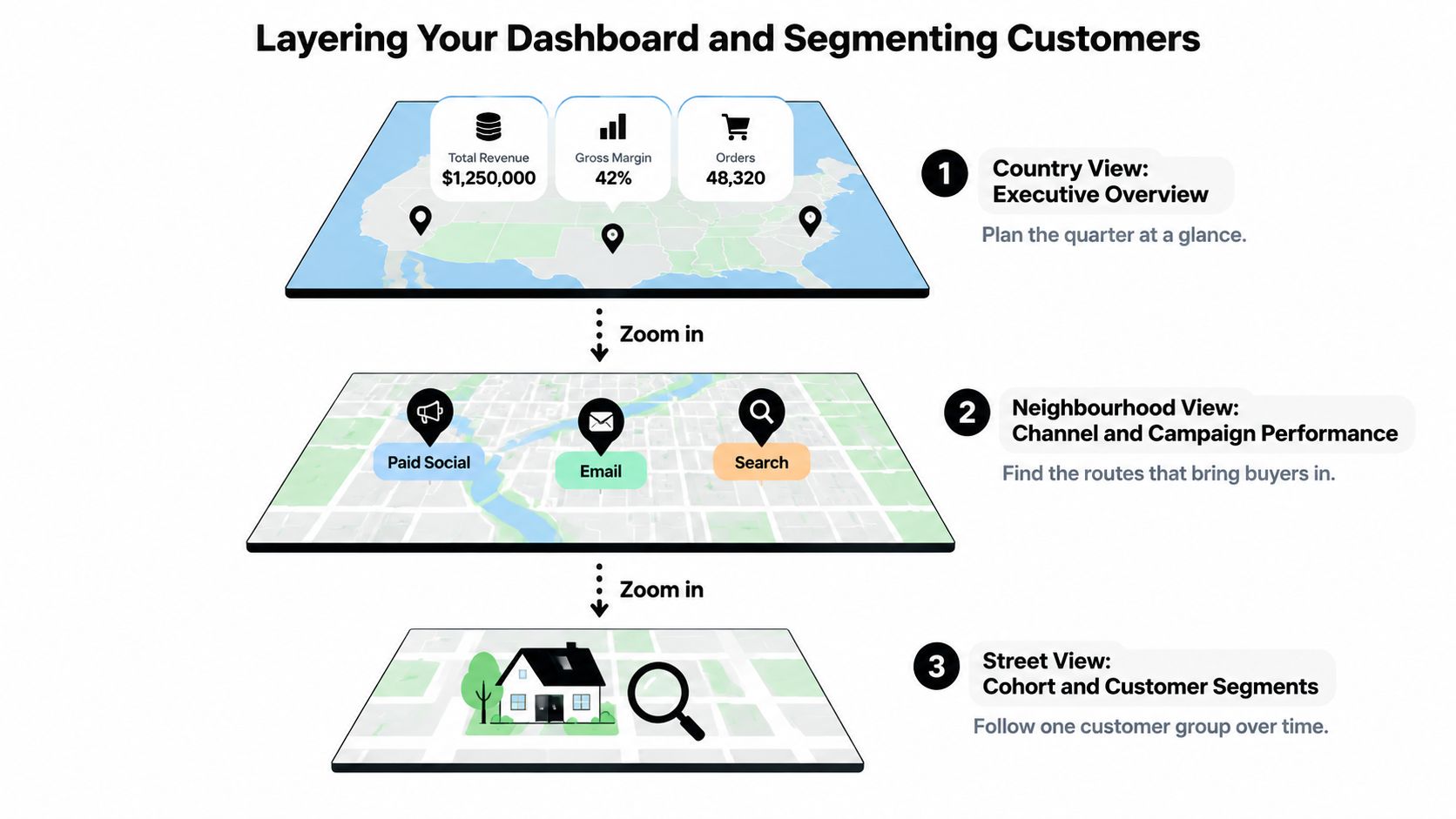
| Layer | Primary audience | Review rhythm | Views it holds |
|---|---|---|---|
| Executive view | Founders and ecommerce directors | Daily | Net revenue, orders, conversion rate, contribution margin |
| Diagnostic view | Growth, CRO and campaign teams | Daily to weekly | Checkout funnel stages, channel performance, AOV by segment |
| Cohort and detail view | Analysts and finance | Weekly to monthly | Repeat rate by acquisition month, returns by SKU, subscription renewals |
The executive view should answer one question fast: is today healthy? Keep it to about five numbers. If net revenue is down, you don't solve it there, you zoom in.
The diagnostic view is where the work happens. Growth and campaign teams look here for which channel, device, or checkout stage moved. The cohort and detail view moves slower on purpose, because repeat behaviour and returns by SKU only mean something over weeks.
Segments that change the reading
Averages hide the cause. These cuts reveal it:
- Acquisition channel: Which source sent the buyer, and did that buyer stay profitable after returns?
- Device and country: Mobile layout or local payment habits can explain a drop that looks like weak demand.
- New versus returning: A conversion dip from new visitors points to traffic quality or first-visit trust, not your loyal base.
- Subscription versus one-time: Renewals fail for billing reasons that one-time orders never face.
- DTC versus B2B versus in-person POS: Order size, terms, and fulfillment differ enough that blending them distorts every average.
Keep segment definitions identical across all three layers. If one report calls a customer new and another calls the same person returning, every comparison between them is wrong. Agree the definitions once, write them down, and reuse them. A shared guide to customer segmentation helps your team apply those same cuts in every view instead of rebuilding them report by report.
Reading the Checkout Funnel Stage by Stage
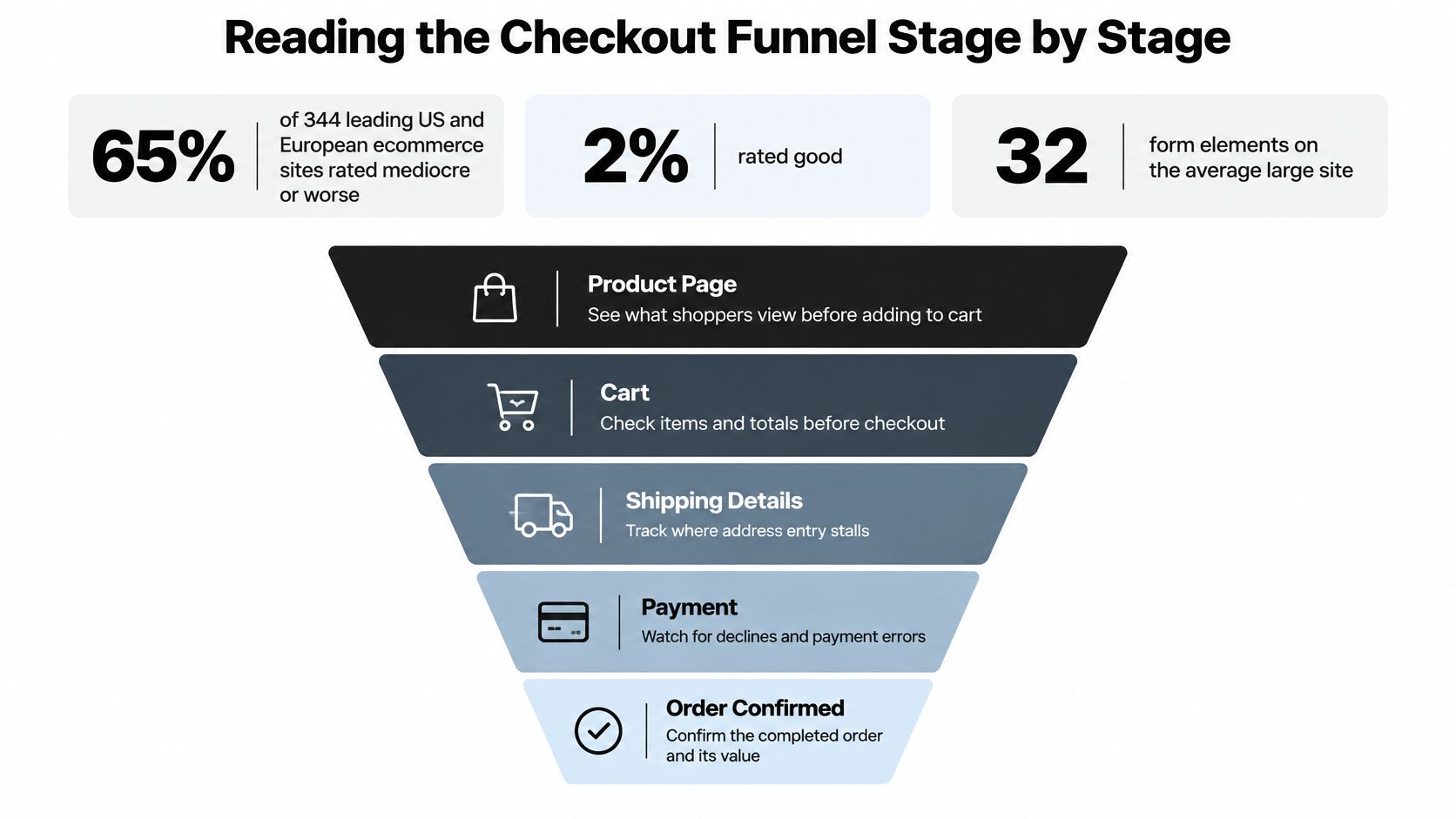
One checkout conversion number tells you buyers are leaving, but it doesn't tell you where. The scale of what's recoverable is larger than many teams assume. In Baymard's checkout usability benchmark of 344 leading US and European ecommerce sites, 65% were mediocre or worse and only 2% were rated good. Baymard estimates the average large ecommerce site has about 32 actionable checkout improvements and could achieve a 35% conversion increase through checkout UX changes alone.
The funnel diagram below shows the five stages to track separately.
| Stage | Metric and denominator | Check first when it drops |
|---|---|---|
| View to cart | Add-to-cart events ÷ product page views | Merchandising, pricing display, product imagery |
| Cart to checkout | Checkout starts ÷ carts created | Shipping cost reveal, visible totals, forced account creation |
| Payment initiation | Payment step loads or wallet clicks ÷ checkout starts | Form length, wallet availability, mobile layout |
| Payment authorization | Authorized payments ÷ payment attempts | Declines, authentication prompts, processor latency |
| Order completion | Confirmed orders ÷ payment initiations | Duplicate submissions, timeouts, missing order confirmations |
Give every stage a consistent denominator and event timestamp. If cart-to-checkout uses carts created today but order completion uses orders from carts started yesterday, a busy day will look broken. Then break each stage by device, country, payment method, new versus returning customer, and subscription versus one-time order. A wallet failure on one mobile browser disappears inside a blended rate.
Set alerts on both the absolute conversion rate and the percentage-point change. Traffic can spike and lift total orders while the payment stage fails for a slice of buyers without anyone noticing. Orders look fine, so nobody checks, and the leak runs for days.
The short walkthrough below shows how a stage-by-stage read looks in practice.
Put a profit value on each leak
Say payment initiation drops 2 points on 40,000 monthly checkout starts in a worked example. That's 800 buyers who never reached payment. Multiply lost sessions by your baseline stage throughput, average order value, and contribution margin, and you get recoverable profit, not just lost clicks.
Rank fixes by that number. A small percentage drop late in the funnel, where buyers already entered payment details, is usually worth more than a larger drop at product view. Late-stage buyers showed the strongest intent, so recovering them costs the least effort per dollar.
Reading Campaign Performance Beyond Platform ROAS
Meta Ads, Google Ads, and TikTok each credit revenue to clicks and views inside their own walls. The problem isn't dishonesty, it's the question they answer. They tell you which channel touched a sale. They don't tell you which channel caused it.
Say a shopper already planned to buy, searched your brand name, then clicked a retargeting ad on the way in. The platform counts that sale. Remove the ad and the sale likely still happens. That's the difference between attributed revenue and incremental revenue, and it's the difference your budget depends on. A comparison of ecommerce analytics tools from Basedash makes the same point for dashboard design: compare platform-reported attribution with incrementality evidence from geo experiments, holdouts, or media-mix modeling, while deducting discounts, fees, fulfillment, returns, and cost of goods.
| Measure | What it counts | Blind spot |
|---|---|---|
| Platform-reported ROAS | Revenue the ad platform attributes to its clicks and views | Counts sales that would have happened anyway |
| Last-click revenue | Revenue credited to the final touchpoint | Ignores the ads that started the journey |
| Geo or holdout test | Sales gap between exposed and held-out regions or audiences | Needs volume and several weeks to read cleanly |
| Media-mix model | Statistical estimate of each channel's contribution to sales | Wide ranges and sensitivity to model assumptions |
| Contribution-based ROAS | Contribution margin per ad dollar after discounts, fees, returns and COGS | Only as accurate as the cost data behind it |
A decision rule you can run this month
Use a hypothetical that shows up often. Platform ROAS shows 4x, so the campaign looks safe to scale. A geo holdout tells a different story: exposed regions produced only 1.5x incremental revenue against held-out regions. If your contribution margin is 30%, that incremental revenue returns less than break-even on contribution. Scaling spend here grows reported revenue and shrinks profit at the same time.
You don't need to pick one number and delete the other. Give each number a job:
- Daily pacing: Use the platform figure to catch a broken ad set or a sudden cost spike.
- Budget decisions: Use the holdout or media-mix estimate, because that's the number tied to sales you wouldn't have had.
- Reporting: Show a range with the experiment status, not a single precise figure that pretends the disagreement doesn't exist.
Ask of every channel: what was incremental contribution margin per dollar of spend, by market and customer cohort?
Privacy restrictions and weaker user-level tracking make exact journey attribution less reliable than it used to be, and dashboards that hide that uncertainty invite bad calls. An uncertainty band isn't a weakness in your reporting. It's an honest bound on what you know, and it stops your team from moving real money on false precision.
Retention and Returns as Profit Signals
Returns usually appear as one monthly percentage, noted and forgotten. At current scale that's too casual. A review of ecommerce returns statistics from Kodif cites the National Retail Federation estimate for 2025 putting ecommerce returns at 19.3% of online sales and total U.S. retail returns at $849.9 billion. It also reports 70.2% of surveyed merchants charged return fees in 2025, up from 60% in 2024.
Charging for returns is one response. Understanding them is a better one. Each return record should carry SKU, variant, content or ad exposure, acquisition source, customer cohort, reason code, resale outcome, refund timing, and reverse-logistics cost. With those fields, a return stops being a percentage and becomes a diagnosis.
Build retention as curves, not averages
Group customers by the month they first bought, then follow that group. Track repeat purchase rate by acquisition month, second-order rate within 90 days, and subscription renewal rate. A flat overall repeat rate can hide a recent cohort that's much weaker than last year's, which often traces back to one campaign or one discount offer.
For subscription brands, renewal behaviour needs its own dedicated views, and a focused list of subscription metrics to track keeps billing failures, skips, and cancellations from blending into ordinary churn. Separating those causes matters because each one has a different fix and a different owner.
Retention only pays when the kept customer is worth keeping. Thinking through customer value beyond Instagram lead acquisition helps you price that properly, since a cheap first order that returns twice and never repeats is worth less than a slower, full-price buyer who stays.
Cutting the return rate can destroy value
The instinct to minimise returns sounds safe and often isn't. Tighter return rules or more cautious sizing content can lower the return rate while also suppressing conversion and lifetime value. If fewer people buy at all, net contribution falls even as the return chart improves.
Measure exchange-adjusted retention instead, so a customer who swaps a size counts as kept, not lost. Then judge each return pattern by what happens next:
- Warning sign: Returns cluster on one SKU, one variant, or one reason code like sizing or colour mismatch. That's a product or listing failure.
- Acceptable cost: Returns lead to exchanges or repeat purchases at a rate that keeps net contribution positive after reverse-logistics costs.
Set alerts for spikes on a single SKU or reason code rather than waiting for the monthly rate to move. A bad size chart or a misleading product photo can generate costly returns for weeks before the blended percentage looks unusual.
Diagnosing Checkout Abandonment and Sudden Metric Shifts
A sudden shift tempts teams to guess. A baseline helps you check instead. Baymard's ecommerce checkout usability research reports a 70.19% average cart-abandonment rate, found 17% of US online shoppers had abandoned because checkout was too long or complicated, and counted 23.48 form elements by default on the average checkout against an ideal flow of roughly 12 elements. Form burden is measurable, so measure it.
Log field-level detail for each checkout attempt: focus, validation errors, correction count, autofill success, elapsed time, and the exit event. Exclude payment-card data and other sensitive values. Then tag each exit as intentional or technical, separating duplicate submissions, declined payments, address-validation errors, shipping-price shock, and out-of-stock responses. Our glossary entry on abandoned checkout keeps those exit definitions consistent for everyone reading the report.
Segment by mobile operating system, browser, country, wallet availability, and customer type. Mobile abandonment concentrated at address entry points to autofill. Abandonment right after shipping selection points to cost or delivery-date uncertainty. The pattern names the cause before anyone opens a ticket.
| Symptom | Likely cause | Check first |
|---|---|---|
| Mobile abandonment concentrated at address entry | Autofill or validation errors on small screens | Field-level validation errors and autofill success by device |
| Drop right after shipping selection | Shipping cost shock or unclear delivery date | Cart total change at the shipping step |
| Payment initiation falls while sessions hold steady | Wallet or express method failing on one browser or OS | Wallet button load rate by browser and operating system |
| Authorization rate falls after a rule change | Fraud rules or authentication prompts blocking genuine buyers | Decline codes and fraud-rule logs for the same period |
| Dashboard orders disagree with processor totals | Timezone cutoffs, refund timing or duplicate order records | Order IDs reconciled against processor payouts |
| Conversion rises while revenue falls | Traffic shifted toward lower-priced products or heavier discounts | AOV and discount rate by channel |
Deliverability creates a similar blind spot after checkout. If order confirmations and recovery emails never arrive, repeat purchase and recovery rates fall for a reason your funnel won't show, so knowing how to check if emails are going to spam belongs in the same diagnostic routine.
Pair each issue with sessions affected and estimated gross-margin loss, then confirm any fix with a randomized test. Watch guardrails for authorization rate, refund rate, fraud rate, and fulfillment error rate while the test runs, so a conversion gain doesn't hide a loss somewhere downstream.
Confirm the Numbers Before You Act
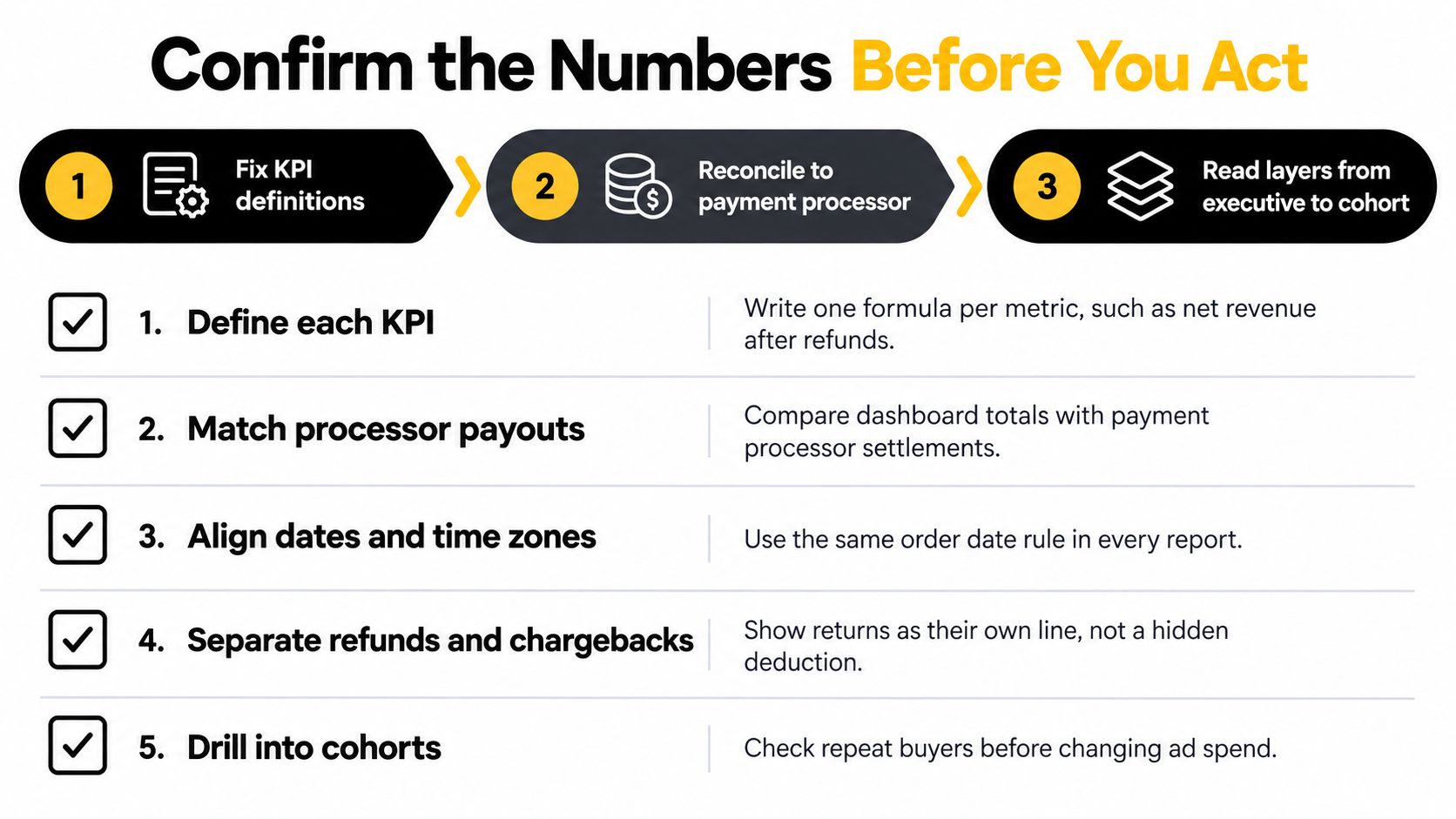
The order of work matters. Fix your KPI definitions first, reconcile the dashboard to your payment processor second, then read from the executive layer down to cohorts. Skipping reconciliation means you might spend a week fixing a checkout that was never broken, chasing a drop caused by a timezone cutoff.
Your first-week checklist
- Define each core KPI: Write one formula and denominator per metric and store it where every report builder can find it.
- Reconcile to payouts: Match order counts and revenue against processor payouts for the last 30 days, order ID by order ID.
- Set funnel alerts: Alert on both absolute conversion and percentage-point change at every checkout stage.
- Schedule one incrementality test: Run a holdout or geo test on your largest paid channel before the next budget increase.
- Review returns monthly: Read returns by SKU and reason code, with resale outcome and reverse-logistics cost attached.
One option for the verification step is PlatformDTC, whose analytics cover orders, customers, campaigns, and checkout performance on one order record. Online, subscription, B2B, and POS sales share one customer list there, so a segment like bought in store then online can be read directly rather than rebuilt by hand from separate exports.
Whatever tool you use, audit where order and customer records diverge across your current apps before you choose it. Then check any new reporting against your existing numbers for one full period before you rely on it for spend or staffing decisions.
The test for any dashboard: it should change a decision within a week. If nothing you did this week traces back to it, the dashboard is decoration.
Visit PlatformDTC to see how its analytics bring orders, customers, campaigns, and checkout performance together on one record across online, subscription, B2B, and in-person sales. Bring your current KPI definitions and a month of processor payouts, compare the numbers side by side, and keep only the views that change your next decision.