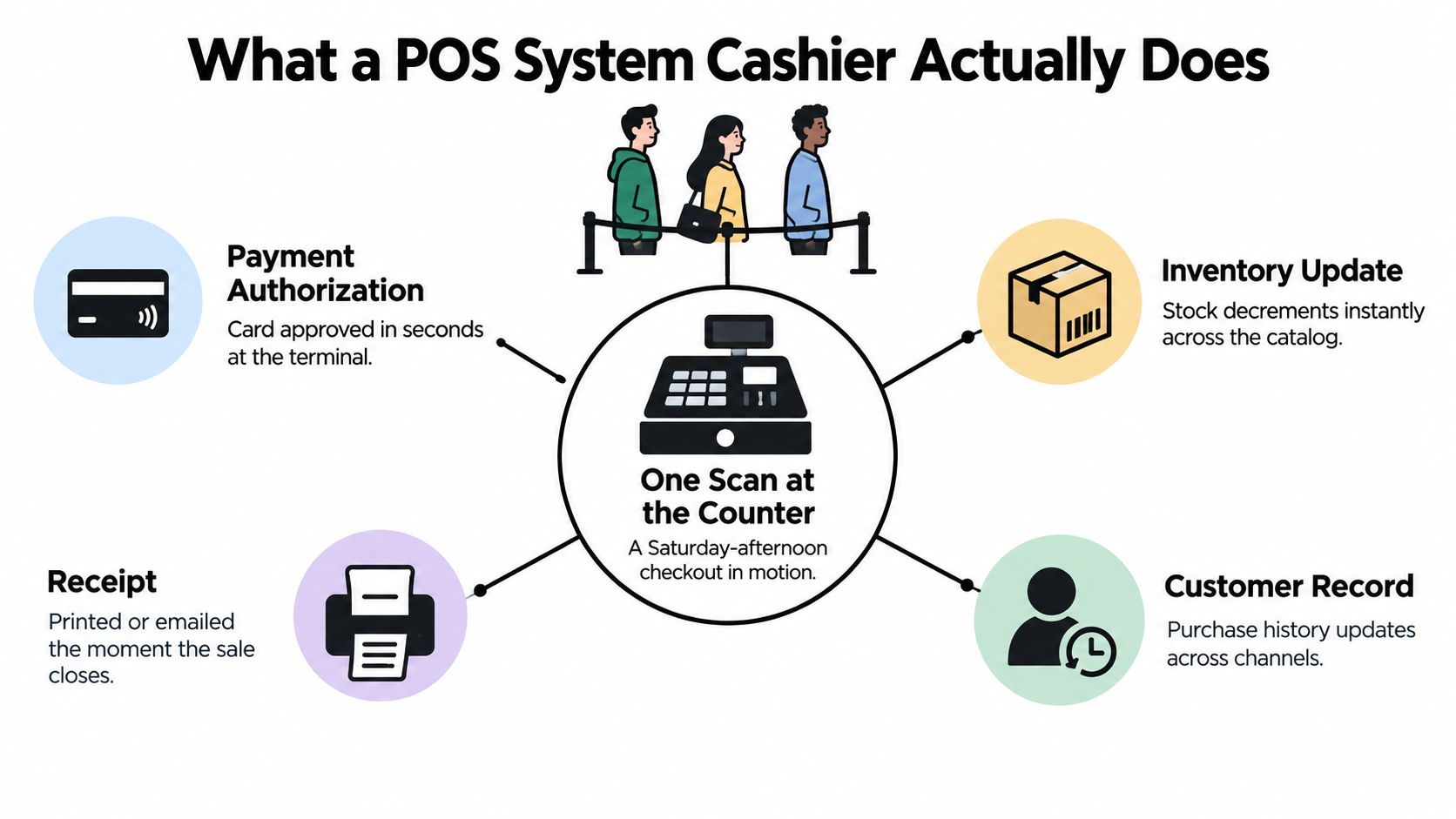
On a busy Saturday afternoon, the queue reaches the door. A cashier scans a jacket, checks a promotion, takes a card payment, and hands over a receipt while the next customer places a basket on the counter. The sale feels simple, but the POS system cashier is coordinating several actions at once: it checks the price, authorizes payment, reduces available stock, records the transaction, and may update the customer's purchase history.
That's why a POS system can't be judged only by how quickly it opens the cash drawer. A register that accepts payment but updates inventory late can create oversells. A system that records sales but mishandles refunds can leave the till and the back office out of balance. Good cashier software makes the routine invisible and gives staff clear control when something goes wrong.
Table of Contents
- What a POS System Cashier Actually Does
- From Cash Register to Networked POS
- The Cashier Transaction Workflow Step by Step
- POS Features Every Cashier Station Needs
- Handling Refunds, Split Tenders, and Edge Cases
- How POS Connects to Unified Commerce
- The Future of the Cashier Role and How to Choose Your POS
What a POS System Cashier Actually Does
The cashier taps the final total. Behind that single action, the system starts a tightly connected transaction sequence. The payment processor checks whether the tender can be accepted, the product record confirms what was sold, inventory is reduced, and the sale is added to reporting. The POS may also attach the transaction to a customer record and generate a printed or digital receipt.
Core concept: A POS system cashier is a transaction-processing layer, not simply a payment terminal. It connects payment authorization, inventory decrement, receipt generation, and sales reporting in one sale.
Consider a store selling its last unit of a particular product. If the terminal records the payment but the stock system updates later, the website may continue showing the item as available. An online customer can then place an order for an item that has already left the store. That gap is data drift, and it often begins with a delay at the counter.
The same issue appears in reporting. If a discount is applied at the register but the back-office system receives only the undiscounted price, the receipt, daily sales report, and cash reconciliation can disagree. The cashier may appear to have made a mistake even though the underlying problem is a broken handoff between systems.
The three operations inside every sale
A retail sale depends on three operations working together:
- Payment authorization: The terminal accepts cash, card, contactless payment, or another supported tender and confirms the transaction.
- Inventory decrement: The system removes the sold quantity from available stock, including the last unit when applicable.
- Sales reporting: The system closes the sale, stores the payment method, and makes the transaction available for receipts, reconciliation, and reporting.
Independent retail guidance describes this immediate connection between payment, transaction closure, and inventory updates in its explanation of how a retail POS system handles sales and stock. For staff, the practical lesson is straightforward: if one part fails, don't assume the other parts completed correctly. Check the transaction status before rescanning, refunding, or taking payment again.
From Cash Register to Networked POS
The modern register began as a control mechanism for sales, not as a general-purpose computer. In 1879, James Ritty developed the first mechanical cash register, known as the “Incorruptible Cashier.” The machine was designed to record sales, discourage theft, and create accountability around transactions, according to this history of POS systems.
Early registers gave owners a reliable record of what happened inside the drawer. Cash drawers and electric registers extended the same idea, but each machine largely operated on its own. A manager could inspect a register's totals, yet shared inventory and centralized reporting required additional manual work.
The register becomes a network
A major change arrived in 1973, when IBM developed a computer-powered cash register. The system could support up to 128 registers connected to one central repository, shifting the architecture from isolated cash drawers to networked POS infrastructure. That connection established the pattern modern retailers still use: many cashier stations writing to a shared operational record.
The distinction matters when evaluating software today. A standalone register answers, “What happened at this drawer?” A networked POS can answer, “What happened across every station, location, channel, product record, and customer account?” The latter requires dependable synchronization, clear transaction identifiers, and controls for outages or repeated submissions.
This is the foundation behind POS integration for connected commerce operations. A barcode scan at one station can affect replenishment, online availability, financial reporting, and customer service elsewhere. The counter is therefore part of the business's data infrastructure.
A large operational layer
The installed base shows how far the category has moved beyond mechanical cash handling. One industry summary reports 71 million POS terminals worldwide in 2024, while another estimates the global POS terminal market at $32.3 billion in 2022, with a projected 10.2% CAGR through 2030, as reported in this POS terminal market overview. A U.S. industry compilation cites 4.5 million POS terminals in the installed base for 2023.
These figures describe more than hardware adoption. POS terminals now form an operational layer for retail, hospitality, and service businesses, handling cash, card, and digital payments while feeding the records that other teams depend on.
The Cashier Transaction Workflow Step by Step
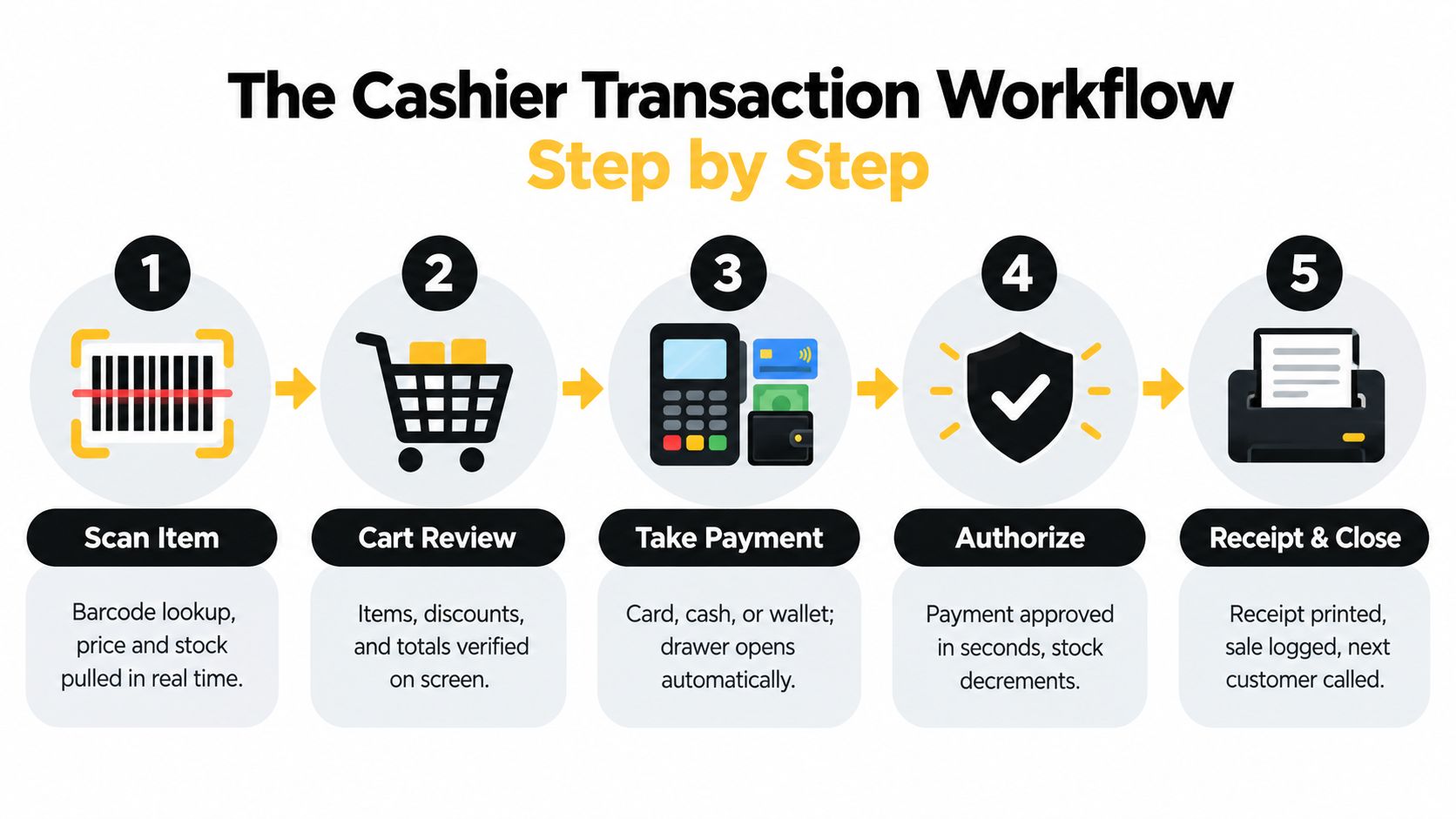
A well-designed sale works like a relay race. Each stage hands accurate information to the next stage, and the customer experiences one continuous checkout rather than a series of disconnected system actions.
1. Scan and identify the item
The cashier scans a barcode or searches the catalog. The POS retrieves the product name, price, tax treatment, available quantity, and applicable promotion. That lookup should be fast and unambiguous. If the barcode isn't recognized, the cashier should use a controlled product search or request an authorized price lookup rather than entering an improvised description.
The scan can also trigger connected actions involving the cash drawer, card reader, inventory service, and accounting record. Integration guidance describes this as simultaneous orchestration rather than a simple barcode event, which is why slow product indexing can make the whole station feel unresponsive.
2. Review the cart
The cashier checks quantities, variants, discounts, and the running total. This is the right moment to catch a duplicate scan, an expired promotion, or a price that doesn't match the shelf label. A clear screen helps the cashier correct the cart before payment begins.
If the item is the last available unit, the system should flag the resulting stockout when the sale completes. The stock change must reach the shared catalog promptly, especially when the same inventory is offered online or at another location.
3. Take and authorize payment
The customer chooses cash, card, contactless payment, or a digital wallet. For cash, the POS should calculate change and record the tender accurately. For electronic payment, the card reader and payment service return an approval or decline status that the cashier can understand.
Published retail guidance gives a benchmark of about 40 seconds per transaction plus 3 seconds per item in this cashier transaction timing guidance. The number highlights why every scan, lookup, discount, and receipt step matters during a rush. Payment speed alone won't fix a station slowed by manual searches or repeated screens.
4. Close the sale and issue the receipt
After authorization, the POS commits the sale, records the payment method, updates inventory, and prints or emails the receipt. The cashier should wait for a clear completed status before moving to the next customer. If the screen is still processing, rescanning or charging again can create duplicate records.
Use the receipt as the customer's proof and as a quick operational check. It should show the purchased items, discounts, totals, and tender details that the store needs for future returns or reconciliation.
POS Features Every Cashier Station Needs
A feature matters because of the failure it prevents. Cashier software should make the standard path short while preserving an auditable path for corrections.
| Feature | Workflow Stage | What Breaks Without It |
|---|---|---|
| Card, cash, contactless, and wallet acceptance | Take payment | Staff improvise tender handling, and payment records can become unclear |
| Printed and digital receipts | Close the sale | Customers lack transaction proof, and returns become harder to verify |
| Refunds, voids, and exchanges | Exception handling | Stock, payment, and sales records can diverge |
| Discounts and promotion rules | Cart review | Cashiers calculate manually, creating inconsistent prices |
| Real-time inventory synchronization | Sale completion | The catalog shows stale availability and can produce oversells |
| Drawer controls and cash reconciliation | Opening and closing | Cash differences are harder to trace |
Payment coverage should match the ways customers pay at the counter. A station may need a card reader, cash drawer, contactless support, and wallet acceptance, but hardware alone isn't enough. The POS must also record each tender correctly and show the cashier what remains due when a customer uses more than one method.
Receipt handling deserves equal attention. A printed receipt supports an immediate handoff, while an emailed receipt can connect the purchase to a customer record. In either case, the receipt should come from the same completed transaction that updated stock and reporting.
Speed comes from orchestration
The benchmark of about 40 seconds per transaction plus 3 seconds per item means an extra second during every item lookup can accumulate quickly in a queue, as explained in the retail POS speed benchmark. The bottleneck may sit in barcode retrieval, promotion rules, device communication, or synchronization rather than in the card network.
A practical audit should ask:
- Can the cashier find an unscannable item quickly? Product search should return the right variant without forcing a long manual sequence.
- Can the system recover safely? A brief network interruption shouldn't cause a second charge or leave stock in an uncertain state.
- Can a supervisor trace corrections? Voids, price overrides, refunds, and drawer movements need clear user and transaction records.
- Can the station show the next action? Error messages should tell staff whether to retry, wait, use another tender, or call a supervisor.
For checkout design considerations beyond payment acceptance, the checkout feature guide provides useful context. Evaluate features at the register, not only in a sales demonstration. Ask a cashier to process a normal basket, a discount, a failed scan, and a correction while you watch the number of screens and decisions involved.
Handling Refunds, Split Tenders, and Edge Cases
The standard sale is the easy part. A POS proves its value when a customer returns an item bought online, changes their mind after payment begins, or presents two forms of tender while a queue waits.
Refunds and exchanges
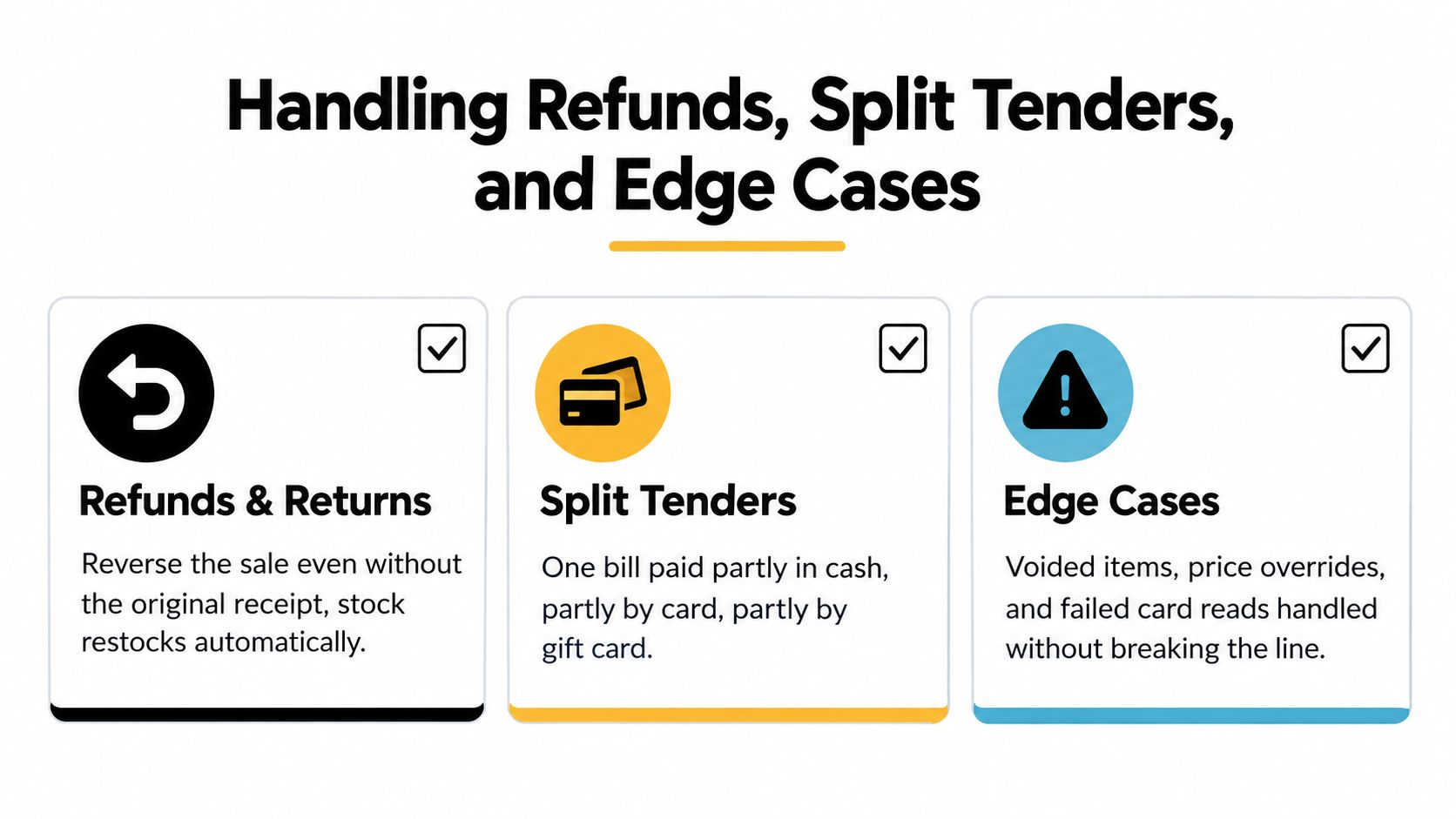
Start by finding the original order through the receipt, order number, barcode, or customer lookup. Confirm the item, quantity, payment method, and return condition before selecting the refund action. The POS should reverse the financial record and restore stock only when the store's return policy says the item is saleable again.
Cross-channel returns need one order history rather than separate counter and website records. If the original order isn't visible, staff shouldn't create an unrelated cash refund just to move the line along. That shortcut can leave the original sale open, duplicate the customer credit, and place the returned item in the wrong inventory state.
For an exchange, treat the returned item and replacement item as connected movements. The system should reverse or restock the first item according to policy and create the new sale with its own price and tax details.
Split tenders
A split tender might involve cash for part of the bill and a card for the balance. The cashier should select the first tender, enter the amount, and let the POS calculate what remains. Only then should the second tender be processed.
Practical rule: Never guess the remaining balance from memory. Let the POS display it after each partial payment.
The system should keep the sale as one transaction with multiple tender lines. That structure makes the receipt understandable and gives the back office a way to reconcile the cash and card portions separately.
Voids, outages, and failed reads
A mis-scan should be voided from the open cart before payment closes. A failed card read should produce a clear retry path, not an instruction to start a second sale without checking whether the first authorization succeeded.
Offline handling requires special care. If connectivity drops, the station may need to continue with locally available product and payment information, then synchronize when the connection returns. The system must use idempotent transaction handling, meaning a retry of the same request doesn't create a duplicate sale or decrement stock twice.
At closing, compare the physical cash with the POS drawer record, including pay-ins, pay-outs, refunds, and split-tender cash. Cashier training materials regularly identify offline connectivity, cash reconciliation, and payment troubleshooting as recurring operational pain points. Build those scenarios into practice sessions instead of waiting for the next rush.
How POS Connects to Unified Commerce
A counter sale doesn't end when the customer leaves. The transaction can affect the shared catalog, fulfillment decisions, customer service, loyalty history, and the availability shown on the online store.
Suppose a customer buys the last medium jacket in a shop. The POS should reduce that variant in the shared inventory record. The online store then needs to read the updated quantity before promising the same jacket to another shopper. If the customer is identified, their purchase history can also support a future return or a service conversation.
One order record across channels
Unified commerce means the cashier terminal, online storefront, subscriptions, fulfillment workflows, and customer records use connected data rather than isolated copies. An in-store return can be matched to an online order. A customer lookup can show the purchase needed to approve an exchange. A shared catalog can prevent the website from selling stock already committed at the counter.
The architecture matters because each duplicated database creates another opportunity for drift. One system may know that a discount was applied, while another sees the original price. One channel may mark an item unavailable, while another still offers it. Staff then spend time correcting records instead of helping customers.
A unified commerce platform approach treats the order lifecycle as one connected process. The cashier is not sending a vague notification to the rest of the business. The cashier is writing a transaction that other systems can use.
What staff need at the counter
Cashiers don't need to understand every service behind the interface, but they do need workflows that reflect the shared record:
- Online order lookup: Search by the approved customer or order details and confirm the original line items before changing the order.
- Cross-channel return: Follow the return policy attached to the order rather than treating an online purchase as an unrecognized walk-in sale.
- Inventory exception: Escalate a mismatch when the shelf, POS, and online availability disagree. Don't adjust quantities to make the current customer happy without proper acknowledgment.
- Customer identification: Ask for the information required to locate the record, then confirm the result before attaching a purchase or refund.
The best mixed-channel design makes these steps feel like normal cashier work. The customer sees one brand and one service experience, even though the transaction may touch inventory, payments, fulfillment, and customer data.
The Future of the Cashier Role and How to Choose Your POS
Cashier work is shifting from entering routine transactions toward managing exceptions and customer needs. Reporting published in 2025 says self-checkout and AI-enhanced POS are reducing cashier roles, with one industry estimate projecting a 20% to 30% reduction in cashier roles over five years. The U.S. labor outlook cited in the same coverage projects a 6% decline in cashier employment from 2025 to 2035, as described in this retail cashier labor analysis.
Those projections don't mean every store can remove people from the front of house. Someone still needs to resolve a failed payment, verify an identity or restricted sale, approve a return, explain a promotion, and help a customer who can't use self-checkout. Automation changes the mix of work, so training should focus on judgment and recovery, not only button memorization.
The future cashier isn't absent from the transaction. The role is moving closer to exception resolution, identity checks, and customer support.
Audit the station before buying more features
Use live scenarios rather than a feature checklist. Ask each POS candidate to handle a regular sale, a product with a discount, a split tender, a return tied to an online order, and a temporary connectivity problem.
Then assess the following:
- Transaction speed: Count scans, screens, confirmations, and manual entries. The cashier should not repeat work the system already knows.
- Synchronization: Check how quickly the sale reaches inventory, reporting, customer history, and online availability.
- Refund flexibility: Confirm how staff locate orders, process exchanges, and restore stock under different return conditions.
- Permission controls: Make sure routine staff can work independently while sensitive overrides remain controlled and traceable.
- Offline resilience: Ask what happens to payment status, stock changes, and retry behavior when the connection fails.
- Training clarity: Have a new or unfamiliar cashier follow the workflow. Confusing labels and buried actions become queue problems.
A restaurant operator evaluating table service, takeaway, delivery, and counter payments may also benefit from this practical restaurant POS guide by OrderOut. The same principle applies across retail and hospitality: judge the system by how it behaves during exceptions, not just by the smooth demo sale.
A capable POS system cashier should disappear during ordinary transactions and become dependable when the ordinary path breaks. Choose the platform that keeps payment, stock, receipts, returns, and channel records aligned while giving staff the authority and guidance to solve real customer problems.
PlatformDTC offers connected storefront, checkout, subscriptions, payments, inventory, fulfillment, analytics, and in-person POS through a unified catalog and order record. If your counter sales and online operations are drifting apart, visit PlatformDTC to assess a more coordinated commerce workflow.