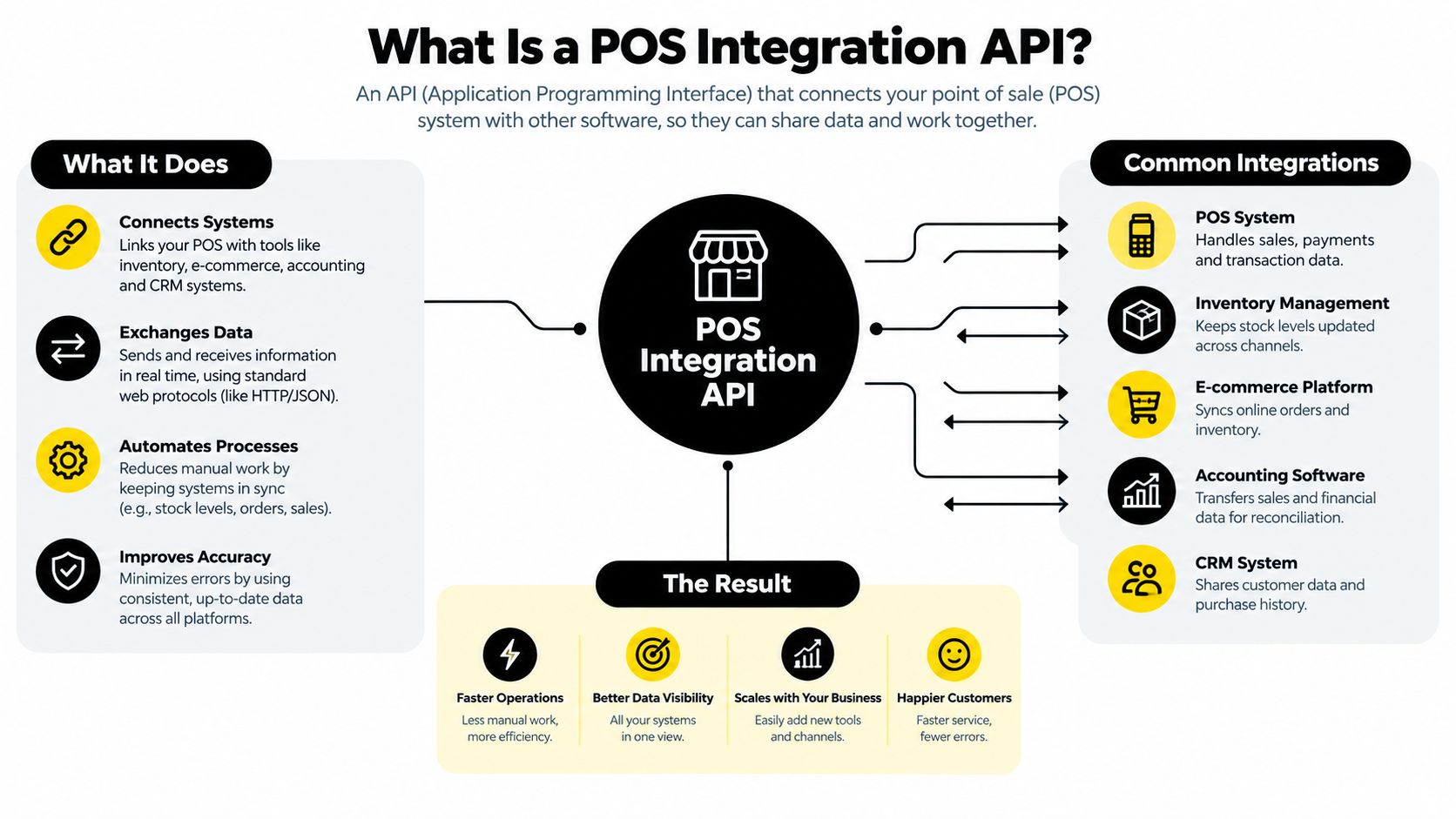
A POS integration API is a standardized connector that lets a POS system automatically exchange sales, inventory, customer, and payment data with other business software. In practice, that means fewer manual re-entry errors and a cleaner sync between in-store, online, and back-office records.
You're usually dealing with this because the register works, but the rest of the stack doesn't stay in step. Inventory drifts, refunds take longer to reconcile, and your team ends up patching gaps by hand. That's the core problem a POS integration API solves, not just payment acceptance.
Table of Contents
- What Is a POS Integration API
- Synchronous Versus Asynchronous POS Patterns
- Authentication and Security Controls for POS APIs
- PlatformDTC Unified Commerce Architecture
- Hidden Costs of Multi-Vendor POS Integration
- Market Scale and Integration Priorities
- Setting Up POS Integration with PlatformDTC
- Choosing Your POS Integration Approach
- Troubleshooting Common POS Integration Issues
- Reducing Total Cost Through Unified Commerce
- POS Integration API Quick Reference
What Is a POS Integration API
A POS integration API is the layer that lets point-of-sale software talk to ecommerce, accounting, CRM, and inventory systems in a controlled way. It's the mechanism behind real-time synchronization that makes a completed in-store transaction show up in accounting and online inventory without a second manual entry, which is why it matters so much for DTC brands running blended channel operations. The idea is mature infrastructure, not a new trend, since Square publicly documented a Point of Sale API by 2015 to 2016 and later kept the same app-switch model for in-person payments. That history matters because it shows the industry has already moved from isolated register software to API-mediated omnichannel systems. PlatformDTC's overview of POS integration fits this same operational model.
For operators, the important shift is simple. A POS is no longer just where a card gets charged. It's the system that should update sales, inventory, customer records, and payments as one event so your storefront, warehouse, and finance tools don't argue with each other.
For teams comparing implementations across regions, a practical reference on Singapore POS system integration is useful because it frames the same connector problem from a local commerce angle. The core architecture doesn't change. What changes is the surrounding business logic, tax handling, and operational workflow.
Synchronous Versus Asynchronous POS Patterns
The biggest mistake I see is teams treating POS integration like a normal request-response app. Card-present flows don't behave that neatly, because terminals can be offline and receipt printing doesn't always complete on the same clock as authorization. Modern guidance is to treat the transaction as an event-driven state machine, with durable resources, asynchronous request-acknowledge flows, and later state changes delivered through events or webhooks. That avoids brittle assumptions that the network, the terminal, and the printer will all respond together. The rationale for event-driven POS design and idempotent writes is laid out in Beefed.ai's POS API extensibility guidance.
What works in production
Build around a canonical transaction ID and keep every write idempotent. That way, retries don't create duplicate captures, duplicate receipts, or duplicate settlement records. In a unified online and POS record model, that single ID becomes the anchor for reconciliation, refunds, and settlements across channels.
Practical rule: if the terminal can go offline, your API design can't assume synchronous completion.
Contract-first design helps here. Publish an OpenAPI or protobuf/gRPC specification as the source of truth, then keep SDKs thin so they validate input, normalize errors, and retry with backoff instead of hiding business logic in client code. That keeps docs, mocks, and tests aligned when the terminal workflow changes.
What does not work
Do not build a happy-path RPC wrapper and call it done. That breaks the moment receipt printing is delayed, the reader disconnects, or the POS vendor returns partial status. For DTC brands, the result is usually the same, hard-to-debug mismatches between online orders, store receipts, and fulfillment records.
The safest pattern is simple, durable, and a little boring. That's exactly what you want in payments infrastructure.
Authentication and Security Controls for POS APIs
Production POS integrations usually fail on the basics, not on exotic edge cases. One documented pattern requires both an API key and a business/location key in the Authorization header, and it also mandates a User-Agent header, rejecting requests that don't send it. Another reference implementation uses bearer-token authentication, JSON over UTF-8, a demo environment for preproduction testing, and HATEOAS links to reduce hard-coded coupling. Those controls aren't decoration, they're the guardrails that keep integrations supportable at scale. PlatformDTC's security guidance belongs in the same review folder as your API docs and rollout plan.
Security checks that should be non-negotiable
- Separate credentials by environment: keep demo and production access isolated so test traffic doesn't leak into live order flows.
- Validate headers early: reject requests missing required authorization fields or
User-Agentheaders before they touch business logic. - Prefer tokenized payment paths: EMV-certified hardware, cloud-native connectivity, cross-channel tokenization, and ISO 20022-aligned messaging help preserve cleaner financial records across channels.
The point isn't just to block unauthorized traffic. It's to reduce data drift between in-store and ecommerce transactions while keeping payment risk low enough that your team can sleep at night.
Where teams get sloppy
They reuse keys across vendors, skip header validation in staging, or let client apps hard-code endpoint paths. That creates brittle integrations that are hard to rotate, hard to audit, and annoying to support when something fails at the counter.
Security should make bad requests fail fast and make good requests easy to trace.
If you can't tell which location submitted a transaction, which terminal processed it, and which environment it came from, your integration isn't production-ready yet.
PlatformDTC Unified Commerce Architecture
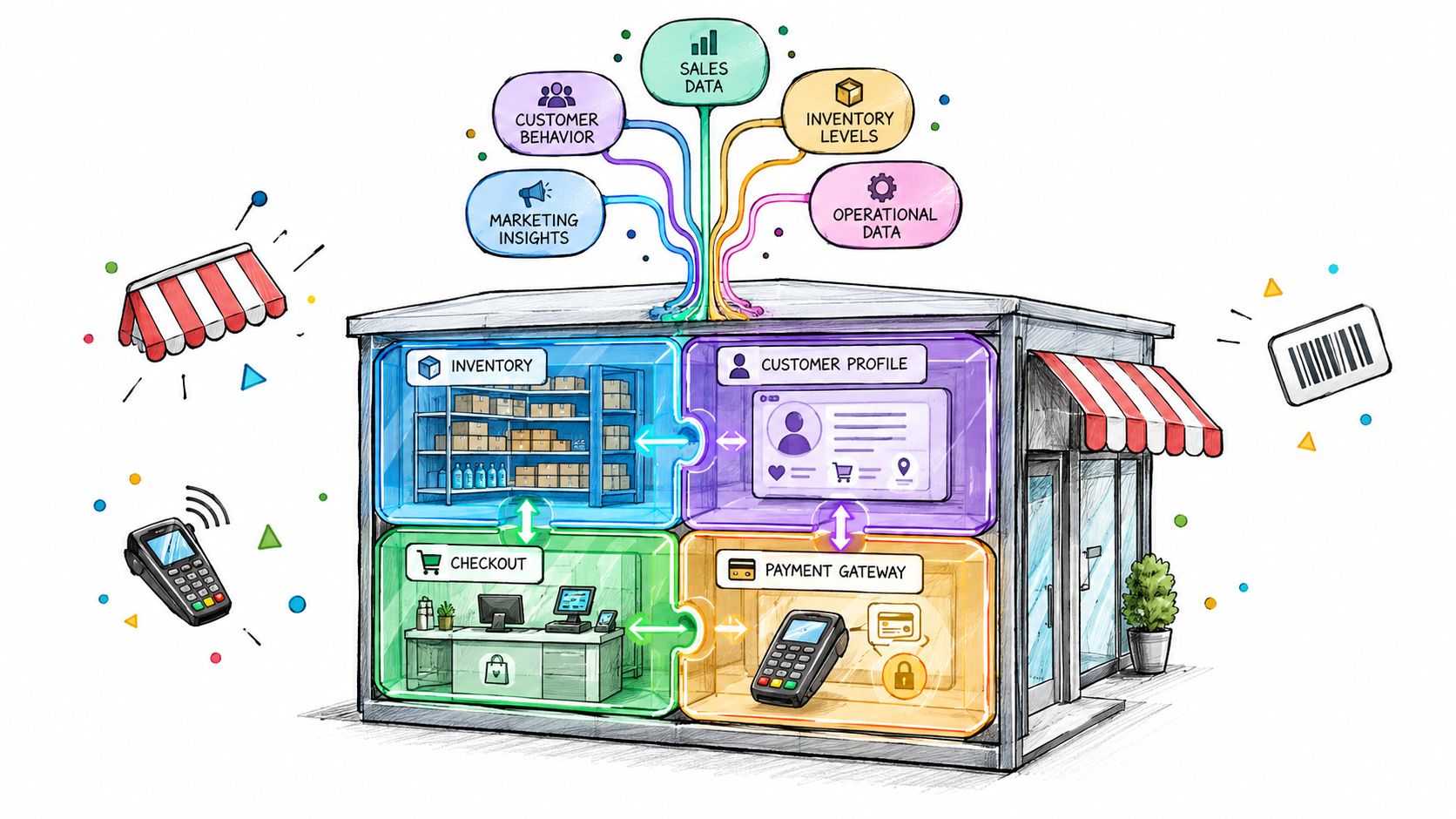
Fragmented stacks create most of the reconciliation pain people blame on POS software. If storefront, subscriptions, payments, inventory, fulfillment, and messaging live in separate systems, each one develops its own version of the truth. PlatformDTC's architecture avoids that by keeping the unified catalog and single order record in one model, so a store sale, an online order, and a return all point back to the same governed data structure.
Why the record model matters
With one canonical record, the platform can keep discounts, attribution, inventory, and fulfillment aligned without custom point-to-point code. That matters when a store associate adjusts inventory at the counter and the ecommerce team still expects the catalog to reflect the change immediately. It also matters when returns need to flow back through the same order lifecycle instead of being stitched together later from separate systems.
The practical recommendation is to model POS writes as eventful, idempotent updates against that one record. That keeps the online store, retail counter, and fulfillment queue from drifting apart as soon as a transaction moves outside the happy path.
What to insist on
Use governed APIs for any automation that touches orders, stock, or customer data. If an AI agent or automation layer can create actions, it should do so through scoped permissions, not broad account access. The safer the underlying record model, the less cleanup your team has to do after launch.
Hidden Costs of Multi-Vendor POS Integration
The expensive part of multi-vendor POS integration isn't the first connection, it's the second, third, and fourth ones. Every vendor brings its own OAuth flow, pagination style, webhook format, menu structure, and rate-limit behavior, so the engineering cost rises long before the business team notices. Content about POS integration usually mentions this briefly, but it's often the main reason projects stall in real life. API2Cart's coverage of POS integration normalization and rate limits gets closer to the operational reality than most vendor brochures do.
Where the work actually goes
Schema normalization is the hidden tax. One POS may call modifiers one thing, another may split them across nested objects, and a third may flatten them into item notes. If your internal model isn't strict, your downstream systems end up guessing what a “product,” “menu item,” or “bundle” means in each vendor's vocabulary.
Rate limits add another layer of pain. Teams that batch too aggressively hit throttles, while teams that back off too cautiously fall behind on sync. The right answer is usually a vendor-aware queue with idempotent writes and retry logic tuned per connector, not a universal polling script.
If you're connecting to several POS vendors, the integration problem becomes a data-model problem first and an API problem second.
The scale of the maintenance burden grows quickly because every new vendor multiplies test cases, webhook paths, and failure modes. That's why unified commerce architectures become more attractive as soon as the stack stops being a single-store setup.
Market Scale and Integration Priorities
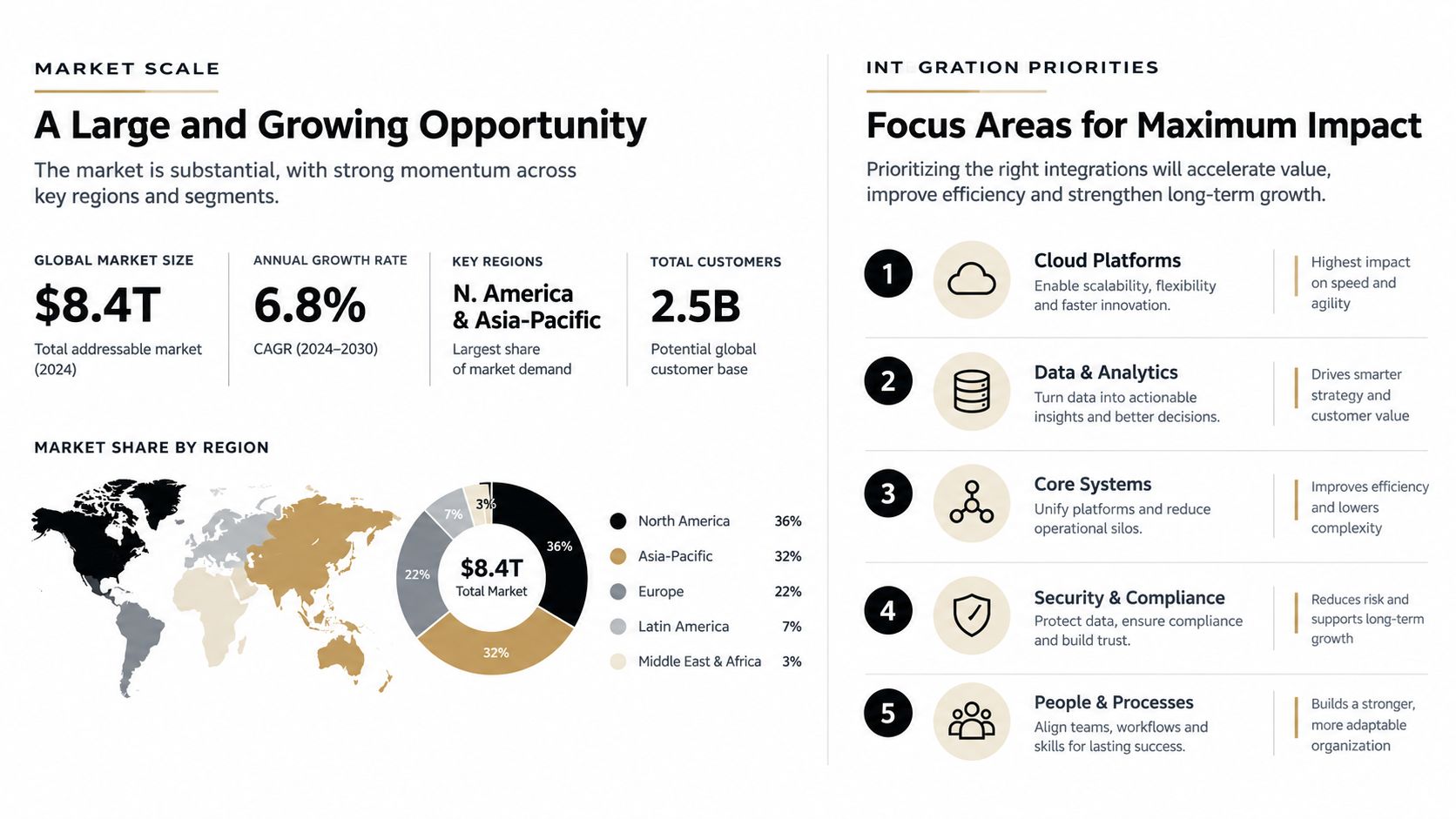
The market is large enough that integration work isn't a side task anymore. Independent coverage placed the global POS market at $33.41 billion in 2024, which shows how much operational surface area these integrations touch. In the same coverage, 85% of restaurant operators were reported to prioritize system integration as their top purchasing driver, which is a strong signal that connectivity now sits near the center of buying decisions. OrderOut's POS integration API coverage captures that scale and priority clearly.
Build versus buy
A custom build can make sense if your workflows are unusually specialized and your engineering team has time to own the entire integration surface. But if you need store, online, and back-office systems to stay aligned without a permanent maintenance queue, a unified platform usually wins on operational drag alone. APIs remove the need for custom point-to-point code and keep inventory and customer records synchronized across channels, which is exactly what larger retail environments need.
That's why a platform like PlatformDTC matters in this conversation. It gives you one operational layer instead of a patchwork of connectors, so the POS isn't sitting off to the side as a separate island.
Setting Up POS Integration with PlatformDTC
Start with the developer APIs and documentation, then map the flows you need before you touch production. The cleanest setup is to decide how in-person payments, catalog updates, customer sync, and returns should behave from the start, then validate each path in a lower-risk environment. The platform's POS area is designed for card and cash payments at retail counters, and it keeps orders and customer lists aligned with the rest of the commerce stack. PlatformDTC's POS page is the right place to confirm the current setup flow.
A practical rollout sequence
- Import the catalog first. Get products, variants, and inventory mappings stable before any live sale happens.
- Run parallel systems. Keep the old stack and the new stack active long enough to verify reconciliation, refunds, and stock movement.
- Test payment settlement paths. PlatformDTC Payments uses Stripe-hosted fields and supports direct settlement to merchants' Stripe and PayPal accounts, so confirm the handoff before cutover.
- Control agent access. If DTC Agents are part of the workflow, keep their permissions scoped to the actions they need, with spend approvals and logs enabled.
The fastest migration is usually the one that spends the most time proving the boring parts.
The point of the rollout isn't to be clever. It's to make sure the first live transaction behaves exactly the way your finance and operations teams expect when the store is busy.
Choosing Your POS Integration Approach
For most DTC brands, the choice comes down to how much integration ownership you want to carry. A custom build gives you control, but control also means you own retries, schema mapping, monitoring, support, and every vendor-specific edge case. A unified platform reduces that surface area by consolidating the record model and the operational tools behind it.
Here's a simple comparison.
| Factor | PlatformDTC Unified | Custom Build |
|---|---|---|
| Total cost of ownership | Lower ongoing coordination across store, online, and back office | Higher because every connector needs separate upkeep |
| Engineering overhead | Smaller integration surface, fewer point-to-point links | Larger support burden across vendors and edge cases |
| Time to production | Faster if your workflows fit the platform model | Slower because each flow must be designed and tested |
| Maintenance burden | Concentrated in one governed stack | Spread across integrations, webhooks, and retries |
| Flexibility | Strong for unified commerce patterns | Strong for highly specialized requirements |
If you want a broader purchasing guide, the Splash Access POS guide is a helpful neutral reference for weighing operational fit against technical overhead.
The right answer depends on your actual team shape. If you have the engineers to own multiple connector lifecycles and a business need that diverges from standard unified commerce, custom can be justified. If not, you'll usually spend more time keeping systems in sync than improving the customer experience.
Troubleshooting Common POS Integration Issues
Most production failures fall into three buckets, and they're usually easy to spot if your logs are useful. Authentication errors show up when API keys, business keys, or location keys are missing or wrong. Rate-limit failures happen when your retry logic is too aggressive. Data sync failures appear when your POS schema and backend schema don't agree on field names, item structure, or transaction state.
What to check first
- Authentication errors: verify the full header set, not just the token. Check whether the request came from the right environment and location.
- Rate-limit rejections: inspect retry timing, queue depth, and burst behavior. One noisy worker can degrade the whole sync pipeline.
- Schema mismatches: compare field mappings for products, modifiers, discounts, and tax lines before assuming the vendor is at fault.
Idempotency failures are the other common trap. If your retry path doesn't recognize the original transaction ID, you can create duplicates even when the first request succeeded. That's why canonical IDs and reconciliation logs matter more than a pretty dashboard.
Use the published system status page and migration verification tools before cutover, then keep a known-good sample transaction set around for regression checks. If a refund can't be traced end to end, the integration still isn't stable enough for live volume.
Reducing Total Cost Through Unified Commerce
Point-to-point integrations look cheaper at the start, then they turn into support debt. Every connector needs monitoring, every webhook needs testing, and every vendor adds another place where inventory or attribution can drift. A unified commerce layer cuts that overhead by keeping orders, payments, inventory, and fulfillment inside one operational model.
The savings are also in engineering time. A brand running five or six custom connectors can easily spend weeks each year on schema mapping fixes, retry tuning, and regression checks every time a POS vendor changes a field or response shape. A governed stack reduces that churn because one integration contract is easier to test, patch, and audit than a pile of one-off links.
Daily close is where the cost shows up fastest. If weekend sales are still reconciling on Monday morning, finance teams lose time chasing mismatched payments, returns, and inventory movements. Watch the reconciliation queue and the status page together. If lag starts to build there, the integration is already costing you more than it should.
POS Integration API Quick Reference
Before you start, make sure you've locked down the essentials. You need a clear transaction ID strategy, documented schema mappings, retry rules that respect vendor rate limits, and security controls that separate test traffic from production traffic. You also need a decision on whether your team will own the connector lifecycle or rely on a unified platform model.
Quick checklist
- Define the canonical record: decide which system owns sales, customer, and inventory truth.
- Document sync behavior: map what happens on sale, refund, partial capture, and offline recovery.
- Test auth and headers: confirm credentials, location scoping, and user-agent requirements in lower environments.
- Validate idempotency: replay the same request and make sure it doesn't duplicate state.
- Check monitoring: log request IDs, vendor responses, and reconciliation outcomes.
If your brand needs unified online and in-person commerce with governed APIs, migration tools, and a POS flow that's tied to the same order record, PlatformDTC is worth evaluating against your current stack. Start with the developer docs, test your current data model against the platform's POS workflow, and compare the maintenance load before you commit to another custom connector.