You've got a code live, it's moving orders, and finance is asking why the discount line is bigger than the forecast. Someone checks a few orders and finds the code stacked on sale prices, applied to shipping, and worked on a gift card. Nobody wrote those rules down. The code string was ready, the rule set wasn't.
That's the usual failure with discounts promo codes. Teams treat the code as a coupon string and stop at the checkout box. In production, a code is a ledger entry. It changes what the customer pays, what you refund, what inventory you reserve, and what a subscription charges next month. Build it that way from the start.
Table of Contents
- Design Rules Every Discount Needs Before Launch
- How to Create and Apply a Promo Code Step by Step
- Resolving Conflicts Between Codes, Sales and Rewards
- What Happens to a Discount When Orders Change
- Measure Promo Codes and Launch One Safely
Design Rules Every Discount Needs Before Launch
A sale launches with a 20% off code, and customers apply it to marked-down goods, shipping, and gift cards. The code works as configured, but the configuration missed those cases. Without explicit rules, support cannot explain which orders qualified, and finance cannot reconcile the discount against the offer.
Write the rule spec before the code string. Each field should answer a decision that affects checkout, a later refund, or an in-store return. The offer becomes a set of rules the system can apply and preserve, rather than a string whose meaning changes with the cart.
The Nine Fields That Define an Offer
| Rule field | Decision to make | Example setting |
|---|---|---|
| Offer type | Percent, fixed amount, free shipping or buy X get Y | 20% off the cart subtotal, not per line |
| Reference price | Which compare-at or prior price backs the claim | A price genuinely charged within a relevant period |
| Eligibility | New customer, tier, list membership or subscriber status | First-order code blocked if the account already has an order |
| Usage limit | Per code, per customer or per order | One use per customer, one code per order |
| Stacking | Which other codes or automatic sales it may combine with | One code plus automatic sale price, never two codes |
| Exclusions | Products, collections, gift cards, bundles or subscriptions | Excludes gift cards and bundles |
| Channel scope | Online, POS, B2B draft orders or agent-assisted orders | Online and POS with the same code |
| Calculation base | Whether the saving is taken before or after tax and shipping | Subtotal before tax and shipping |
| Expiry | Start and end time, plus the timezone used | Ends Sunday at 23:59 store timezone |
Practical rule: A blank field leaves the engine to apply a default. That default can create an unintended discount or an argument over whether an order qualified.
Set the reference price with the same care as the discount amount. A 20% off claim compares the offer price with a real prior or standard price. The comparison should reflect a price genuinely charged, and should remain meaningful for the period in which the claim appears. A compare-at value entered for display alone does not establish that customers paid that price.
Keep price history with the discount record. Landing page copy, cart totals, and checkout disclosures should use the same reference price. If marketing changes the compare-at price, retain the version associated with each order, so a later refund or return can be checked against the offer and price in force when the purchase happened.
The rule spec also needs to account for what happens after checkout. A refund should refer to the original discount calculation, not recalculate against current prices or current eligibility. For a subscription, record whether the offer applies only to the first charge or repeats. At POS, keep the same offer rules available for returns, even if the original purchase used another channel. These decisions determine what the ledger entry means after the sale.
Store the completed spec as a versioned record inside the engine, not only in a spreadsheet or campaign document. When finance asks why an order received a particular discount, the order should point to its rule version and calculation base. That record gives support and returns teams the same answer without relying on memory or current campaign settings.
How to Create and Apply a Promo Code Step by Step
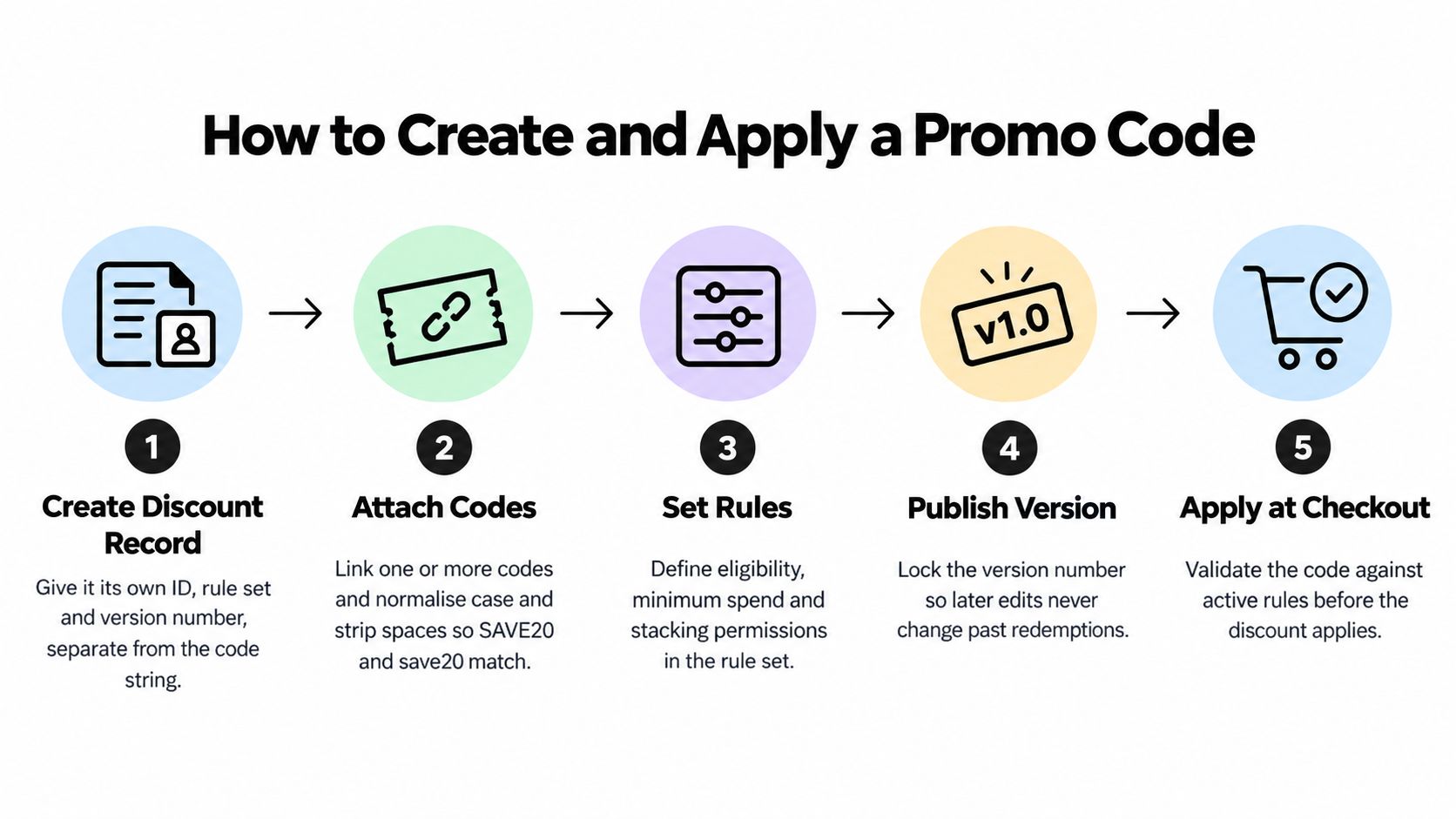
The sequence below separates the discount, the code, and the redemption. That separation is what lets you change a code string, retire a leaked code, or audit an order without rewriting history.
Build the Record Before the String
- Create the discount record first. Give it its own ID, the full rule set from the previous section, and a version number. The record is the offer. The code is only one way to reach it.
- Attach one or more codes. Normalize case and strip spaces so SAVE20 and save20 resolve the same way. Multiple codes can point to one record for different channels or partners, and you can disable one leaked string without killing the offer.
- Validate on every cart update. Check the active window, eligibility, usage limits, exclusions, minimum spend, and current prices each time the cart changes. A code that was valid for two items may stop being valid when one is removed.
- Return a specific failure reason. Don't show a generic invalid message. Say expired, not valid on subscriptions, minimum not met, or already used. Specific reasons reduce support tickets and stop shoppers guessing with other codes. That clarity at the code field is one practical way to reduce cart abandonment at checkout, because shoppers can fix the problem or move on instead of stalling.
Calculate Once and Commit Atomically
- Calculate in one pricing function. Cart, checkout, and the final order must call the same server-side function. Never recalculate the discount in the browser, or the displayed total and the charged total will drift.
- Attach the code with an idempotency key. Build the key from checkout ID plus code. If the shopper double clicks, the network retries, or payment times out and resubmits, that key prevents a second redemption from registering.
- Commit in one transaction. On order commit, write the order, the redemption record, and the usage counter increment together. A counter bumped later by a payment webhook is the usual cause of limit overruns, because two concurrent checkouts both pass validation before either counter moves.
- Reserve inventory in the same commit. Discounted units shouldn't be oversold because reservation happened somewhere else. If payment fails, release the reservation and don't count the redemption.
Finally, store per-line discount allocations on the order. If a cart-level 20% discount covers three lines, record how much of that discount belongs to each line at purchase time. You'll need that split for every partial refund, exchange, and POS return later, and you can't reconstruct it reliably after prices change.
Distribution comes after the mechanics work. Whether you send the code through your email marketing program, an influencer link, or an on-site banner, the redemption path above stays identical.
Run this test today. Place a test order, submit the same checkout three times with the same idempotency key, and confirm you get exactly one order, one redemption, and one counter increment.
If that test produces two redemptions, don't launch. Retries aren't edge cases. They're normal network behavior, and your usage limits are only real if they survive them.
Resolving Conflicts Between Codes, Sales and Rewards
A customer applies a code to an item already on sale, adds loyalty points, then tries a second code. If the checkout changes the total without explaining why, the customer has no clear way to tell whether the order is correct. Treat each promotion as a ledger entry with eligibility, priority, and a defined effect on the order, not as a coupon string that can combine with anything.
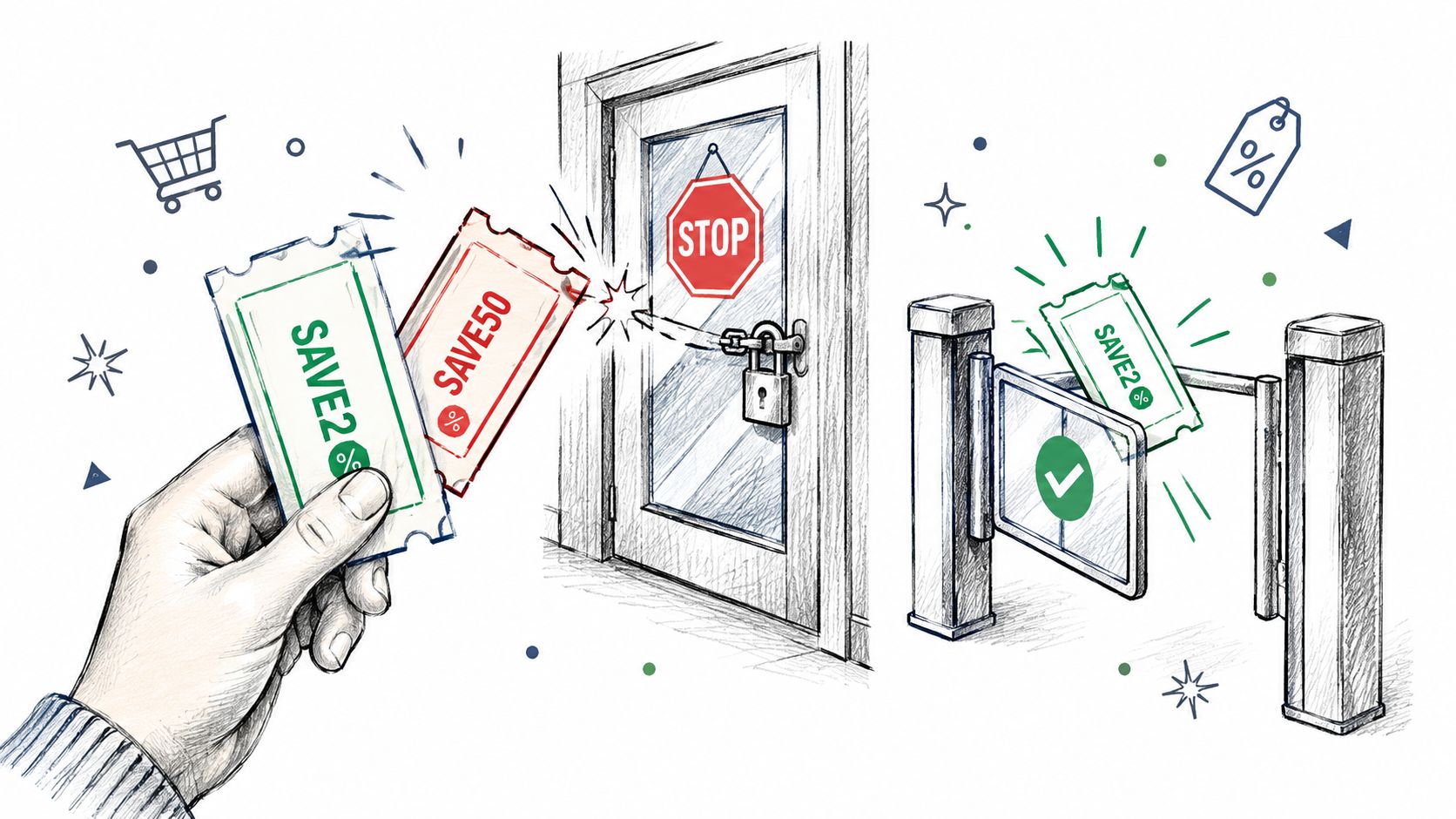
The image below shows the decision your checkout must make: accept an eligible code and give a clear reason when another is rejected.
Precedence Rules for Common Collisions
Set the priority rules before launch and apply them consistently across channels. A discount should resolve to a predictable order total, with the accepted promotion and any rejection reason visible at checkout.
| Conflict | Resolution rule | Reason |
|---|---|---|
| Code versus automatic sale price | Apply whichever saves more per line, if stacking is allowed | Prevents the customer from losing a better eligible price |
| Two codes entered on one order | Accept the first valid code and reject the second with a named rule | Makes the one-code limit clear |
| Code plus loyalty points | Apply points to the net total after the code | Keeps points tied to the amount paid |
| Free shipping code plus percent-off code | Keep them in separate discount classes with a stated priority | Prevents one class from erasing the other |
| First-order code on a subscription renewal | Block the code after the first order | Stops repeat first-order savings |
| Returning customer with a new email | Match on account ID, payment fingerprint, or shipping address | Detects repeat claims without blocking shared devices by default |
Loyalty needs its own explicit order of operations. If your rewards program lets shoppers spend points like cash, apply points after the code against the net total. Applying points first can inflate the code discount and complicate reconciliation of the points liability.
The checkout should explain the result in the moment. A specific message such as “This code cannot be combined with a sale price” gives the customer a decision; a generic “invalid code” does not.
Abuse Controls That Spare Legitimate Customers
A one-code-only rule can limit stacking, but it will not catch every form of misuse. Blocking by email alone is easy to bypass, while blocking by device or address can affect a household with multiple legitimate customers. Choose controls that match the offer's risk, and record the reason for each decision.
- Customer-level eligibility: Check first-order status against the account and order history, not only the email entered at checkout.
- One-time redemption: Enforce single use in the transaction that creates the order. A later cleanup job leaves a window for duplicate redemptions.
- Minimum spend and exclusions: Exclude gift cards or set a qualifying spend to limit low-value orders made solely to use a code.
- Velocity monitoring: Flag repeated attempts, account creation, and redemptions tied to the same payment fingerprint in a short window.
- Post-purchase review: Hold suspicious orders for review before fulfillment when immediate rejection could block a legitimate customer.
Apply the same eligibility and precedence rules across web, POS, B2B draft orders, subscriptions, and agent-assisted orders. Store the applied code, discount amount, order context, and rejection reason so support can explain the result and finance can reconcile it. If a code is blocked online but accepted at the counter, the channel mismatch becomes a loophole, and the discount record no longer reflects one consistent policy.
What Happens to a Discount When Orders Change
At checkout the discount is only half done. Payments fail, items come back, subscriptions renew, and a customer returns an online order at a store counter. Each event has to move the usage counter, the discount allocation, and inventory in a predictable way.
Two traps cause most of the damage. The first is a partial refund that reverses the entire discount instead of the returned line's share, so you refund more than the customer paid for that item. The second is an exchange where staff apply the original discount to a higher-priced replacement, quietly expanding an offer that was priced for the first item.
A refund should reverse money the customer actually paid, line by line. If your system can't show the per-line allocation, it can't calculate that refund correctly.
Event by Event Treatment
| Order event | Usage counter | Discount treatment | Inventory effect |
|---|---|---|---|
| Order placed and paid | Increments by one per customer and per code | Locked to per-line allocation | Reserved units become sold |
| Payment fails | Not counted | Not applied | Reservation released when the hold expires |
| Full refund | Kept or reversed, per written policy | Refund equals the net amount paid | Restocked when the return is received |
| Partial return | Kept | Refund prorated by line allocation | Only returned lines restocked |
| Cancelled before fulfilment | Reversed | Voided | Released immediately |
| Subscription renewal | Counted per cycle if the limit allows | Rule set at signup applies again | Reserved per shipment |
| Exchange for a higher-priced item | Kept | Applies to the original line only; difference at current price | Swap reservation on both items |
| In-store POS return | Same as online | Same allocation as the online order | Restocked at the original location |
The full refund row contains a genuine business choice. Some brands keep the redemption counted after a full refund so a one-time code can't be recycled through buy, refund, and buy again. Others reverse it because the customer never kept the goods and blocking reuse feels punitive.
Either policy can work. What doesn't work is leaving it to whoever processes the refund. Decide once, write it into the rule set, and make web and POS follow the same instruction.
Subscriptions need the same discipline. State whether the signup discount applies to the first shipment only, a fixed number of cycles, or every renewal, and store that limit on the subscription record. A renewal shouldn't have to guess from the original code string whether it's still entitled to a discount.
Measure Promo Codes and Launch One Safely
A code can rack up redemptions while discounting orders customers would have placed anyway. Redemption rate shows who acted, not whether the offer caused a sale or earned its cost. Treat each promo as a ledger entry: measure its effect, then trace the discount through order changes and reporting.
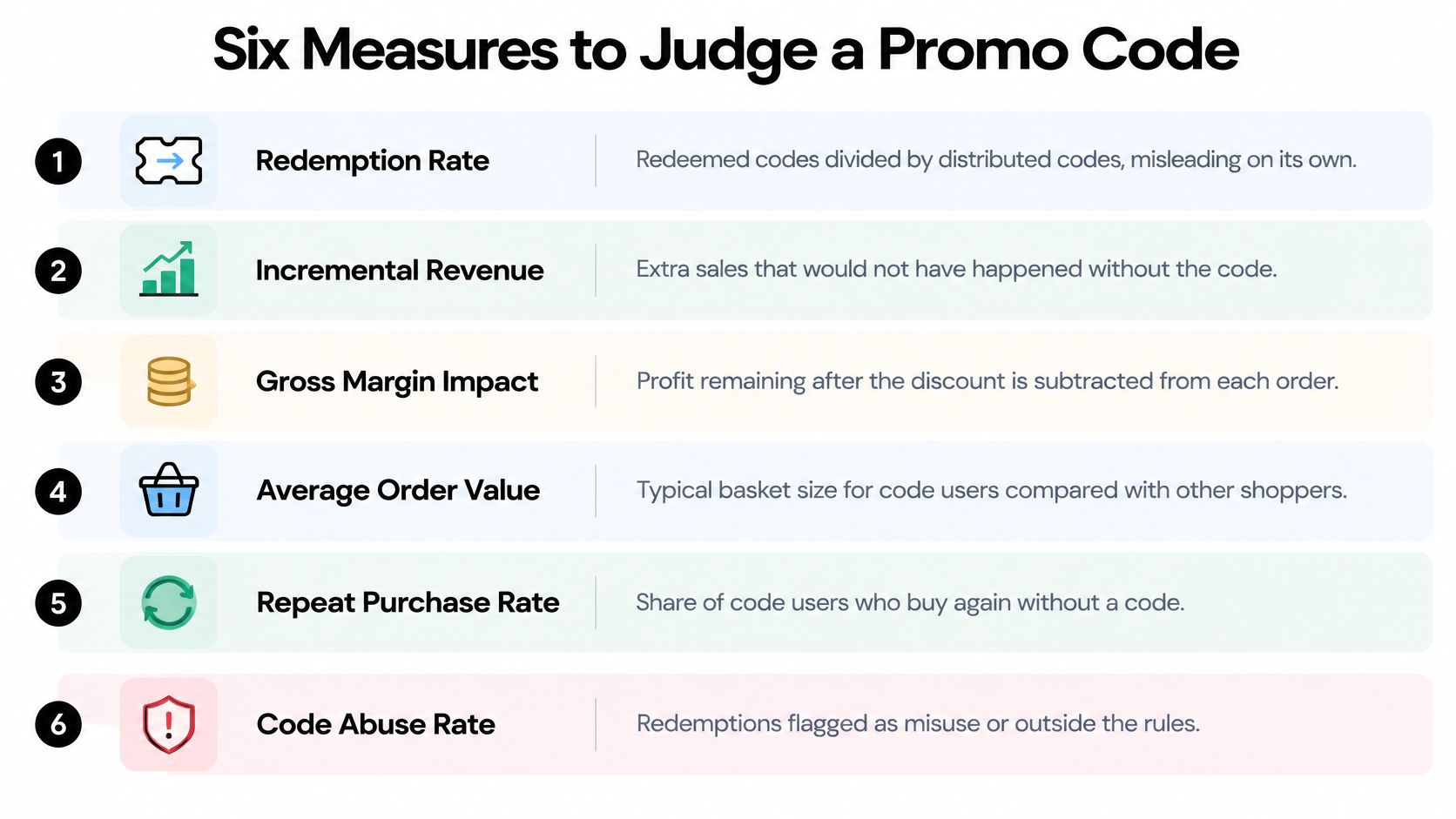
Six Measures in Decision Order
| Metric | Calculation | What it tells you |
|---|---|---|
| Redemption rate | Redeemed codes divided by distributed codes | How many recipients acted, but not whether the code changed their decision |
| Incremental revenue | Code-order revenue minus holdout-expected revenue | Whether the code created sales or discounted purchases that would have happened anyway |
| Discount cost rate | Total discount given divided by net revenue | How much revenue the code gives away |
| Margin after discount | Gross margin per code order after the discount | Whether each discounted order remains profitable |
| Average order value change | Code-order AOV minus non-code AOV | Whether the offer shifts basket size |
| Validation failure rate | Failed code attempts divided by total attempts | Where shoppers encounter friction or unclear rules |
Run a Holdout or Stop Guessing
Withhold the code from a random 10% of the eligible audience during the test window. Keep other conditions the same, including landing pages and sale prices. Compare revenue, conversion, and margin for the exposed group with the holdout group, which shops without the code.
The difference estimates incremental revenue. A common failure is to celebrate rising redemptions while the code mostly subsidizes existing demand and total profit falls. Redemption reports alone cannot distinguish those outcomes.
Report the six measures weekly while the code is live. After the 90-day repeat rate window closes, add that measure for code buyers. A first-order offer that attracts one-time bargain hunters has a different value from one that brings customers back. Feed allocation and redemption events into analytics reporting, so finance, growth, and support work from the same figures.
Keep a code live only when its incremental effect is measurable. Without a holdout comparison, redemption is not proof of value.
PlatformDTC is one option built around this model. It uses a single order record and discounts engine to carry per-line allocation data into orders, refunds, subscriptions, POS, and reporting. Whatever stack you use, maintain one consistent record. Manual joins between a promotions tool and an order system can break attribution, especially when refunds or renewals change the original order.
A Three-Step Launch Procedure
- Run the rule set on staging. Use a copy of the live catalog and recent orders, including sale prices, bundles, gift cards, and subscriptions. Clean test data misses the conflicts that appear in production.
- Test three failure scenarios. Retry a checkout submission and confirm it creates one redemption. Process a partial refund and verify the line allocation. Force a subscription renewal past the discount limit and confirm the discount stops.
- Launch one code with its holdout defined. Wait for clean redemption, margin, and failure-rate data before enabling another code. Overlapping launches make it harder to identify which offer caused the result.
Choose one live code this week, attach a holdout to its remaining audience, and report its incremental revenue next Monday. That gives the team a measurable result and an auditable ledger entry, rather than a redemption count without context.