You usually don't start looking for a custom ecommerce solution because you want a prettier storefront. You get there after the third app starts conflicting with the fourth, discount logic drifts across channels, checkout can't support the way your team sells, and every “small” change turns into a coordination problem between ops, marketing, and engineering.
At that point, the question isn't whether custom is possible. It's whether your current stack is becoming a risk you can't keep paying for. A custom build can solve that, but only if you treat it like an operating model decision, not a feature wishlist. For a useful external view on how ecommerce teams think about growth channels and merchandising around the store, the ecommerce marketing insights hub from Cometly is a solid reference point.
Table of Contents
- Introduction to Custom Ecommerce Solutions That Scale
- Planning Requirements and Scoping Your Build
- Choosing Your Architecture Between Monolith and Composable
- Designing APIs and Integrations That Hold Together
- Migrating Without Losing Revenue or Data
- Tips for Launching and Maintaining Your Solution
Introduction to Custom Ecommerce Solutions That Scale
A custom ecommerce solution usually enters the conversation when a brand has outgrown templates, app sprawl, or a platform's default checkout rules. That doesn't always mean starting from zero. Sometimes it means a custom frontend on top of a tighter commerce core, sometimes it means a more opinionated stack, and sometimes it means replacing enough of the workflow that the business finally stops bending itself around software.
The teams that benefit most are the ones with real complexity, not just ambition. If you're managing subscriptions, wholesale, multi-location inventory, unique bundles, or a serious experimentation program, the question is less “can the platform do it?” and more “how many brittle workarounds are we willing to live with?” A custom ecommerce solution makes sense when the answer has become “too many.”
Practical rule: if every launch request turns into a stack of app installs, manual exceptions, and support tickets, you're already paying the complexity tax.
A custom build also changes ownership. You're not just buying software, you're signing up for architecture decisions, QA discipline, release management, and ongoing maintenance. That's not a downside by itself, but it is the part feature-list guides usually skip. The right expectation is that you'll trade some convenience for control, and that trade only pays off when the team is ready to run the system with clear guardrails.
There's also a strategic filter that helps. If your business model depends on a unified customer record, controlled promotions, reliable order lifecycle data, and fewer integration seams, custom starts to look less like vanity and more like risk management. If your needs are simpler, a heavily customized SaaS stack may get you there faster without taking on the same operational burden.
A useful way to read the rest of this guide is simple. First, define the business problem you're solving. Then map that into scope, architecture, integrations, and cutover risk. If the answer still points to custom after that, you'll know why.
Planning Requirements and Scoping Your Build
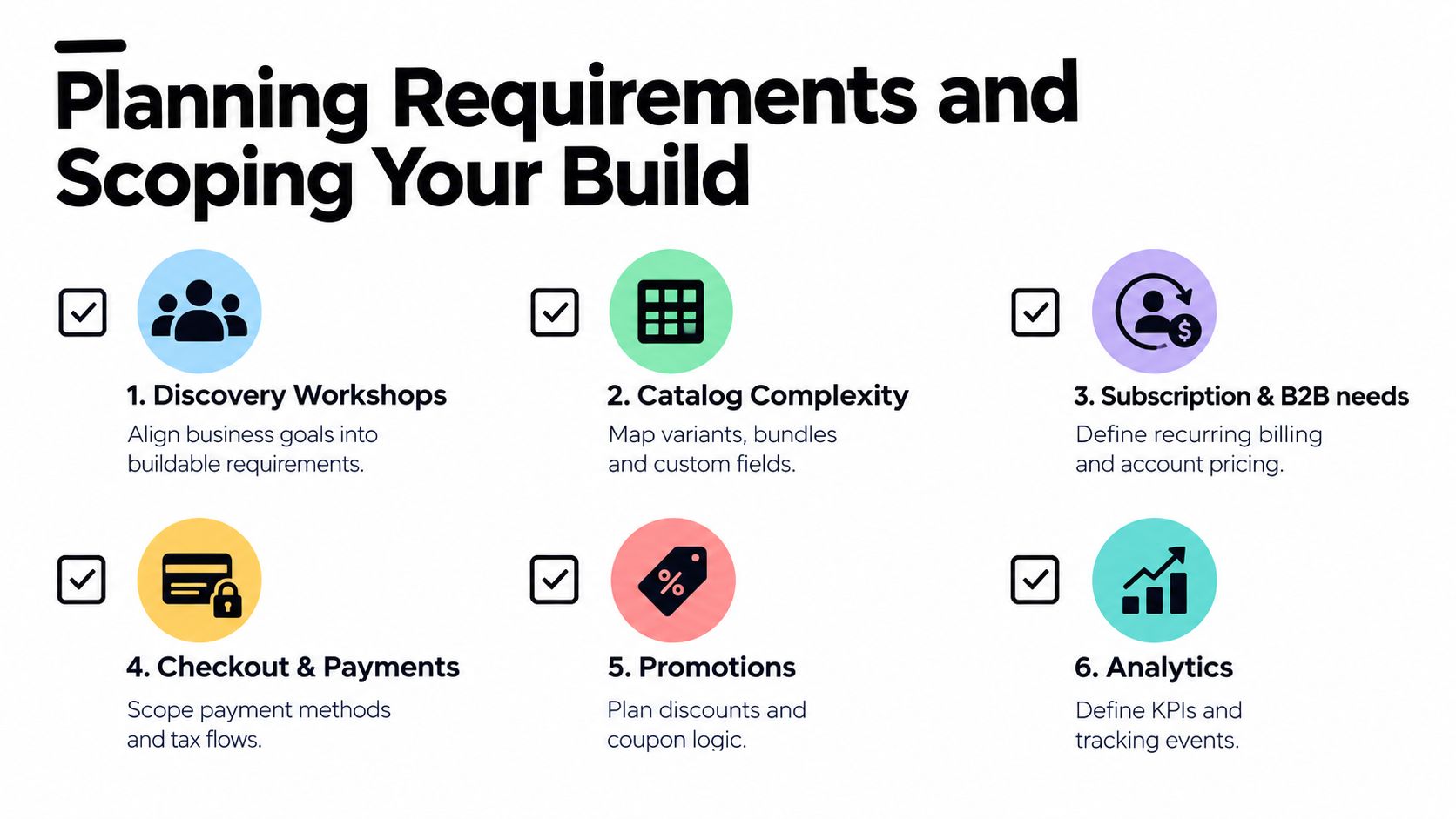
Planning a custom ecommerce solution starts with translating business goals into buildable requirements. That sounds obvious until the first workshop turns into a wish list. The teams that stay on track write down what the business must achieve, what users must do, and what the platform has to support on day one versus later.
Start With Stakeholders and Revenue Paths
Bring marketing, operations, finance, customer support, and engineering into the same discovery session. Each team sees a different failure mode. Marketing cares about campaign flexibility and attribution, operations cares about catalog and fulfillment rules, finance cares about payments and reconciliation, and support cares about fewer broken promises to customers.
A clean requirements doc should answer a few direct questions:
- What products are being sold? Variants, bundles, subscriptions, samples, kits, and custom fields all change the build.
- Who is buying? DTC customers, wholesale buyers, or both will shape account logic and pricing.
- How does checkout need to behave? Payment methods, taxes, discounts, shipping, and fraud checks all need explicit scope.
- What has to be measured? If the team can't name the KPIs and events, analytics becomes an afterthought.
A common scoping mistake is letting the catalog shape itself around whatever the current theme can handle. That creates hidden constraints later. The better move is to map product structure, customer types, and order types first, then decide what needs to be native and what can wait for phase two.
Use Scope Boundaries, Not Hope
A good scope document separates must-have, should-have, and later. That's not project management theater, it keeps the build from absorbing every edge case the business has ever encountered. If you're adding subscriptions and wholesale at the same time, for example, define which pricing rules must exist at launch, which invoice flows are required, and which exceptions can stay manual for the first release.
A strong scope is a contract with the business, not a developer convenience list.
This is also where analytics planning matters. If marketing needs campaign-level reporting and lifecycle teams need event-level tracking, those requirements belong in the build doc, not in a post-launch scramble. For teams that want a practical marketing-side framing of this, AdManage.ai's ecommerce approach is useful because it reinforces the link between campaign execution and store operations.
A DTC brand adding subscriptions and wholesale usually needs two separate decision trees. The subscription path asks how renewals, payment retries, and customer self-service work. The wholesale path asks how draft orders, account pricing, and invoicing behave. If you merge those into one vague “B2B” requirement, the build gets fuzzy fast.
Choosing Your Architecture Between Monolith and Composable
The architecture choice is really a trade-off between simplicity and flexibility. A monolith gives you a single record model and one place to reason about data. A composable setup gives you modular services with governed APIs, which is usually the better fit once the business needs more freedom than a single core can comfortably offer.
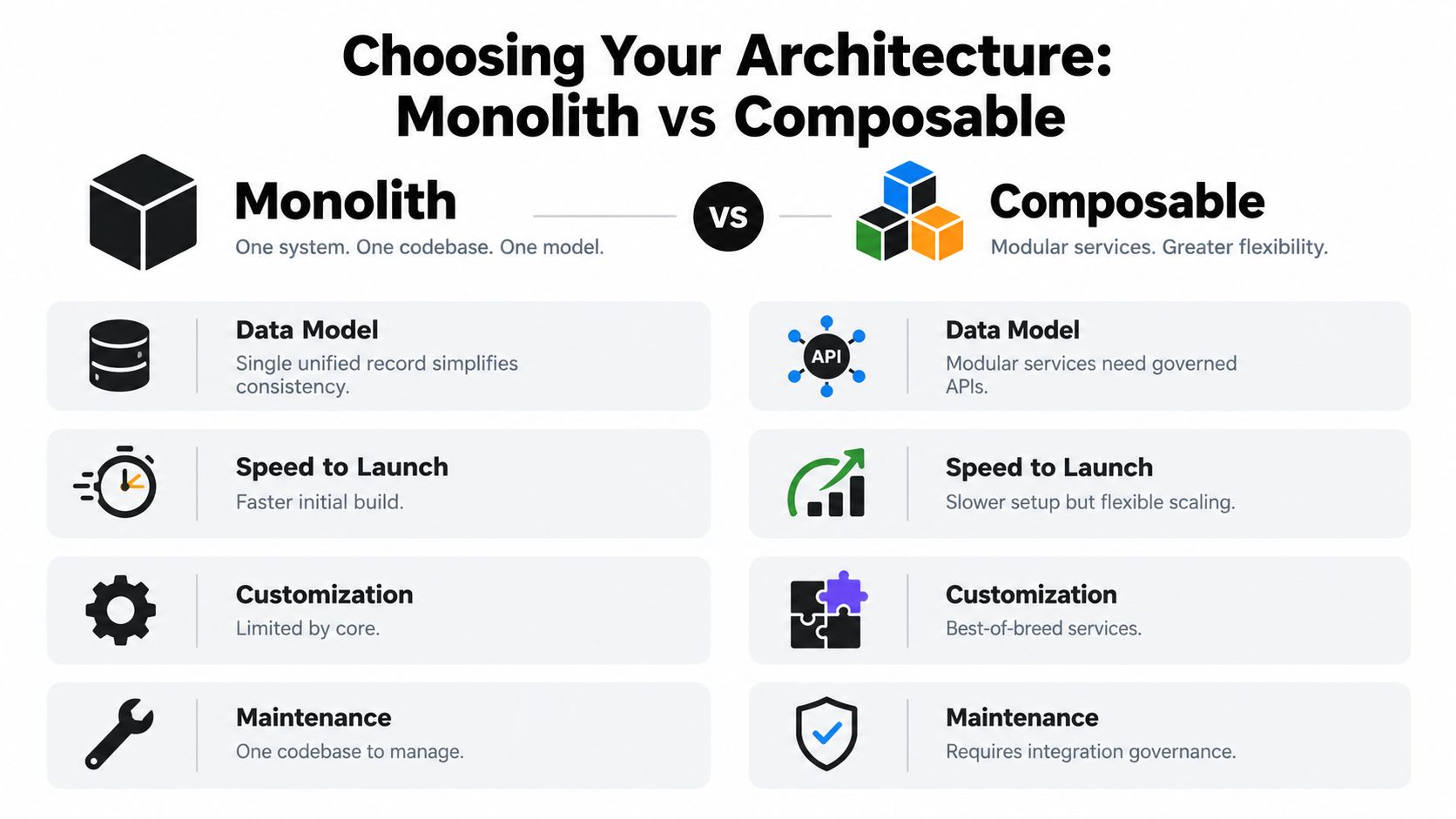
| Criteria | Monolith | Composable |
|---|---|---|
| Data Model | Single unified record simplifies consistency | Modular services need governed APIs |
| Speed to Launch | Faster initial build | Slower setup but flexible scaling |
| Customization | Limited by core | Best-of-breed services |
| Maintenance | One codebase to manage | Requires integration governance |
Decide Based on Operational Reality
A monolith works well when the team is small, the product model is still stabilizing, and the business values fast coordination over deep specialization. You get fewer moving parts, simpler debugging, and less integration overhead. That can be the right answer for brands that need speed and don't have the staffing to manage a large service mesh.
Composable starts making sense when one part of the stack changes faster than the rest. Maybe checkout must evolve quickly, while merchandising, POS, and fulfillment each have their own constraints. In that world, modular services reduce the blast radius of change, but only if the APIs are disciplined and ownership is clear.
For a more tooling-oriented comparison lens, see this architecture breakdown on PlatformDTC's comparison page. The important part isn't the label, it's whether the architecture matches the way your team ships.
Match the Architecture to the Team
If your engineering team is lean, choose the path that minimizes coordination overhead. If you have multiple product squads and a real need to evolve channels independently, composable can be worth the extra governance. AI agent workflows add another layer of pressure here, because an agent that can touch orders, discounts, or content needs strict boundaries and clean APIs regardless of architecture.
Rule of thumb: if integrations are the exception, a monolith is often easier to run. If integrations are the operating model, composable is easier to grow into.
The wrong choice is usually not “monolith” or “composable.” It's choosing a structure that looks modern but exceeds the team's ability to maintain it. The best architecture is the one you can support without slowing launches to a crawl.
Designing APIs and Integrations That Hold Together
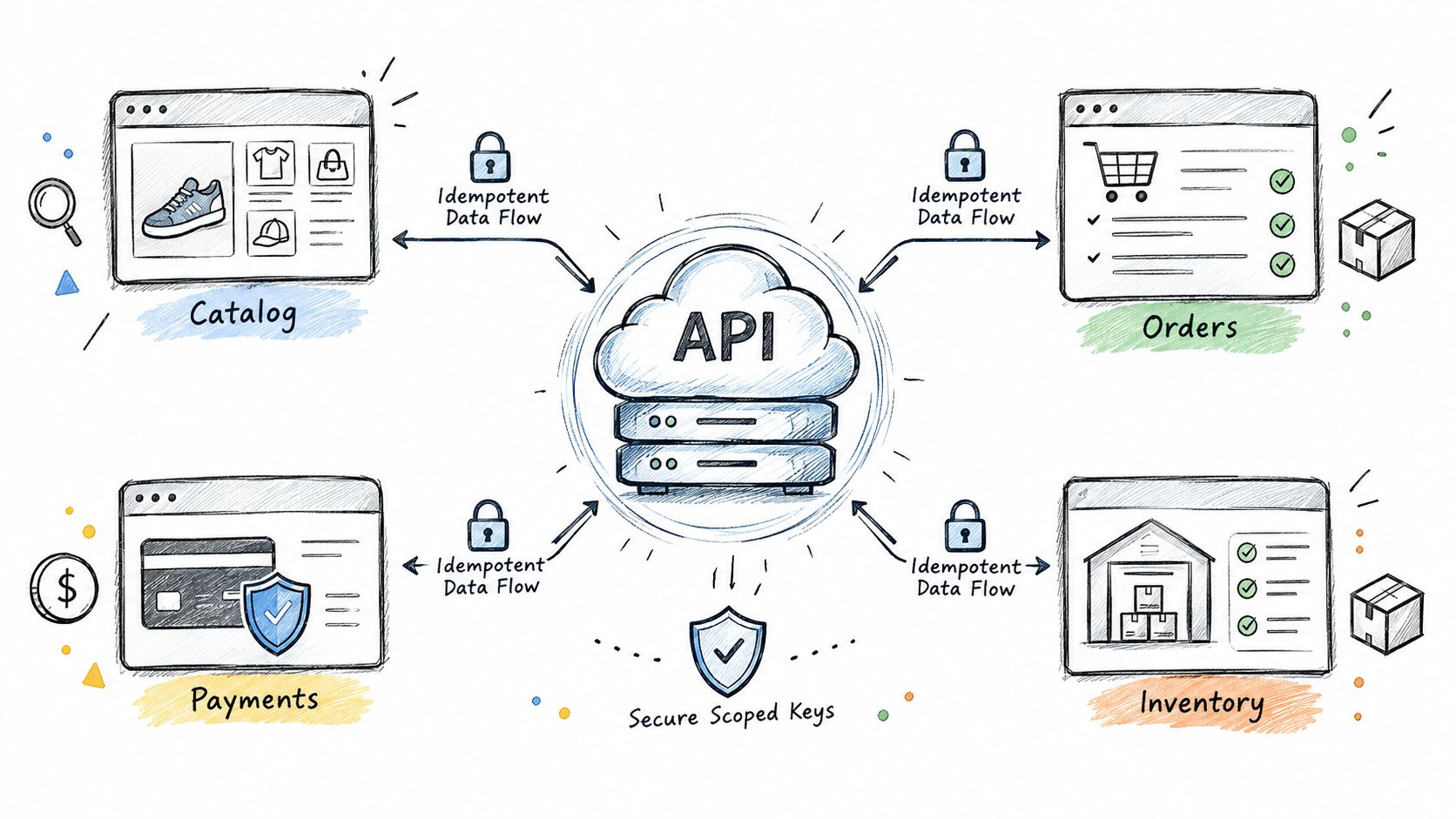
A custom ecommerce solution falls apart when every system has its own version of truth. The storefront says one thing, the payment layer says another, and fulfillment is left reconciling the difference. Good API design keeps that from happening by making one system authoritative for catalog, orders, inventory, and customer state.
Build Around a Single Source of Truth
Start by deciding which system owns which record. The storefront should present data, not invent it. Payments should confirm financial state, not guess order state. Inventory should be updated through controlled writes, not side effects buried in unrelated services.
That sounds simple, but it's where many stacks get messy. A cleaner pattern is to define a unified catalog model and a unified order model, then expose only the fields that downstream systems need. If ads, email, SMS, and POS all read from different customer records, you get drift. If they read from the same model through governed APIs, you get fewer surprises.
Use Idempotent Writes and Scoped Access
Idempotent writes matter whenever retries are possible, which is most of the time in commerce. If a webhook fires twice or an agent repeats an action, the system should not create duplicate orders, duplicate refunds, or duplicate inventory adjustments. The write operation needs to behave predictably under failure, not just on a clean run.
Scoped keys and approval gates matter just as much when AI agents are involved. An agent should not have the same permissions as a human ops manager. It needs constrained access, clear approval steps for spend or state changes, and a full audit trail so someone can trace every action later.
For a concrete payment-system reference inside the DTC stack, this guide to payment system setup on PlatformDTC shows why payments need to sit inside a controlled flow rather than as a loose add-on.
Connect the Surrounding Stack Carefully
Ads platforms should receive clean event data, not scraped order exports. Email and SMS should trigger from real order and customer events. POS should sync customer and inventory records in a way that doesn't create phantom stock or duplicated profiles. Webhooks are useful, but only when they're versioned, monitored, and tested like any other integration.
A strong integration layer doesn't mean more tools. It means fewer places where truth can split. If the commerce core is authoritative and the surrounding systems subscribe to it cleanly, the business can add channels without rebuilding the whole house every time.
Migrating Without Losing Revenue or Data
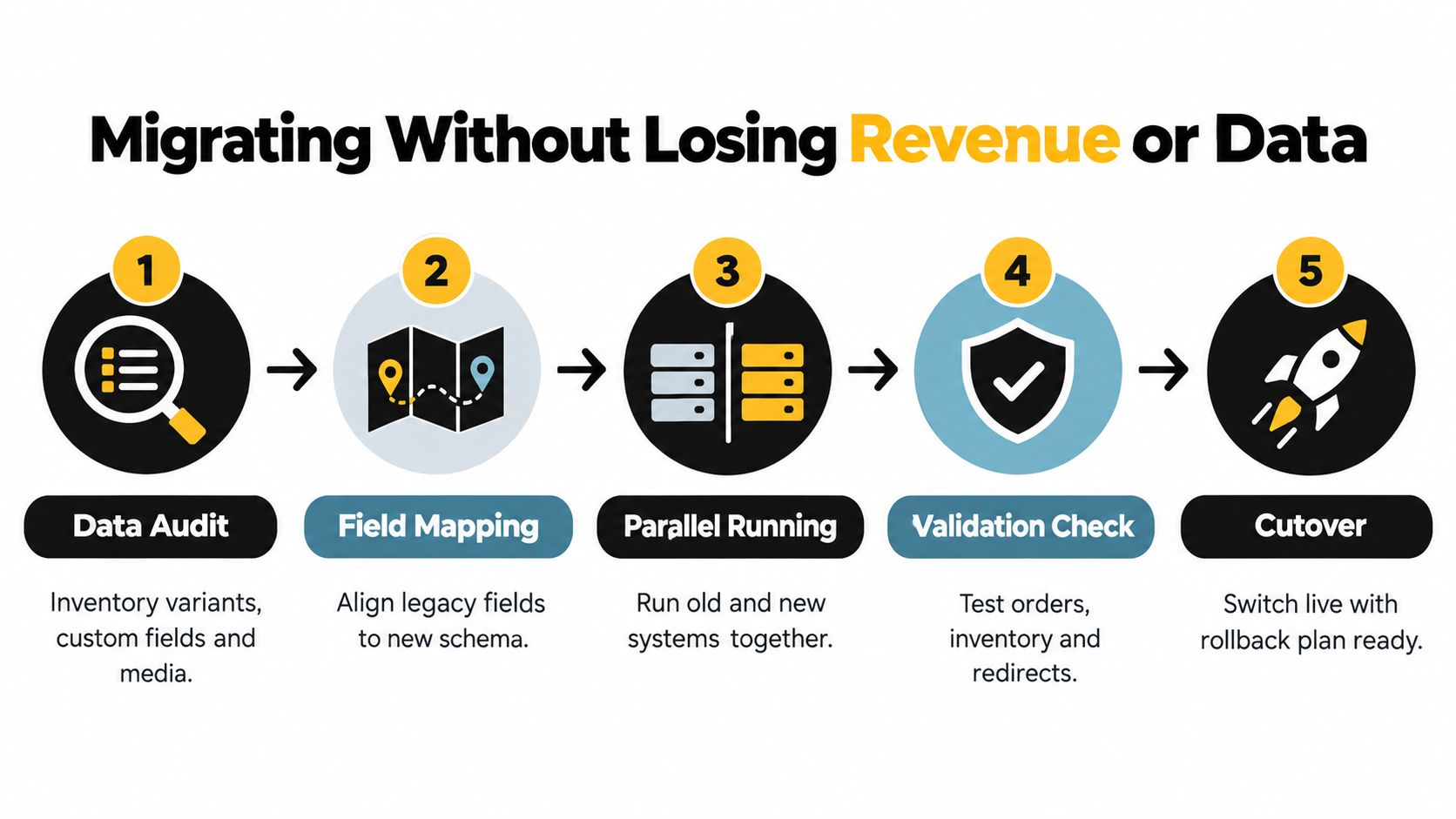
Migration is where many custom ecommerce solution projects succeed or fail. The storefront can be beautiful, the APIs can be clean, and the business can still lose revenue at cutover if legacy data, passwords, redirects, or order history are handled casually.
Start With Audit and Field Mapping
A practical migration starts with a full data audit and explicit field mapping. Legacy product data often carries variants, custom fields, metadata, relationships, and media associations that don't transfer cleanly, so the team has to inventory those structures before import begins. Passwords are typically hashed and not portable, which means reset flows need to be planned before launch, not after customers start failing sign-in.
That same discipline applies to catalog, customer, and order records. The right move is to run parallel validation on all three before you cut over. If the new system can't prove it matches the old one on core records, it's not ready.
Protect Testing Time and Cutover Discipline
Independent migration guidance notes that compressed testing is a common failure mode, and migration risk rises when teams treat the project like a simple lift-and-shift. Migration guidance from InstaWP emphasizes full data audit, fixed testing time, parallel validation, and password-reset planning. Another independent source says the biggest technical risk in custom ecommerce replatforming is data and integration complexity, not the storefront build itself, and notes that 45% of migrations fail when old data structures clash with the target platform and 83% of projects either fail or exceed budgets when data migration is the dominant risk, while also recommending 20-30% extra time for testing and delays (Okoone's migration guidance).
Those figures are a reminder to protect the cutover window. If the team compresses QA or drops the rollback plan to save time, the launch becomes a gamble. Redirects, backfills, and rollback readiness are not optional tasks, they're revenue protection.
Practical rule: if the team can't validate orders, inventory, and redirects in parallel, cutover should be delayed.
A useful migration checklist is simple. Verify field mapping. Validate records in parallel. Test password reset flows. Keep redirects mapped. Keep rollback available until the new stack has proven stable. The businesses that launch cleanly are the ones that treat migration as a production system, not a data upload.
For a more detailed operational path, this migration answer on PlatformDTC fits well with the parallel-run approach. It's the kind of work that saves you from learning the hard way after customers are already in the new flow.
Tips for Launching and Maintaining Your Solution
The launch itself is only the first real stress test. After go-live, the questions shift to total cost of ownership, support quality, monitoring, and whether the system stays stable as campaigns, promotions, and traffic patterns change. That's where a custom ecommerce solution either becomes a durable asset or turns into a maintenance drag.
Neutral industry coverage points to a gap that many teams feel but don't always quantify. Merchants are dissatisfied with platform limitations more than with price alone, with over 20% of respondents saying they were unhappy because they couldn't customize their platform and 8% citing bad customer support, according to Statista's platform migration coverage. That's a clear signal that the long-term burden isn't just build cost, it's the reliability of the stack once real operations begin.
Launch Checklist That Actually Matters
Before launch, confirm the basics that protect revenue and team sanity:
- Checkout paths: Validate payments, shipping, taxes, and error states in real scenarios.
- Promotions logic: Test stacking rules, exclusions, and edge cases before campaign traffic hits.
- Analytics events: Verify key events fire correctly for orders, refunds, and abandoned checkout.
- Support workflows: Make sure customer service can see the right order and account data.
- Access controls: Check that admin permissions and AI agent approvals are scoped properly.
After launch, keep the optimization loop tight. Review checkout drop-offs, promotion behavior, and reporting accuracy together, because those systems interact. A discount rule can distort analytics, and a tracking bug can hide a checkout issue, so isolated reviews miss the underlying problem.
Build for Ownership, Not Just Release Day
If your team expects high-touch support, ask how it's delivered. If engineers won't be able to investigate issues directly, response time suffers. If agent workflows are part of the stack, they need the same governance as any other live order path, with approval gates, scoped actions, and audit trails.
The build-vs-buy decision should stay honest here. Some teams are better served by a hybrid model, where core commerce stays controlled and specialized services handle narrow tasks. Others need a unified system because the maintenance burden of multiple tools is already the problem. The right answer is the one that keeps the business shipping without creating a permanent integration tax.
If you're evaluating a custom ecommerce solution and want to reduce migration risk, tighten ownership, and keep the stack manageable after launch, PlatformDTC is worth a look. It consolidates storefront, checkout, subscriptions, payments, inventory, fulfillment, messaging, and analytics into one system, which makes it easier to reason about cutover and ongoing operations. Visit the site, compare it against your current stack, and decide whether a unified model fits the way your team works.