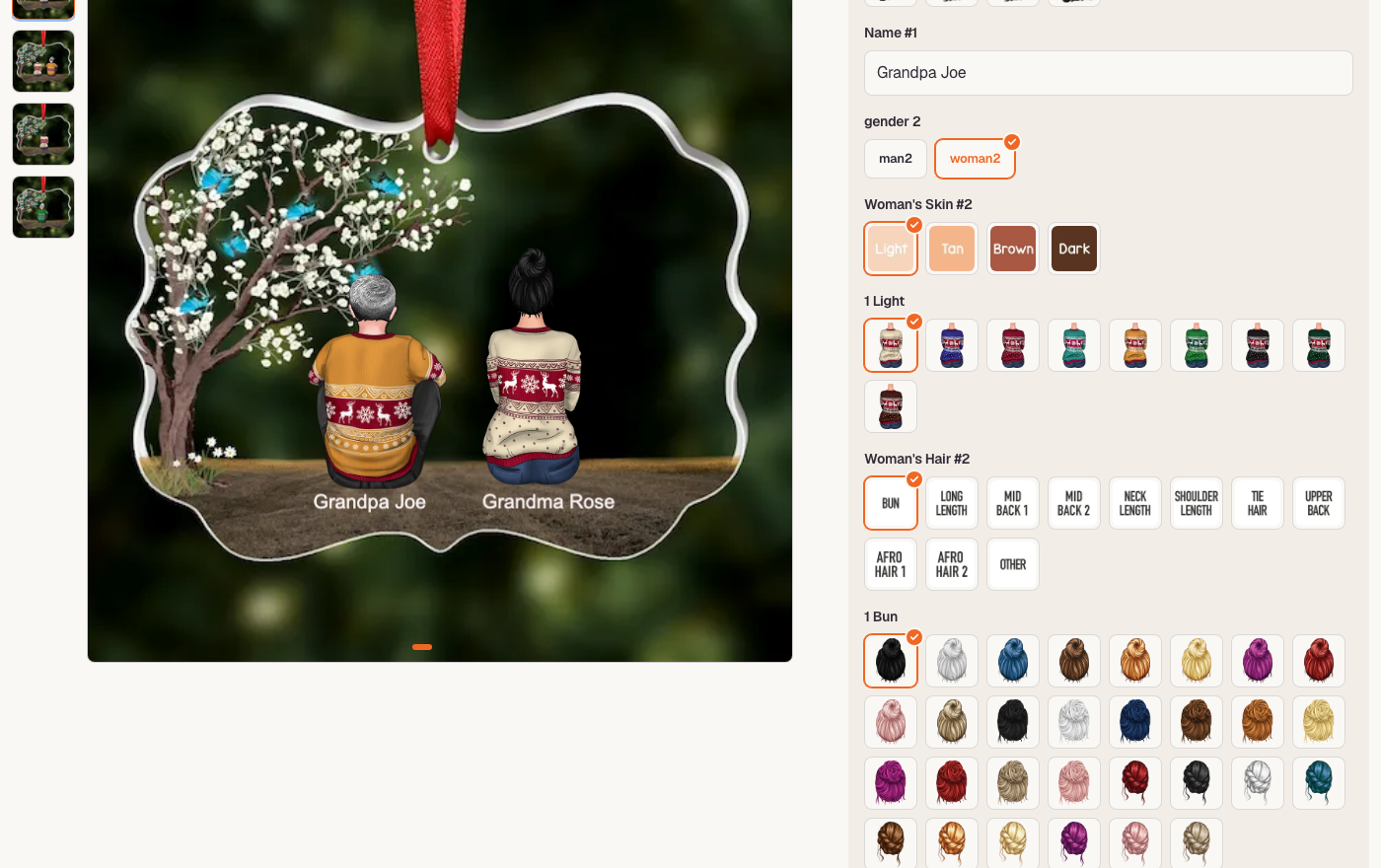
Let shoppers personalize products with a live preview and get a print-ready file for every order
Sell personalized products without back-and-forth. Build a design template once, add the choices shoppers can make, and link it to your products. Shoppers see their design update live on the product photo, and every personalized order line comes with the shopper's choices and a high-resolution print file.
- Visual template Studio with text, image and clipart layers
- Option sets: text, dropdowns, swatches, colour and date pickers, photo upload
- Conditional options and layers, template switching
- Live preview on the product gallery image
- Required choices checked before Add to cart
- Shopper choices saved on the cart and order line
- Orders screen: a print-resolution PNG for every personalized line
- Clipart and image libraries, custom fonts, ZIP bulk import
Yoursly adds product personalization to your PlatformDTC store.
Design templates in Yoursly. Lay out text, images and clipart on your product, set fonts and colours, and decide which layers the shopper can change.
Give shoppers real choices. Option sets turn a template into a form: text fields, dropdowns, colour and image swatches, colour pickers, date pickers, checkboxes, font choices and photo uploads. Conditions show or hide an option, or a layer, based on earlier answers, and one option can switch the whole template.
Live preview on the product page. The Personalizer block goes into your theme like any other app block. As shoppers pick, their design is drawn on the product's gallery image. Required choices are checked before Add to cart.
Everything arrives with the order. The shopper's choices are saved on the cart line and carried onto the order line, and a print-resolution PNG is rendered from the same inputs, so production gets exactly what the shopper saw. The Orders screen lists every personalized order line with its choices and a download for its print file.
Reusable assets. Keep clipart and images in libraries organised by category, upload your own fonts, and reuse them across templates. Import many templates at once from a ZIP file.
Works with your catalogue. Your products sync from your store, and you link each one to a template and its option sets.
Your data stays on PlatformDTC. Templates, option sets, libraries and product links are mirrored to your store as metafields in the app's own $app:studio namespace, so the platform — not only our server — holds a copy.
- Languages
- English
- Categories
- Custom productsProduct display
- Adds to your store
- Personalizer live preview (Theme app block), Personalizer options (Theme app block), preconnect (App embed)
Pricing
- FreeFree
All charges are billed in USD, approved by you before they start, and billed through your PlatformDTC account.
Reviews
No reviews yet.
Permissions
You approve these before install, and uninstalling revokes them.
- View storeread
Read store settings, branding, and configuration.
Why: Resolve which stores this merchant has, so every catalog and order call is scoped to the right one.
- View catalogread
Read the product catalog and collections.
Why: Mirror the merchant's products so a personalization template can be attached to one.
- View custom fieldsread
See the extra details saved on your products, orders and customers.
Why: Yoursly keeps two kinds of metafields, both in PlatformDTC's app-owned `$app` namespace: the key `pointer_v` on each personalized product (the version of that product's personalization), and pages on the shop under `$app:studio` (a copy of everything the app stores for the merchant — settings, templates, option sets, libraries, fonts and product links). We read them back to check the stored value is the one we published and to repair or delete stale pages we wrote ourselves. We only read keys our app created under `$app`.
- Change custom fieldswrite
Add and change the extra details saved on your products, orders and customers.
Why: When a merchant saves or removes a personalization for a product we write that product's current version identifier to the product metafield `$app.pointer_v`, so the storefront block can load the matching immutable version files from our CDN. We also keep the app's own store data on PlatformDTC, as required by the app-data policy: the merchant's settings, templates, option sets, libraries, fonts and product links are mirrored to shop metafields under `$app:studio`, so a copy of everything the app knows about the store lives on PlatformDTC and our database is only a cache. We only create and update keys under `$app`, on products the merchant has linked to a personalization and on the merchant's own store.
- View ordersread
Read orders, line items, and order status.
Why: Read the orders that contain personalized lines, so each line's print-ready file is rendered from the shopper's exact choices and listed on the Orders screen, and to answer customer data requests for those orders.
- View themesread
See your themes, their files, version history, and preview links.
Why: Read the product templates to find the product section where the personalizer app blocks go.
- Edit themeswrite
Create development themes, change theme files, and restore earlier versions. Your live store does not change.
Why: Place the personalizer app blocks in the product section of a development theme.
- Publish themesadmin
Make a theme live on your store. Each publish follows your Agent theme publishing setting — by default it waits for your approval.
Why: Publish that theme change once the merchant approves it, so shoppers see the personalizer.
Support
App support provided by PSA.
- Developer
- PSAyoursly.platformdtc.com
- Launched
- October 27, 2026